



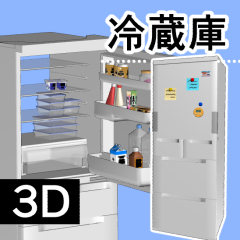
This is a collection of materials consisting of two types of refrigerator 3D Object.
Use it for food stock at home or at work.
Vertices: 33134 (28873, 4261)
Prices are subject to change without notice.
冷蔵庫の3Dオブジェクト2種からなる素材集です。
お家や、職場の食品ストックにどうぞ。
頂点数: 33134 (28873, 4261)
価格は予告なく変更される場合があります。
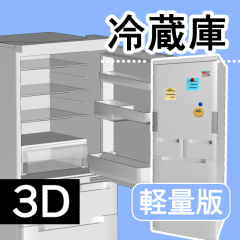
This material collection contains two 3D Object: [Refrigerator _3D] (normal version) and [Refrigerator _3D_ lightweight version].


[Refrigerator _3D] is a material that contains small items mainly food, and [Refrigerator _3D_ lightweight version] is a material that does not contain them.
Specifically, it is a part included in [◯food/foods] and [◯food(door side)/foods].

(Text in the image below)
The food and decoration (front of the door) folder has a "◯" mark, so please use it as a landmark.
(or above)
- Basically, the material layout of each 3D Object material is set in common. Try to find a setting that matches your image.
- The doors are double-sided, each with a movable setting.

[Note]If the value of [Open Right] (Movable 1) is not 0 and you move the value of [Open Left] (Movable 2), it will float from the main body and move.When setting [Open Left] (Movable 2), be sure to make sure that the value of [Open Right] (Movable 1) is 0.

(Text in the image below)
When creating an angle of view from the inside of the cabinet, it is recommended to adjust the perspective (is it better to strengthen the sense of realism?)
(or above)
The pose material used in the reference image above [Pose of taking things out of the refrigerator (ID = 2233117)] is being distributed.
This material is also available at BOOTH . Please feel free to use it.
Have a good refrigerator life!
この素材集には[冷蔵庫_3D](通常版)と[冷蔵庫_3D_軽量版]の2つの3Dオブジェクトが含まれています。
[冷蔵庫_3D]は庫内に食品を中心とした小物を含む素材で、[冷蔵庫_3D_軽量版]はそれらが含まれない素材です。
具体的には、[◯食品/foods]および[◯食品(扉側)/foods]に含まれるパーツです。
(以下画像内テキスト)
食品・装飾(扉前面)のフォルダには「◯」マークがついていますので、目印にしてみてください。
(以上)
- 基本的にそれぞれの3Dオブジェクト素材のマテリアル・レイアウトは共通して設定されています。イメージに合う設定を探してみてください。
- 扉は両開きで、それぞれに可動が設定されています。
[注意点][右開き](可動1)の値が0でない場合に[左開き](可動2)の値を動かすと本体から浮いて動いてしてしまうので、[左開き](可動2)を設定する場合は必ず[右開き](可動1)の値が0であることを確認してください。
(以下画像内テキスト)
庫内からの画角を作るときはパース調整がオススメ(強めにすると臨場感UP?)
(以上)
上記の参考画像で用いられているポーズ素材[冷蔵庫から物を取り出すポーズ (id=2233117)]を配布中です。
また、本素材は BOOTH でも取扱中です。ぜひご利用ください。
よい冷蔵庫ライフを!
Category 1 カテゴリ1


Other materials by 囲炉裏辺


Popular “Material catalog” materials


New materials





Badges
-
 MVP ◆This user has contributed greatly to the management of the community, by posting many great responses to the questions asked. Once every three months, MVPs are determined based on the points earned during that period and will be recognized accordingly.
 -
 New Valuable Player (NVP) ◆These are the next-best contributors to the community after MVPs. This is awarded to users who have not yet won an MVP award, based on the number of points they have earned.
 -
 Official Expert ◆Chosen out of all MVP awardees, who are already proof of excellence, this is a testimony of outstanding correspondence in the community. After careful screening, they are appointed by CELSYS and assume their position.Note: Formally called “Evangelists”
 -
 Official Moderator of CELSYS ◆Moderators are official CELSYS staff members who are fluent in Japanese as well as various other languages. Moderators are not experts on the software or illustration, so they are not able to directly answer your questions. However, moderators provide communication and language support to ensure that everyone can smoothly communicate with each other.
 -
 CELSYS official accountThe Official Administrator Account