


Using Rito Workspace on Galaxy Tab 2026 (갤탭에서 쓰는 리투 워크스페이스 2026) 갤탭에서 쓰는 리투 워크스페이스 2026
Content ID:2316036
-
51


This is the Workspace I use on my Galaxy tablet.
There are two versions: general illustration and manga. The comic is messy because it was written before. I will update it if I make any corrections later.
Abstract - About Tools
Yellow-Layer Related
Blue-brush size and opacity related to Quick Access
Pink - Guitar
Illustrated version (screen with all windows expanded)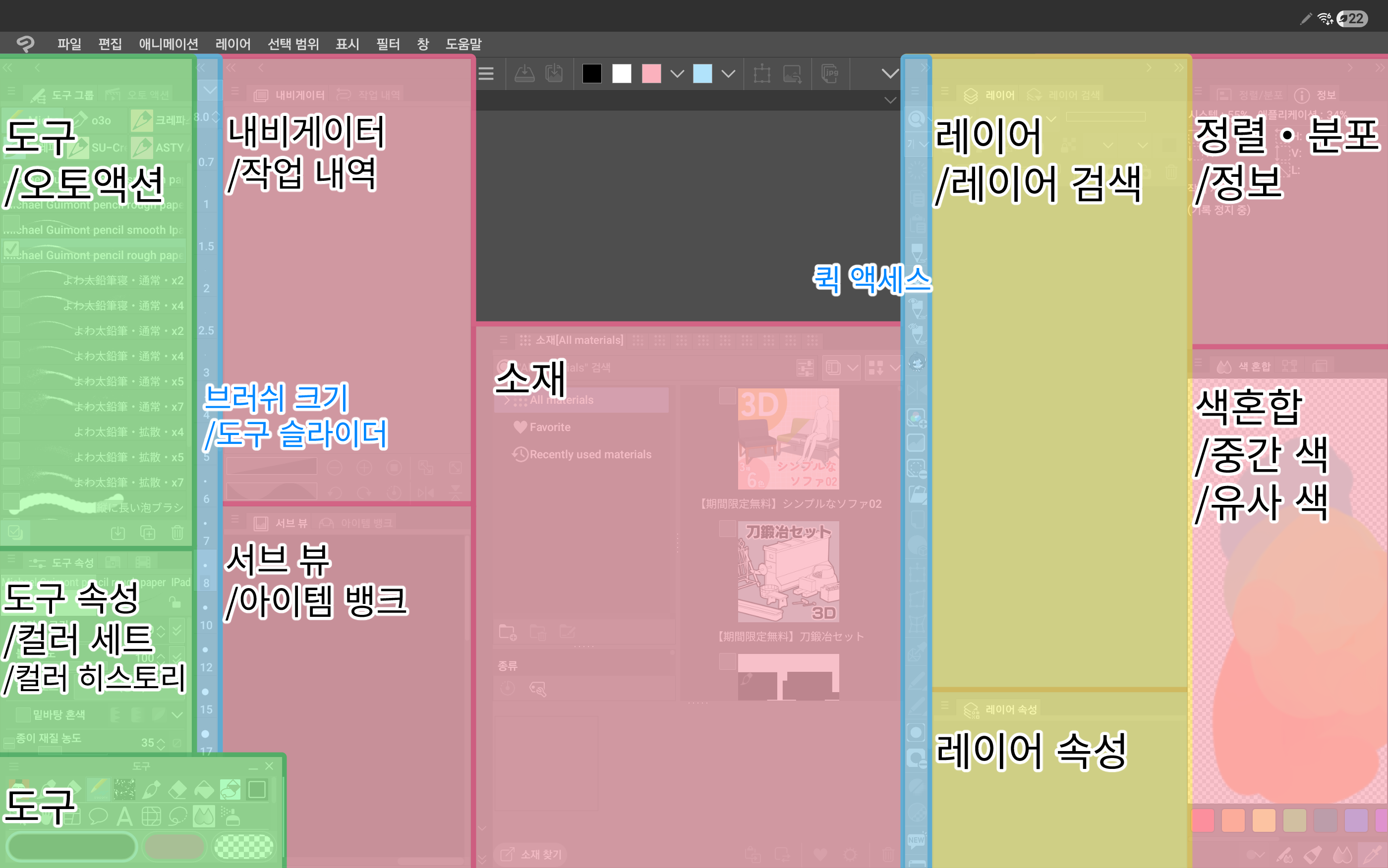
(If you are not a Korean speaker: please use an image translation app.)
Screens I usually use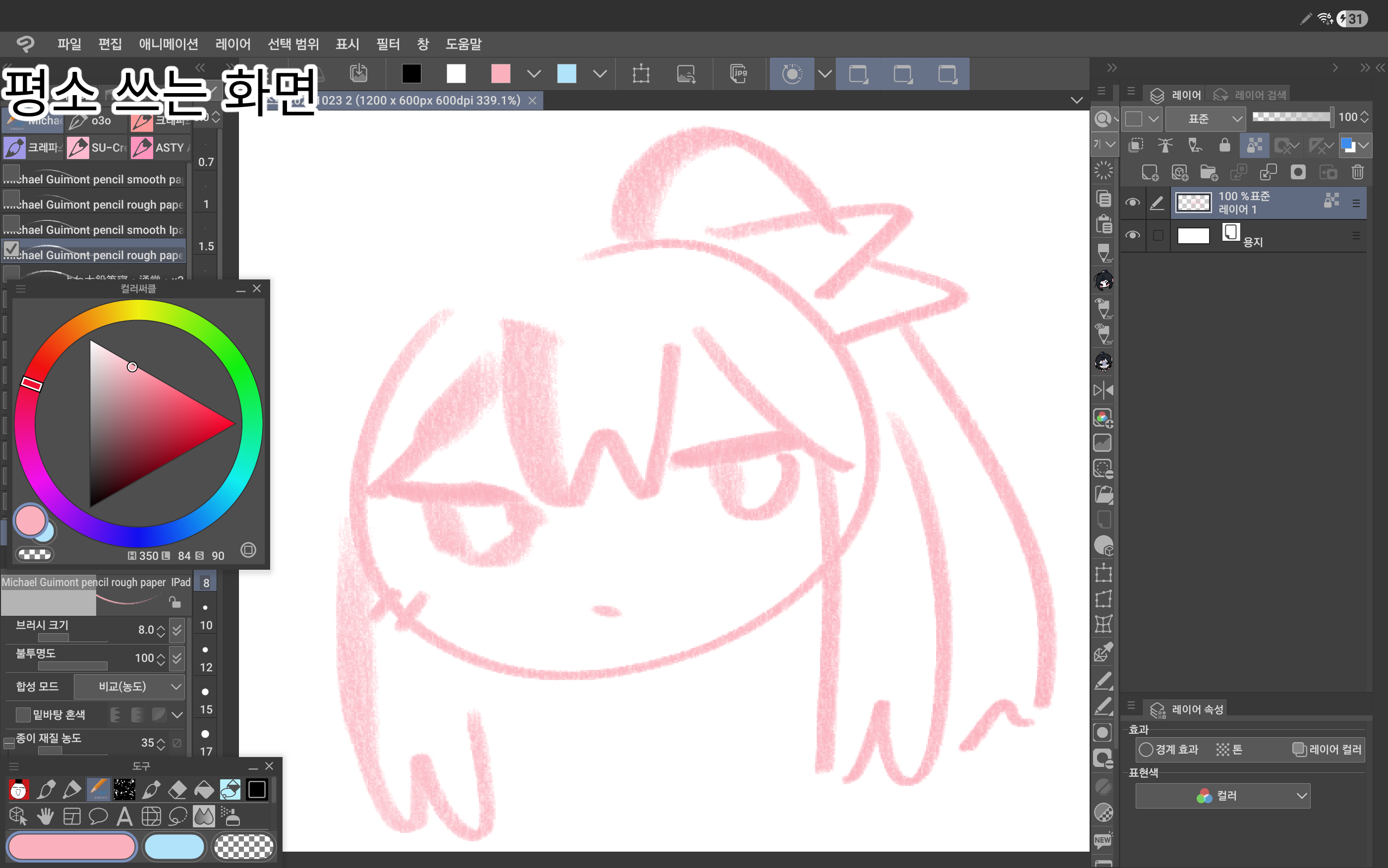
(The photo says "the screen you usually use")
Manga version
It was created with the purpose of always checking the entire page as a navigator.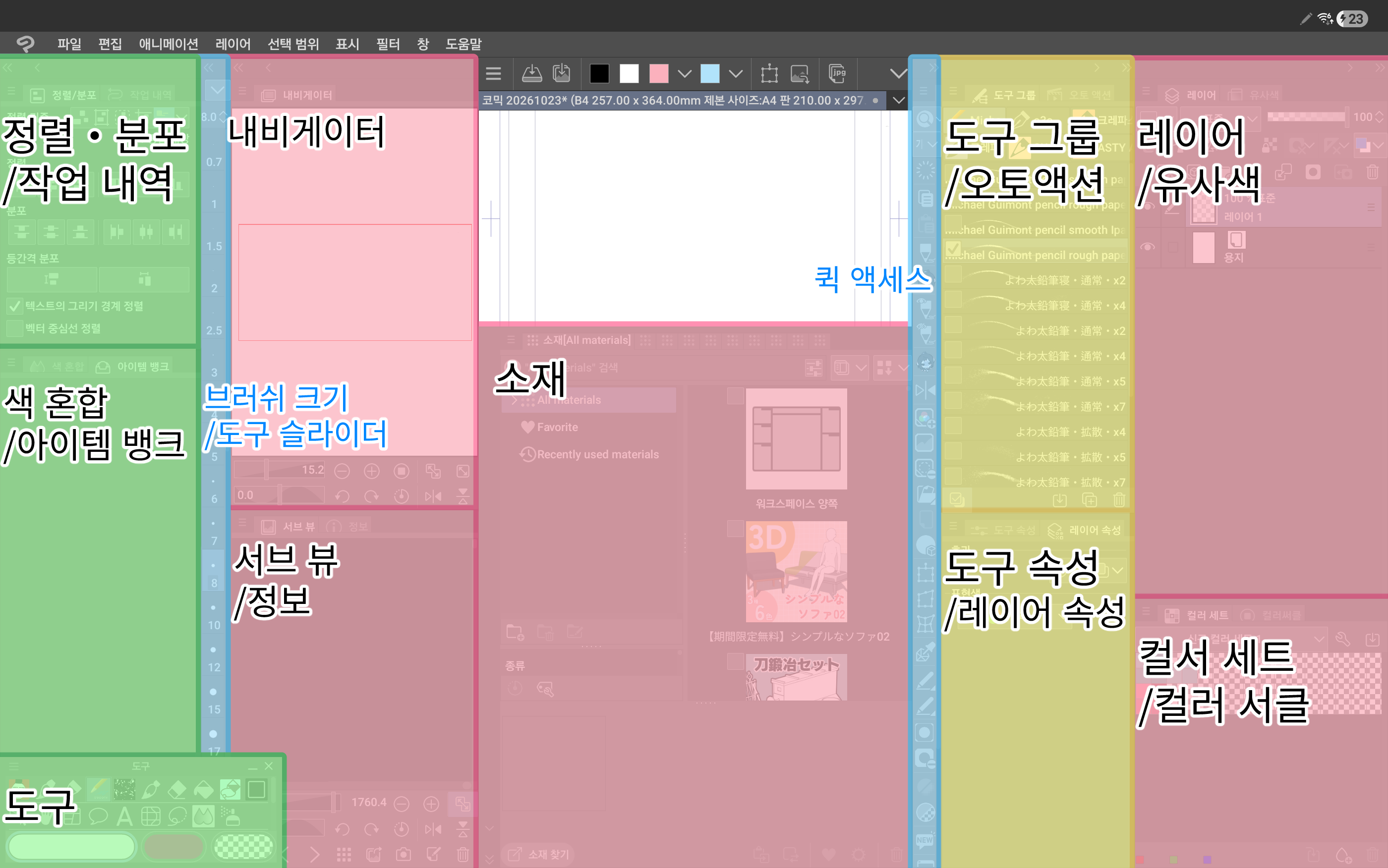
(If you are not a Korean speaker: please use an image translation app.)
Screens I usually use

(The photo says "the screen you usually use")
When loading Workspace, I recommend unchecking the shortcut key settings, command bar layout, and unit settings in preferences before loading.

Other Information
• Based on right-handed users. Left-handers should move the spear precisely left and right and use it.
• Due to the small screen, windows that are rarely used are kept closed. I also created the layer window thinking of closing it when I wasn't using it when I was drawing for a long time.
• If the screen is small, it's easier for your hands to touch it, so it's recommended to move frequently used windows to the left (right-handed for left-handers).
• Not recommended if the screen of your device is large enough.
갤럭시 태블릿에서 쓰고 있는 워크스페이스 입니다.
일반 일러/만화 두 가지 버전이 있습니다. 만화는 예전에 쓰던 거라 난잡합니다. 나중에 수정하게 되면 업데이트 하겠습니다.
초록-도구 관련
노랑-레이어 관련
파랑-브러쉬 크기 및 불투명도 관련과 퀵액세스
분홍-기타
일러 버전(모든 창을 펼친 화면)
(비한국어 사용자일 경우: 이미지 번역 어플을 사용하세요.)
평소 사용하는 화면
(사진에는 "평소 쓰는 화면"이라고 적혀 있습니다)
만화 버전
내비게이터로 전체 페이지를 항상 확인 하는 것을 목적으로 만들었습니다.
(비한국어 사용자일 경우: 이미지 번역 어플을 사용하세요.)
평소 사용하는 화면
(사진에는 "평소 쓰는 화면"이라고 적혀 있습니다)
워크스페이스를 불러올 때 단축 키 설정, 커맨드 바의 레이아웃, 환경 설정의 단위설정의 체크를 풀고 불러오시는 걸 추천합니다.
기타 안내
• 오른손잡이 기준입니다. 왼손잡이는 창을 정확히 좌우반전으로 옮기고 사용하세요.
• 화면이 작기에 잘 쓰지 않는 창은 닫아 놓는 것을 전제로 하고 있습니다. 레이어 창 또한 한참 그릴 때는 사용하지 않기에 안 쓸 때는 닫아 놓는 것으로 생각하고 만들었습니다.
• 화면이 작으면 손날이 화면을 터치하기 쉬우므로 자주 사용하는 창은 왼쪽(왼손잡이는 오른쪽)으로 옮기는 걸 추천합니다.
• 사용하는 기기의 화면이 충분히 크다면 추천하지 않습니다.
Rito Workspace 2026 리투 워크스페이스 2026


Other materials by tto_iya


Popular “Material catalog” materials


New materials


Badges
-
 MVP ◆This user has contributed greatly to the management of the community, by posting many great responses to the questions asked. Once every three months, MVPs are determined based on the points earned during that period and will be recognized accordingly.
 -
 New Valuable Player (NVP) ◆These are the next-best contributors to the community after MVPs. This is awarded to users who have not yet won an MVP award, based on the number of points they have earned.
 -
 Official Expert ◆Chosen out of all MVP awardees, who are already proof of excellence, this is a testimony of outstanding correspondence in the community. After careful screening, they are appointed by CELSYS and assume their position.Note: Formally called “Evangelists”
 -
 Official Moderator of CELSYS ◆Moderators are official CELSYS staff members who are fluent in Japanese as well as various other languages. Moderators are not experts on the software or illustration, so they are not able to directly answer your questions. However, moderators provide communication and language support to ensure that everyone can smoothly communicate with each other.
 -
 CELSYS official accountThe Official Administrator Account