


Tower apartment (night view from living room) (タワーマンション(リビングからの夜景)) タワーマンション(リビングからの夜景)
Content ID:2314502
-
10,609


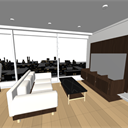
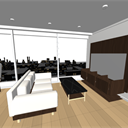
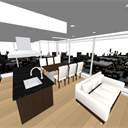
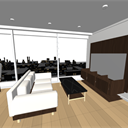
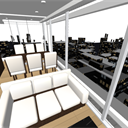
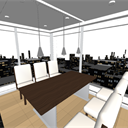
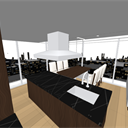
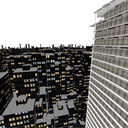
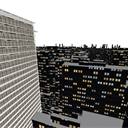
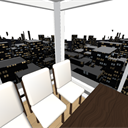
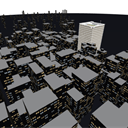
It is a material that cuts out only the LDK on the top floor of the tower condominium, and expands the night view of about 150 buildings and the cityscape that extends about 1.5 km away from the window. LDK is 7.7×5.2m. The two floor-to-ceiling FIX windows, south and east, house the living room with a black marble kitchen island, dining sofa and sofa. The building has 30 floors and a height of about 96 meters. The exterior and even the rooftop are made, so you can use it for both the view from the inside and the exterior of the city. There is no glass plate in the window, so you can see the night view immediately after placing it. There are 9 different camera angles. タワーマンション最上階のLDKだけを切り出し、窓の外に約150棟のビル街と、約1.5km先まで続く街並みの夜景を広げた素材です。LDKは7.7×5.2m。南と東の2面が床から天井までのFIX窓で、黒大理石のアイランドキッチン・ダイニング・ソファのリビングが入ります。建物は30階建て・高さ約96m。外形と屋上まで作ってあるので、室内からの眺めにも街ごしの外観にも使えます。窓にガラスの板は入れてないので、置いた直後から夜景が見えます。カメラアングルは9種類。
About this material
This is the night view of the building street seen from the LDK on the top floor of the tower apartment.
Since the scenery outside the window plays a leading role, the room is limited to LDK only.

================================
★ Before ★ use (moving the camera may cause the room to collapse)
Once deployed, make this setting first. The room will not crumble.
1. Select the 3D layer and open the sub tool detail (wrench mark on the tool property)
2. Press "rendering settings..." → "Environment" on the left
3. Uncheck "automatic when resetting camera" in "clipping planes"
4. Enter 5 in "near plane" and 100000 in "far plane" and click OK

【Reason】
The CLIP STUDIO 3D layer automatically calculates the range (clipping planes) of the distance to be drawn each time you move the camera.
This "automatic when resetting the camera" is a CLIP STUDIO setting, so we are sorry, but it cannot be changed arbitrarily on the material side, so you need to set it manually.
Because this material has a large view outside the window and the whole thing is much larger than the room, the near plane of the automatic calculation increases, and the floor and furniture in the room close to the camera are out of range and will not be drawn. If you manually reduce the near and maximize the fur, you will be able to draw both the interior and the distant view at the same time.
================================
LDK

Outside the window
In the near view, about 150 buildings are lined up at a height overlooking from the top floor. The low-rise cityscape continues for about 1.5 km ahead.

LT Conversion

Dimensions
LDK 7,700 × 5,200mm (approx. 40 square meters, 24 square meters) / Ceiling height 2,600mm
The two sides of the south and east sides are FIX windows (cubic pitch approx. 1,850mm)
Building: 30 floors, about 96m (exterior and rooftop only. Only LDK inside)
Building district: Approx. 150 buildings (260m square on the ground) and a distant view that extends up to about 1.5km
Origin: Floor with LDK / Front: −Y and +X (2 sides with windows)
--------------------------------------
For those who want to use everything indoors
This material is only LDK. All rooms in the tower apartment have separate common areas.
"Tower condominium (with all exterior and interior of the building)"
Entrance → Elevator → Inner corridor → I create a flow line for my home on the top floor (all rooms in my house), so I can draw a series of flows of life.
The room includes a master bedroom, walk-in closet, spa (jacuzzi, sauna, cold bath), washroom, and toilet. There are 18 camera angles.
https://assets.clip-studio.com/ja-jp/detail?id=2314501


--------------------------------------
この素材について
タワーマンション最上階のLDKから見たビル街の夜景です。
窓の外の景色が主役なので、室内はLDKだけに絞ってあります。
================================
★ご使用の前に★(カメラを動かすと室内が崩れる場合があります)
配置したら、最初にこの設定をしてください。室内が崩れなくなります。
1. 3Dレイヤーを選び、サブツール詳細(ツールプロパティのレンチのマーク)を開く
2. 左の「環境」→「レンダリング設定…」を押す
3. 「クリッピングプレーン」の「カメラリセット時に自動設定」のチェックを外す
4. 「ニアプレーン」に 5、「ファープレーン」に 100000 を入れて、OK
【理由】
クリスタの3Dレイヤーは、カメラを動かすたびに、描く距離の範囲(クリッピングプレーン)を自動で計算します。
この「カメラリセット時に自動設定」はクリスタの設定なので、申し訳ありませんが素材側では勝手に変更できないためユーザさまに手動で設定いただく必要があります。
この素材は窓の外の景色が広く、全体が部屋よりずっと大きいので、自動計算のニアプレーンが大きくなり、カメラに近い室内の床や家具が範囲の外になって、描かれなくなります。手動でニアを小さく、ファーを最大にすると、室内も遠景も同時に描かれるようになります。
================================
LDK
窓の外
近景は約150棟のビル街を、最上階から見下ろす高さで並べています。その先の約1.5kmまで、低層の街並みが続きます。
LT変換
寸法
LDK 7,700 × 5,200mm(約40平米・24帖)/天井高 2,600mm
南・東の2面がFIX窓(方立ピッチ約1,850mm)
建物:30階・約96m(外形と屋上のみ。内部はLDKだけ)
ビル街:近景約150棟(地面260m角)と、約1.5kmまで続く遠景
原点:LDKのある階の床/正面:−Y と +X(窓のある2面)
--------------------------------------
室内をすべて使いたい方へ
この素材はLDKだけです。タワーマンションの全室・共用部つきが別にあります。
「タワーマンション(ビル外観/内装全部入り)」
エントランス → エレベータ → 内廊下 → 最上階の自宅(自宅内は全部屋)の動線を作っていますので、生活の一連の流れを描くことができます。
部屋の中は、主寝室・ウォークインクローゼット・スパ(ジャグジー/サウナ/水風呂)・洗面室・トイレまで入っています。カメラアングルは18種類。
https://assets.clip-studio.com/ja-jp/detail?id=2314501
--------------------------------------
Material マテリアル
-
default material 初期マテリアル
Configuration 配置
-
default layout 初期レイアウト
Angle アングル
-
LDK and Night View LDKと夜景
-
Living room with a window 窓ぎわのリビング
-
From sofa to window ソファから窓へ
-
Dining and night view ダイニングと夜景
-
Night view from the kitchen キッチンから夜景
-
South window 南の窓ぎわ
-
East window 東の窓ぎわ
-
From the southeast corner 南東の角から
-
Tower and night view タワーと夜景
Update history
2026/08/28 Modification of buildings for night view (loss of shape of some buildings, removal of unnecessary texture on rooftop)
Modified the shape of the living room (pendant light, sink, range hood, dining chair, sofa)
Revised on October 17, 2026
- Corrected the environment color setting (brightened the room)
・Outside the window: In addition to the nearby buildings, we have added a cityscape that extends about 1.5 km away.
・Exterior: The exterior, which was a glass band only on the top floor, has been matched to the same appearance on all floors.
・ object list: Room, building, landscape, and moving parts are divided into folders to make it easier to find.
2026/08/28 夜景用の建物の修正(一部の建物の造形崩れ、屋上の不要なテクスチャ削除)
リビング内の造形を修正(ペンダントライト、シンク、レンジフード、ダイニングチェア、ソファ)
2026/10/17改定
・環境色の設定を修正(室内を明るくしました)
・窓の外:近くのビル街に加え、約1.5km先まで続く街並みを追加しました
・外観:最上階だけガラスの帯だった外観を、全階で同じ見た目にそろえました。
・オブジェクト一覧:部屋・建物・景観・可動部を、フォルダに分けて探しやすくしました。
Old version


Other materials by Didymoi.A


Popular “3D object” materials




New materials


-
 MVP ◆This user has contributed greatly to the management of the community, by posting many great responses to the questions asked. Once every three months, MVPs are determined based on the points earned during that period and will be recognized accordingly.
 -
 New Valuable Player (NVP) ◆These are the next-best contributors to the community after MVPs. This is awarded to users who have not yet won an MVP award, based on the number of points they have earned.
 -
 Official Expert ◆Chosen out of all MVP awardees, who are already proof of excellence, this is a testimony of outstanding correspondence in the community. After careful screening, they are appointed by CELSYS and assume their position.Note: Formally called “Evangelists”
 -
 Official Moderator of CELSYS ◆Moderators are official CELSYS staff members who are fluent in Japanese as well as various other languages. Moderators are not experts on the software or illustration, so they are not able to directly answer your questions. However, moderators provide communication and language support to ensure that everyone can smoothly communicate with each other.
 -
 CELSYS official accountThe Official Administrator Account