


Canned Juice 3D Closed Can 4 sizes (11 types of labels switched) (缶ジュース 3D 閉じた缶 4サイズ(ラベル11種切り替え)) 缶ジュース 3D 閉じた缶 4サイズ(ラベル11種切り替え)
Content ID:2313519
-
29


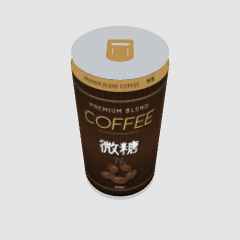
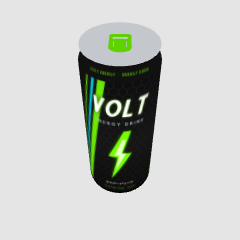
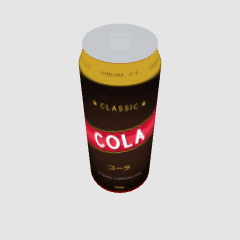
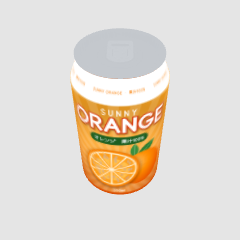
3D material of canned juice, 4-piece set.
We made 190ml (canned coffee type), 250ml slim, 350ml, and 500ml in actual size.
The label can be switched from 11 types of materials, so you can use it as a variety of drinks just by placing one.
The lid is modeled after Japanese cans, and even the shape of the pull tab and drinking spout is made. For small items on vending machines, convenience stores, and desks.
缶ジュースの3D素材、4点セットです。
190ml(缶コーヒー型)・250ml スリム・350ml・500ml を実寸で作りました。
ラベルはマテリアルから11種類に切り替えられるので、1つ置くだけで色々な飲み物として使えます。
ふたは日本の缶を手本に、プルタブや飲み口の形まで作り込んでいます。自販機・コンビニ・机の上の小物に。


Closed cans 閉じた缶


Other materials by たら238


Popular “Material catalog” materials


New materials


-
 MVP ◆This user has contributed greatly to the management of the community, by posting many great responses to the questions asked. Once every three months, MVPs are determined based on the points earned during that period and will be recognized accordingly.
 -
 New Valuable Player (NVP) ◆These are the next-best contributors to the community after MVPs. This is awarded to users who have not yet won an MVP award, based on the number of points they have earned.
 -
 Official Expert ◆Chosen out of all MVP awardees, who are already proof of excellence, this is a testimony of outstanding correspondence in the community. After careful screening, they are appointed by CELSYS and assume their position.Note: Formally called “Evangelists”
 -
 Official Moderator of CELSYS ◆Moderators are official CELSYS staff members who are fluent in Japanese as well as various other languages. Moderators are not experts on the software or illustration, so they are not able to directly answer your questions. However, moderators provide communication and language support to ensure that everyone can smoothly communicate with each other.
 -
 CELSYS official accountThe Official Administrator Account