



This is a corrective auto-action that gives the impression of looking through a window on a rainy day. Using it generates an image like the following. The example images used were the basic 3D and sky images from Clip Studio.
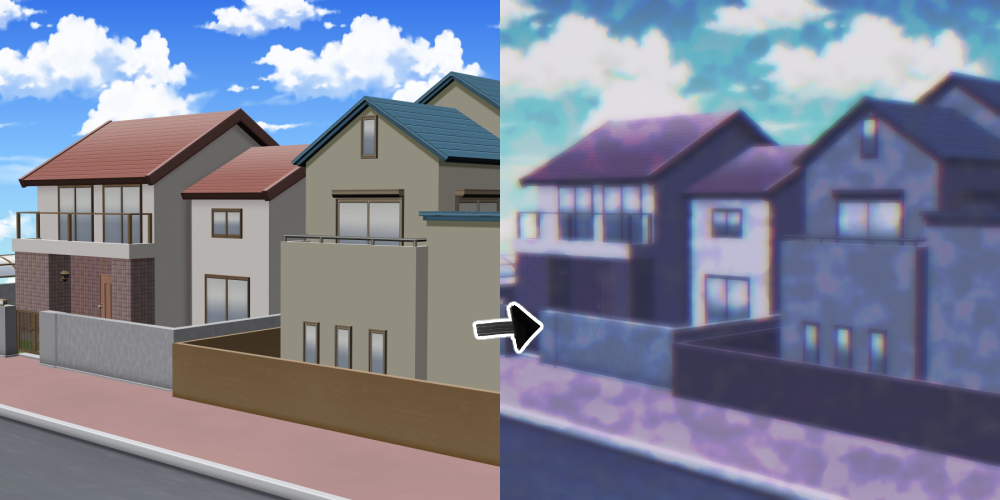

Here's how to use it.
1. Prepare a picture where all layers are merged into one. And make sure the resolution is at least 150 mm!
The example image was created with a resolution of 150 and a size of 3000*3000.
Images with low resolution or small size may appear different from the example!
2. Tap the loaded Auto Action in order of number. 1>2>3
3. Freely adjust the opacity of the areas marked with arrows according to the drawing.

You can also adjust the color tone to create a unique feel, so feel free to use it.
비 오는 날 창문 너머로 보는 느낌을 주는 보정용 오토액션입니다. 사용하면 다음과 같은 이미지가 생성됩니다. 사용한 예시 이미지는 클립스튜디오의 기본 3d와 하늘 이미지를 사용했습니다.
사용방법은 다음과 같습니다.
1. 모든 레이어가 하나로 합쳐진 그림을 준비합니다. 그리고 해상도는 최소 150 이상으로 해주세요!!
예시 그림은 해상도 150 크기 3000*3000으로 작업했습니다.
해상도가 낮거나 작은 그림은 예시와 다르게 나올 수 있습니다!
2. 불러온 오토액션을 번호 순서대로 누릅니다. 1>2>3
3. 그림에 맞춰서 화살표로 표시한 부분의 불투명도를 자유롭게 조절합니다.
그 외에도 색감을 조절해서 색다른 느낌을 낼 수도 있으니 자유롭게 사용해 보세요.





Other materials by jajajajajajaja


Popular “Auto Action” materials


New materials


Badges
-
 MVP ◆This user has contributed greatly to the management of the community, by posting many great responses to the questions asked. Once every three months, MVPs are determined based on the points earned during that period and will be recognized accordingly.
 -
 New Valuable Player (NVP) ◆These are the next-best contributors to the community after MVPs. This is awarded to users who have not yet won an MVP award, based on the number of points they have earned.
 -
 Official Expert ◆Chosen out of all MVP awardees, who are already proof of excellence, this is a testimony of outstanding correspondence in the community. After careful screening, they are appointed by CELSYS and assume their position.Note: Formally called “Evangelists”
 -
 Official Moderator of CELSYS ◆Moderators are official CELSYS staff members who are fluent in Japanese as well as various other languages. Moderators are not experts on the software or illustration, so they are not able to directly answer your questions. However, moderators provide communication and language support to ensure that everyone can smoothly communicate with each other.
 -
 CELSYS official accountThe Official Administrator Account