



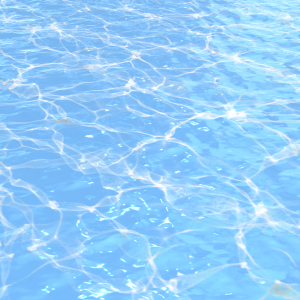
A total of 5 assets, 4 2D & 3D assets of water surface light and 1 composite example. Please use it to express swimming pools, the sea, etc.
水面の光の2D&3Dアセット4種とコンポジット例1種、合計5種のアセット。プールや海などの表現にご使用ください。
May your work be warm, fruitful and happy.
The use of materials and the dissemination of new works are done on the following SNS and HP.
We hope you will follow us.
https://x.com/MANGA_3D_LABO
https://arigatou.myportfolio.com/shop-1


Example of combining this material (3D / without addition or color adjustment)
Adjust layer mode only

Cloud image material + water surface light (3D) + color adjustment
No additions

2D & 3D assets to reproduce the beautiful light of the water surface
Solving various compositions that are difficult with brushwork


Light_on_Water(3D)
Gradient + B&W texture on background (screen)

water_surface(3D)

water_surface + Light_on_Water(3D)
After placing both ABCDs by drag and drop, adjust
Layers that use 3D are used by rasizing.
Please use it with additions and corrections as you like.
water_surface (3D) by adjusting the lighting
You can change the color of the water surface beautifully.

Orient lighting

Adjust lighting colors
If you want to create a high-resolution representation of light on the surface of the water
Use B or A (B&W/screen mode, etc., where the black disappears).

Texture selection screen
* Please turn off the outline line if necessary.

≪A Light_on_Water(3D)》
Light 3D Object on the surface of the water
It contains two types of textures.
W&transparent
Texture with a combination of white and transparent.
Used when combined with 3D materials.
Layer mode is used normally.
B&W
Texture with a combination of black and white.
When expressing high-resolution light
Used on a single layer.
In that case, set the layer mode to screen, etc.
Use in layer mode where black information disappears.
When you want to combine with other 3D,
If you duplicate the model, delete it, and place it, it will be in another layer.
It can be aligned with the same 3D space.
Please refer to the Compositing Sample.
The light is on,
Turn it off if you don't need it.
≪B Light on Water(2D)》
Water surface light texture
≪C water_surface(3D)》
3D Object on the surface of the water
≪D water_surface + Light_on_Water(3D)》
A and B combined 3D Object
Textures are basically W&transparent.
※Do not use B&W※
E Compositing Sample
Examples of use of the Asset.
See an example of a combination of 3D assets and layer modes.
Please open it on the 4096×4096 72dpi work file.
※The cloud image material used in the sample is not included※


皆様の制作が温かく実り豊かな幸せなものでありますように。
素材の使い方や新作の周知は下記SNSとHPで行っています。
フォローして頂けたら幸いです。
https://x.com/MANGA_3D_LABO
https://arigatou.myportfolio.com/shop-1
本素材を組み合わせた例(3D/加筆及び色調整なし)
レイヤーモードのみ調整
雲の画像素材+水面の光(3D)+色調整あり
加筆なし
水面の美しい光を再現する為の2D&3Dアセット
ブラシワークでは難しい、様々な構図を解決
Light_on_Water(3D)
背景にグラデーション+B&Wテクスチャ(スクリーン)
water_surface(3D)
water_surface + Light_on_Water(3D)
ABCDともにドラック&ドロップで配置後、調整を行い
3Dを使用しているレイヤーはラスタイズをして使用します。
お好みで加筆修正などしてご使用ください。
water_surface(3D)はライティングを調整する事で
水面の色を美しく変化させる事ができます。
ライティングの方向調整
ライティングのカラー調整
高解像度の水面上の光の表現を行いたい場合は
Bを使うか、A(B&W/スクリーンモード等、黒が消えるモード)を使用。
テクスチャの選択画面
※必要に応じて輪郭線はオフにして下さい
≪A Light_on_Water(3D)》
水面の光の3Dオブジェクト
テクスチャ二種が入ってます。
W&transparent
白と透明の組み合わせのテクスチャ。
3D素材と組み合わせる時に使う。
レイヤーモードは通常で使用。
B&W
白と黒の組み合わせのテクスチャ。
解像度が高い光の表現を行う時に
単独のレイヤーで使用。
その際にはレイヤーモードをスクリーンなど、
黒の情報が消えるレイヤーモードにして使用。
他の3Dと組み合わせたい時には、
そのモデルを複製して削除して配置すると別レイヤーでも
同じ3D空間に合わせて配置できます。
Compositing Sampleをご参照ください。
ライトはオンになっていますが、
必要でない場合にはオフにして下さい。
≪B Light on Water(2D)》
水面の光のテクスチャ
≪C water_surface(3D)》
水面の3Dオブジェクト
≪D water_surface + Light_on_Water(3D)》
AとBを合わせた3Dオブジェクト
テクスチャは基本的にW&transparentを使用。
※B&Wは使わないでください※
E Compositing Sample
本アセットの使用例。
3Dアセットとレイヤーモードの組み合わせの例としてご確認ください。
4096×4096 72dpi の作品ファイル上でお開き下さい。
※サンプルで使用した雲の画像素材は付属しません※
Category 1 カテゴリ1




Update history
Published on 2026/03/31 2026/03/31 公開








Other materials by 真夜中のアクアリウム


Popular “Material catalog” materials


New materials


Badges
-
 MVP ◆This user has contributed greatly to the management of the community, by posting many great responses to the questions asked. Once every three months, MVPs are determined based on the points earned during that period and will be recognized accordingly.
 -
 New Valuable Player (NVP) ◆These are the next-best contributors to the community after MVPs. This is awarded to users who have not yet won an MVP award, based on the number of points they have earned.
 -
 Official Expert ◆Chosen out of all MVP awardees, who are already proof of excellence, this is a testimony of outstanding correspondence in the community. After careful screening, they are appointed by CELSYS and assume their position.Note: Formally called “Evangelists”
 -
 Official Moderator of CELSYS ◆Moderators are official CELSYS staff members who are fluent in Japanese as well as various other languages. Moderators are not experts on the software or illustration, so they are not able to directly answer your questions. However, moderators provide communication and language support to ensure that everyone can smoothly communicate with each other.
 -
 CELSYS official accountThe Official Administrator Account