


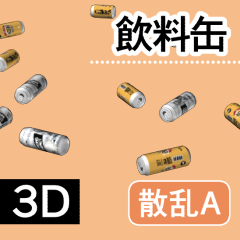


A is a object that mixes both 350ml and 500ml cans and is mainly intended for alcoholic beverages.
B is a object with a 250ml can, which is mainly intended for energy drinks.
■The shape of the object is the same as the single version of the 3D Object material [beverage can_3D].
■ There are 5 types of layouts.
It is recommended to choose one that is close to your placement image before fine-tuning.

By default, all are displayed, but you can adjust the number of sub tool detail displayed.

● Tips for setting the placement of cans in detail by yourself (Tips for comfortable adjustment)
- Select [Top] from [Camera Angle Presets (Camera Mark)] on the object and operate it.
- Set the [sub tool detail (spanner mark)] > [Camera] > [Projection method] setting of the object to [Parallel projection].
- Rotate and move the Y axis (green arrow direction), which is the upper and lower axis, as little as possible and adjust at the end.

Have a good beverage can life!
Aは350mlと500mlの両方の缶を混ぜ合わせたオブジェクトで、主に酒類を想定しています。
Bは250ml缶を配置したオブジェクトで、主にエナジードリンクを想定しています。
■オブジェクトの形状は単体バージョンの3Dオブジェクト素材[飲料缶_3D]と同様です。
■レイアウトは5種類あります。
自分の配置イメージに近いものを選んでから微調整をするのがおすすめです。
デフォルトではすべて表示されていますが、サブツール詳細から表示する個数を調節できます。
●缶の配置を自分で細かく設定するときのコツ (快適に調整するためのヒント)
- オブジェクトの[カメラアングルのプリセット(カメラマーク)]から、[上面(top)]を選択して操作する。
- オブジェクトの[サブツール詳細(スパナマーク)]>[カメラ]>[投影方法]設定を[平行投影]にする。
- 回転や、上下軸であるY軸(緑矢印方向)の移動はできるだけ触れない・最後に調整する。
よい飲料缶ライフを!
マテリアル
-
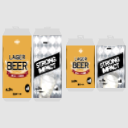
default material 初期マテリアル
-
Plain (gray) プレーン(グレー)/plain
-
A Blur Aブラー
-
Block A Aブロック
-
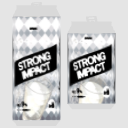
B Blur Bブラー
-
Block B Bブロック



配置
-
default layout(A) 初期レイアウト(A)
-
B B
-
C C
-
D D
-
And E





アングル
-
Top 上面(top)
-
Front 正面(front)


Update history


Other materials by 囲炉裏辺


Popular “Material catalog” materials


New materials


Badges
-
 MVP ◆This user has contributed greatly to the management of the community, by posting many great responses to the questions asked. Once every three months, MVPs are determined based on the points earned during that period and will be recognized accordingly.
 -
 New Valuable Player (NVP) ◆These are the next-best contributors to the community after MVPs. This is awarded to users who have not yet won an MVP award, based on the number of points they have earned.
 -
 Official Expert ◆Chosen out of all MVP awardees, who are already proof of excellence, this is a testimony of outstanding correspondence in the community. After careful screening, they are appointed by CELSYS and assume their position.Note: Formally called “Evangelists”
 -
 Official Moderator of CELSYS ◆Moderators are official CELSYS staff members who are fluent in Japanese as well as various other languages. Moderators are not experts on the software or illustration, so they are not able to directly answer your questions. However, moderators provide communication and language support to ensure that everyone can smoothly communicate with each other.
 -
 CELSYS official accountThe Official Administrator Account