


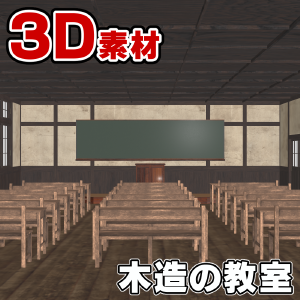
It is a set of old wooden classrooms. 古い木造の教室のセットです。
The following 3D data are included with this material:
・Wooden classroom
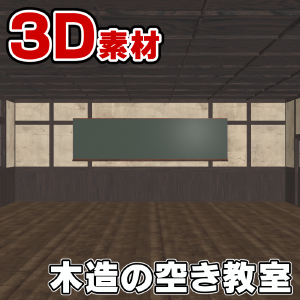
・Empty wooden classroom
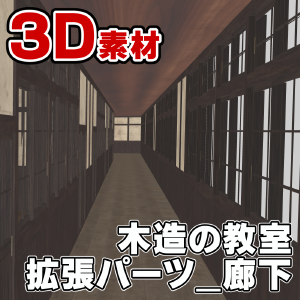
・Wooden classroom_Equipment_Corridor
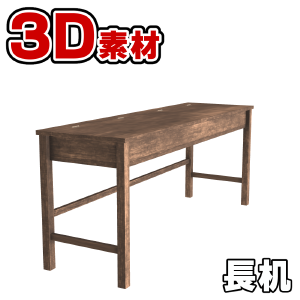
・Long desk
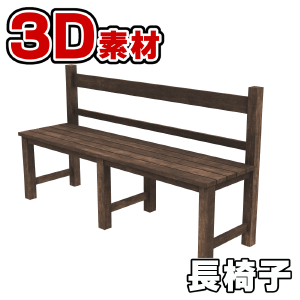
・Chaise longue
■Indoor sample image
・Blackboard side

・Window side

・Corridor side

■LT conversion sample for manga
・No tone gradation

This material has textures enabled by default.
By enabling tone work and removing the check mark for gradation during LT conversion, you can use realistic tones as textures.
・With tone gradation

* After automatic LT conversion, adjustments have been made such as removing tones that are clearly unnecessary.
* In the sample image, there is moiré in the tone, but this is because it was reduced for the WEB, so it will be output beautifully if it is an appropriate resolution.
・Line only

■pose parts
This material is pose parts set on a long desk.
The top of the long desk can be easily opened and closed by simply operating the slider.

* The hinges of the long desks placed in the classroom have been removed to reduce the number of polygons.
In addition, it does not set the slider, but you can operate it by selecting the object individually.
Individually registered long desks have pose parts and hinges. If you want details, go for it.
In addition, by selecting parts other than the pose parts from the object list, you can perform operations such as moving and rotating. Doors, windows, chairs, desks, and other fixtures can all be operated individually.
By default, there is nothing beyond the sliding door, but by placing a corridor for equipment, it is possible to write out the outside of the room.
■Equipment
This material is registered as a separate material for the corridor.
This is intended to reduce the load when there is no need to draw at the same time.

When placing on a 3D layer, it is possible to connect rooms by setting the coordinate axes of X, Y, and Z of both materials to 0.
・LT conversion sample

The walls, ceiling and floor of the room can be hidden individually.
Walls that interfere with the camera should be hidden from the object list.
For LT conversion, a detection accuracy of about 90 to 100 is recommended, but the appropriate value varies depending on the resolution.
If detail lines are difficult to obtain, increasing the resolution of the canvas may improve it. It is recommended to extract the lines of this material on a large canvas.
* If the 3D drawing is heavy, please try the following.
・Change the display settings for editing of the tool property to "Speed".
https://www.clip-studio.com/clip_site/support/faq/detail/svc/52/tid/87549
- Disable "Use multisampling" from the environment settings.
https://www.clip-studio.com/site/gd/csp/manual/userguide/csp_userguide/500_menu/500_menu_file_environment_win_3d.htm
We hope that this material will help you create.
この素材には、下記の3Dデータが同梱されています。
・木造の教室
・木造の空き教室
・木造の教室_拡張パーツ_廊下
・長机
・長椅子
■室内サンプル画像
・黒板側
・窓側
・廊下側
■漫画向けLT変換サンプル
・トーン階調化なし
本素材はデフォルトでテクスチャを有効にしてあります。
LT変換時にトーンワークを有効化し、階調化のチェックマークを外すことで、リアル調のトーンを質感としてご利用になれます。
・トーン階調化あり
※自動でLT変換後、明らかに不要なトーンを削るなどの調整をしてあります。
※サンプル画像ではトーンにモアレが生じていますが、これはWEB用に縮小した為で適切な解像度であれば綺麗に出力されます。
・ラインのみ
■可動パーツ
本素材は、長机に可動パーツの設定を行っています。
長机の天板は、スライダーを操作するだけで簡単に開閉が可能です。
※教室に配置されている長机はポリゴン数削減の為に蝶番を削除してあります。
また、そちらはスライダーの設定は行っておりませんが、オブジェクトを個別に選択することで操作することが出来ます。
個別に登録してある長机には、可動パーツと蝶番があります。ディテールが欲しい場合は、そちらをご利用ください。
また、可動パーツ以外のパーツもオブジェクトリストより選択して頂くことで、移動や回転などの操作ができます。扉、窓、椅子、机など、配置されている備品は全て個別に操作できます。
デフォルトでは引き戸を開いた先には何もありませんが、拡張パーツの廊下を配置することで、部屋の外を書き出すことが可能になります。
■拡張パーツ
本素材は廊下を別素材として登録しています。
これは、同時に描画する必要がないときの負荷低減を目的としています。
3Dレイヤーへ配置する際、双方の素材のX,Y,Z全ての座標軸を0にすることで、部屋を繋げることが可能です。
・LT変換サンプル
部屋の壁、天井、床は、個別に非表示にすることが可能です。
カメラの邪魔になる壁は、オブジェクトリストから非表示に設定してください。
LT変換の際は、検出精度90から100ぐらいがおすすめの値ですが、解像度などにより適切な値は異なります。
細部のラインが取得しづらい場合、キャンバスの解像度を大きくすることで改善することがあります。本素材は大きなキャンバスでラインを抽出することをお薦めします。
※3Dの描画が重いときは下記をお試しください。
・ツールプロパティの編集表示設定を『高速』に変更する。
https://www.clip-studio.com/clip_site/support/faq/detail/svc/52/tid/87549
・環境設定から『マルチサンプリングを使用する』を無効にする。
https://www.clip-studio.com/site/gd/csp/manual/userguide/csp_userguide/500_menu/500_menu_file_environment_win_3d.htm
本素材が皆様の創作の一助となれば幸いです。
Category 1 カテゴリ1
Old version


 Report problematic material
For those who don’t have a Clip Studio account
Please contact us by email with the following information.
- Name of product/software
- Detailed information about the issue

Software
-
 CLIP STUDIO PAINT PRO/EX
 Re-download
Please purchase with GOLD or Clippy if you plan to use a device that is not verified with your annual/monthly plan.

Price
3,500

Current balance
 Checkout Now
 Purchase successful.
 See save location for materials


3,500
CLIPPY
Type
Material catalog
Tag

Compatible software
CLIP STUDIO PAINT PRO/EX
Content ID:
2323541

Published : 16 minutes ago
Last updated : 16 minutes ago


Badges
-
 MVP ◆This user has contributed greatly to the management of the community, by posting many great responses to the questions asked. Once every three months, MVPs are determined based on the points earned during that period and will be recognized accordingly.
-
 New Valuable Player (NVP) ◆These are the next-best contributors to the community after MVPs. This is awarded to users who have not yet won an MVP award, based on the number of points they have earned.
-
 Official Expert ◆Chosen out of all MVP awardees, who are already proof of excellence, this is a testimony of outstanding correspondence in the community. After careful screening, they are appointed by CELSYS and assume their position.Note: Formally called “Evangelists”
-
 Official Moderator of CELSYS ◆Moderators are official CELSYS staff members who are fluent in Japanese as well as various other languages. Moderators are not experts on the software or illustration, so they are not able to directly answer your questions. However, moderators provide communication and language support to ensure that everyone can smoothly communicate with each other.
-
 CELSYS official accountThe Official Administrator Account