This material will be available free of charge until December 6 (UTC+9). Shortly after the expiration date, it will switch to paid materials.
The free period is limited, so if you are interested, please try it (DL) as soon as possible.
———
13 species in total
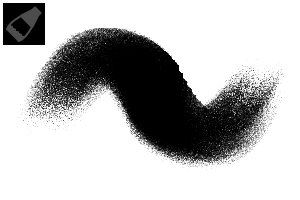
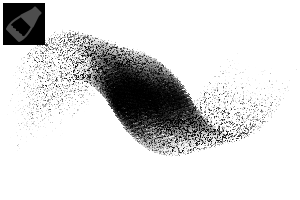
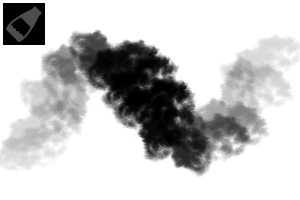
Ambient Grit Brush:
It is a versatile brush that can be used for anything. Please adjust the degree of color mixing.
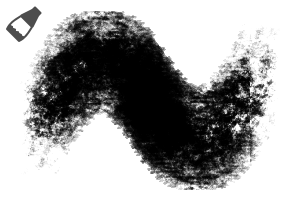
AG Cream Brush:
Unlike the Ambient Grit Brush, it is a brush that does not mix colors. It is a versatile brush that can be used in areas where you want to clarify the outline.
AG Blend Brush:
It is a blend brush that is close to opaque watercolor. With low pen pressure, the opacity is low, so it is suitable for layering. The opacity increases in proportion to the pen pressure.
AG Texture 1:
It is a brush with a strong border of watercolor. It is recommended when you want to draw a surface and outline it at the same time.
AG Texture 2:
It is a textured brush with a very strong sense of noise. You can make noise with weak pen pressure. If you increase the pen pressure, you can add color. It is recommended when you want to add texture.
AG Texture 3:
It is a textured brush with a strong uneven color. It can be used to blend in strong textures and rust.
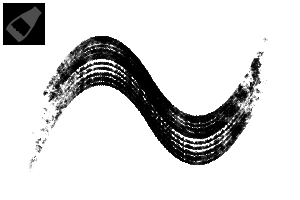
AG Texture 4:
It is a brush that can add a sense of line. It is recommended to use it locally on turf, wood skin, wood grain, artificial objects, color borders, etc. The border of watercolor is strongly effective, so please adjust it to your liking.
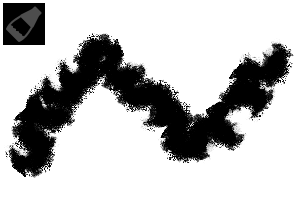
AG Texture 5:
It is a brush that can draw rough leaf masses. In addition to plants, it can also be used when you want to blend in without blurring the border.
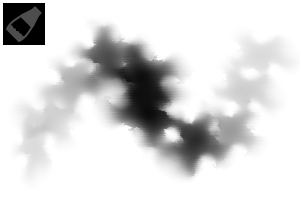
AG Texture 6:
This brush is for when you want to create uneven colors. A slightly random change in brightness occurs. It is easy to use if you overlap the strokes in the same place. It can also be used for man-made objects such as distant mountains, plants, rock surfaces, and rust.
AG Cloud 1:
It is a cloud brush that adds edges to the bokeh feeling. I created it to draw clouds that are not too assertive. Using this brush on the outline of AG Cloud 2 will look good. A slightly random change in brightness occurs.
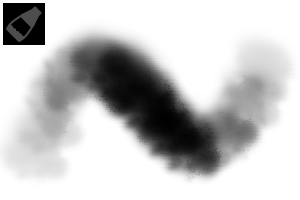
AG Cloud 2:
It is a soft cloud brush. I created it to draw clouds that are not too assertive. After placing this brush on the base, it feels good to use AG Cloud 1 together with the contour. A slightly random change in brightness occurs.
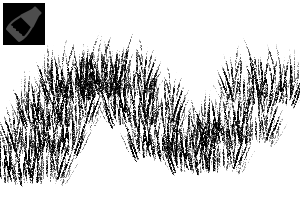
AG Grass:
It is a turf brush. If it's not enough to draw, but the texture is not enough, it will be nice to layer this brush. border of watercolor is working, so adjust it to your liking. Color mixing is set so that it is easy to get used to, so please turn off color mixing if you do not need it.
AG Edge Blur:
It is a blur brush that can be blended in while maintaining its contours. It can be widely used for clouds, plants, mountains, etc. It is recommended when mixing base colors or when you want to blend in locally.
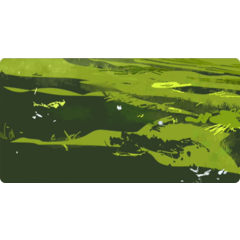
It is recommended to draw the cloud brush (AG Cloud) lightly with No. 2 and then outline it with No. 1.
↑ It can also be used for thick coating. It is recommended when you want to increase the amount of information with a rough touch.
To finish this illustration, we use a gradient map called "Red" from the material "Nukegara Grade" on sale.
Material link: https://assets.clip-studio.com/ja-jp/detail?id=2247404
There is also a free trial version, so please take a look if you like.
———
We release a variety of materials for illustrations, comics, and designs.
#ぬけがらイラスト素材
#Nukegara manga material
#ぬけがらデザイン素材
You can search from the above tag.
I would be happy if you could see other materials together ^^
———
That's all for this material.
Thank you for watching!
We hope it will help you create.
本素材は12月6日(UTC+9)まで無料で公開します。期限日以降程なくして有償素材に切り替わります。
無料期間が限られていますので、ご関心のある方はぜひお早めにお試し(DL)ください。
———
<収録素材一覧>
全13種
Ambient Grit Brush:
何にでも使える万能ブラシです。色の混ざり具合を調整して使ってください。
AG Cream Brush:
Ambient Grit Brushと異なり、色が混ざらないブラシです。輪郭をはっきりさせたい箇所に使える万能ブラシです。
AG Blend Brush:
不透明水彩に近いブレンドブラシです。弱い筆圧では不透明度が低いため、重ね塗りに向きます。筆圧に比例して不透明度が高くなります。
AG Texture 1:
水彩境界が強めに効いたブラシです。面を描きながら輪郭も同時に出したい時におすすめです。
AG Texture 2:
ノイズ感がとても強いテクスチャブラシです。弱い筆圧でノイズをかけることができます。筆圧を強めれば色も乗せられます。質感を足したい時におすすめです。
AG Texture 3:
色むらが強いテクスチャブラシです。強いテクスチャを馴染ませる時や、錆にも使えます。
AG Texture 4:
ライン感を乗せられるブラシです。芝、木肌、木目、人工物、色の境界部分等に局所的に使うのがおすすめです。水彩境界が強く効いていますので、お好みで調整してください。
AG Texture 5:
ザラザラした葉の塊が描けるブラシです。植物のほか、境界線をぼかさないまま馴染ませたい時にも使えます。
AG Texture 6:
色むらを作りたい時のためのブラシです。微かにランダムな明度変化が発生します。同じ場所にストロークを重ねると使いやすいです。遠い山並みや植物、岩肌、錆などの人工物にも使えます。
AG Cloud 1:
ボケ感にエッジを足した雲ブラシです。主張しすぎない雲を描くために作成しました。AG Cloud 2の輪郭にこのブラシを使うと良い感じになります。微かにランダムな明度変化が発生します。
AG Cloud 2:
柔らかい雲ブラシです。主張しすぎない雲を描くために作成しました。 このブラシをベースに置いた後、AG Cloud 1を輪郭に併用すると良い感じです。微かにランダムな明度変化が発生します。
AG Grass:
芝ブラシです。描き込むほどではないが質感が足りない時にこのブラシを重ねるといい感じになります。水彩境界が効いていますので、お好みで調整してください。馴染みやすいよう混色設定してありますので、ご不要な場合は混色をOFFにしてください。
AG Edge Blur:
輪郭を保ったまま馴染ませられるぼかしブラシです。雲、植物、山並みなど幅広く使えます。ベースカラーを混ぜる時や、局所的に馴染ませたい時におすすめです。
<使用例>
雲ブラシ(AG Cloud)は2番で軽く描いた後に、1番で輪郭を描くのがおすすめです。
↑厚塗りにも使えます。ざらついたタッチで情報量を増やしたい時におすすめです。
<宣伝>
こちらのイラストの仕上げには販売中素材「ぬけがらグラデ」の「Red」というグラデーションマップを使用しています。
素材リンク: https://assets.clip-studio.com/ja-jp/detail?id=2247404
無償お試し版もありますので、よろしければご覧ください。
———
<他素材のご案内>
イラスト、漫画、デザイン向けの素材を各種リリースしています。
#ぬけがらイラスト素材
#ぬけがら漫画素材
#ぬけがらデザイン素材
上記タグから検索できます。
他素材も併せてご覧いただけると嬉しいです^^
———
今回の素材は以上です。
ご覧いただきありがとうございました!
皆様の創作の助けになれば幸いです。












 MVP ◆This user has contributed greatly to the management of the community, by posting many great responses to the questions asked. Once every three months, MVPs are determined based on the points earned during that period and will be recognized accordingly.
 New Valuable Player (NVP) ◆These are the next-best contributors to the community after MVPs. This is awarded to users who have not yet won an MVP award, based on the number of points they have earned.
 Official Expert ◆Chosen out of all MVP awardees, who are already proof of excellence, this is a testimony of outstanding correspondence in the community. After careful screening, they are appointed by CELSYS and assume their position.Note: Formally called “Evangelists”
 Official Moderator of CELSYS ◆Moderators are official CELSYS staff members who are fluent in Japanese as well as various other languages. Moderators are not experts on the software or illustration, so they are not able to directly answer your questions. However, moderators provide communication and language support to ensure that everyone can smoothly communicate with each other.
 CELSYS official accountThe Official Administrator Account