August 2026 Update Details
・Added layer template version.
・Added guide border (blue frame)
・ Some shapes have been replaced with vectors to improve usability.
・Other minor corrections
Please contact us if you have any problems.
————————
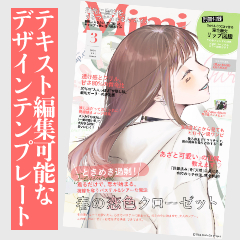
Created at B5.350 dpi, this is a fashion magazine-style cover design template material.
All edit text can be done, and some of the line art is vector material that is resistant to deformation and the line width can be adjusted.
* Some of the figures are drawn in raster layer for the convenience of use.
Recommended for such times ↓
・ I want to easily create a magazine cover style design
・ I want to study layout
・ I want to shorten the time of cover design
・ I want to complete the design on the clip studio
It is also possible to create a design using only part of the part.
Please enjoy the magazine cover style design!
This material is in the article "How to make a fashion magazine style cover design" posted on CLIP STUDIO TIPS,
It will be a template version of the actual design as it is.
The article explains how to make it using various fonts,
This template material follows the convention of ASSETS, and all fonts have been replaced with "Iwata Antic Body B".
Please change the text and font before using.
The TIPS article introduces the key points of design that looks like a magazine cover, the concept of eye guidance, and design tips that can be applied to it with illustrations and videos for beginners to intermediate users.
If you are interested, please see the article from this link ↓
https://tips.clip-studio.com/ja-jp/articles/12103
————————
This is the design actually introduced in TIPS.
The font is using the one that came in by default on my iPad.
I used Gothic Bold, Didot, Helvetica Neue series, etc.
* Depending on the usage environment, the corresponding font may not be included even on the iPad. Please be aware of this before use.
I used this template to edit the font, alignment, text, color, etc.
The illustration is heavier and chic than the usage example (1), so I put it together in a calm atmosphere.
Try to adjust it like this and use it!
(1) image material version (same as conventional material)
Import and use → layer palette
(2) layer template edition ←New!
Select and use with → layer template
The above two types are included, and the usage is different for each.
(1) How to use the image material version (the same as the conventional material)
It will be the same as the material before the update.
The usage is the same as that of conventional materials.
1. Create a B5, 350dpi canvas (for canvases of other sizes, you need to adjust the material size)
2. Drag and drop this material to the layer palette
* If you drag and drop it on the canvas, the center will be shifted, so be sure to do it on the layer palette.
3. Load the main visual and place it on the bottom layer
4. Adjust headline text, fonts, colors, and more
↑ There is a guide layer with a blue frame at the top of the folder.
When output, hide or delete the guide layer.
(2) layer template edition ←New!
It is a new addition in this update.
The usage is different from conventional materials.
In the image material version, it is necessary to adjust the size of the material for canvas size other than B5,
The layer template version does not require adjustment of the size of the material even for canvas size other than B5.
Once you get used to it, this is more convenient, so I recommend it.
How to use GIF ↓
1. When creating a new canvas, check the "layer template" checkbox.
2. Choose this material
3. Choose any canvas size and create a canvas
With the material automatically positioned according to the → canvas size
A new canvas is created
4. Load the main visual and place it at the bottom
5. Adjust headline text, fonts, colors, and more
Indications for canvas size
・B5/B4 → perfect
・ A4/A5 → slightly off, but not noticeable
(*When using the layer template version)
In addition, please adjust it according to your own usage.
———
Added on August 30
The template material of the version of the above usage example (2) has been released as Vol.2.
It is designed to fit illustrations with little movement.
Please take a look if you like.
Link ↓
https://assets.clip-studio.com/ja-jp/detail?id=2300724
In addition, we use the gradient map material "Nukegara Grade 2" that we made ourselves to adjust the color of the usage example.
Nukegara Grade 2 contains 24 types of gradient map to increase the amount of information on the screen and unify the atmosphere.
In this use case, I used "slumber" and "carbonic acid".
Introducing some of the recorded materials ↓
It will be a paid material, but if you are interested, please see here as well.
Link to "Nukegara Grade 2" ↓
https://assets.clip-studio.com/ja-jp/detail?id=2250230
————————
That's all for this material.
We hope it will help you create!
2026年8月 アップデート内容
・レイヤーテンプレート版を追加
・ガイド枠線(青枠)を追加
・一部図形をベクターに差し替えて使用感を向上
・その他、軽微な修正
不具合等ございましたらご連絡ください。
————————
B5・350dpiで作成した、ファッション誌風の表紙デザインテンプレート素材です。
すべてのテキスト編集が行えるほか、一部のラインアートはベクター素材になっており変形に強く、線幅の調整も可能です。
※図形の一部は使用感の都合からラスターレイヤーにて描写されています。
こんな時におすすめです↓
・雑誌表紙風のデザインを手軽に作りたい
・レイアウトの勉強がしたい
・表紙デザインの時間を短縮したい
・クリップスタジオ上でデザインを完結させたい
パーツの一部だけを使ってデザインを作成することも可能です。
雑誌表紙風のデザインを楽しんでみてください!
こちらの素材はCLIP STUDIO TIPSに投稿した記事「ファッション誌風の表紙デザインの作り方」にて、
実際に制作したデザインをそのままテンプレート化したものになります。
記事では様々なフォントを使って作り方を解説していますが、
こちらのテンプレート素材はでASSETSの規約に倣い、フォントはすべて「イワタアンチック体B」に差し替え済みです。
TIPS記事では雑誌の表紙らしいデザインのポイントや、視線誘導の考え方、応用が効くデザインのコツなどを、初心者〜中級者向けに図解と動画でまとめて紹介しています。
ご興味のある方はこちらのリンクから記事をご覧ください↓
https://tips.clip-studio.com/ja-jp/articles/12103
————————
<使用例①>
TIPSで実際にご紹介したデザインです。
フォントは私のiPadにデフォルトで入っていたものを使用しています。
游ゴシック体ボールド、Didot、Helvetica Neueシリーズ等を使用しました。
※使用環境によってはiPadであっても該当フォントが入っていない場合がございます。ご了承の上ご利用ください。
<使用例②>
こちらのテンプレートを使い、フォント、配置、文章、カラーなどを編集して作成しました。
使用例①よりも重たくシックなイラストなので、落ち着いた雰囲気にまとめました。
このように調整して使ってみてください!
<使い方>
①画像素材版(従来素材と同じもの)
→レイヤーパレットに読み込んで使う
②レイヤーテンプレート版 ←New!
→レイヤーテンプレートで選択して使う
上記2種が含まれていて、使い方がそれぞれ異なります。
①画像素材版(従来素材と同じもの)の使い方
アップデート前の素材と同じものになります。
使い方は従来素材と同じです。
1. B5、350dpiのキャンバスを作成する(他サイズのキャンバスの場合は素材サイズの調整が必要です)
2. レイヤーパレットにこの素材をドラッグ&ドロップ
※キャンバスにドラッグ&ドロップすると中央がずれてしまうので、必ずレイヤーパレット上に行なってください
3. メインビジュアルを読み込んで最下層に置く
4. 見出し文の文章、フォント、カラーなどを調整する
↑フォルダの最上層に青枠のガイドレイヤーがあります。
出力時にはガイドレイヤーを非表示or削除してください。
②レイヤーテンプレート版 ←New!
今回のアップデートで新しく追加されたものになります。
使い方が従来素材と異なります。
画像素材版ではB5以外のキャンバスサイズでは素材の大きさ調整が必要になりますが、
レイヤーテンプレート版はB5以外のキャンバスサイズでも素材の大きさ調整が不要です。
慣れたらこちらの方が便利なのでおすすめです。
使い方GIF↓
1. 新規キャンバス作成時、「レイヤーテンプレート」のチェックボックスにチェックを入れる
2. こちらの素材を選ぶ
3. 任意のキャンバスサイズを選び、キャンバスを作成
→キャンバスのサイズに合わせて素材が自動的に配置された状態で
新規キャンバスが作成されます
4. メインビジュアルを読み込んで最下層に置く
5. 見出し文の文章、フォント、カラーなどを調整する
キャンバスサイズの目安
・B5/B4 →ピッタリ
・A4/A5 →ややズレるが気にならない程度
(※レイヤーテンプレート版を使用した場合)
その他、ご自身の使い方に合わせてご調整ください。
———
<蛇足: 他素材のご案内>
8月30日追記
上記の使用例②のバージョンのテンプレ素材をVol.2としてリリースしました。
動きが少ないイラストに合うデザインになっています。
よろしければご覧ください。
リンク↓
https://assets.clip-studio.com/ja-jp/detail?id=2300724
また、使用例のカラー調整に自作したグラデーションマップ素材「ぬけがらグラデ2」を使用しています。
ぬけがらグラデ2では、画面の情報量を上げたり雰囲気を統一したりするためのグラデーションマップを24種収録しています。
今回の使用例に使ったのは「微睡」と「炭酸」です。
収録素材の一部をご紹介↓
有償素材になりますが、ご興味のある方はこちらも併せてご覧ください。
「ぬけがらグラデ2」へのリンク↓
https://assets.clip-studio.com/ja-jp/detail?id=2250230
————————
今回の素材は以上です。
皆様の創作の助けになれば幸いです!













 MVP ◆This user has contributed greatly to the management of the community, by posting many great responses to the questions asked. Once every three months, MVPs are determined based on the points earned during that period and will be recognized accordingly.
 New Valuable Player (NVP) ◆These are the next-best contributors to the community after MVPs. This is awarded to users who have not yet won an MVP award, based on the number of points they have earned.
 Official Expert ◆Chosen out of all MVP awardees, who are already proof of excellence, this is a testimony of outstanding correspondence in the community. After careful screening, they are appointed by CELSYS and assume their position.Note: Formally called “Evangelists”
 Official Moderator of CELSYS ◆Moderators are official CELSYS staff members who are fluent in Japanese as well as various other languages. Moderators are not experts on the software or illustration, so they are not able to directly answer your questions. However, moderators provide communication and language support to ensure that everyone can smoothly communicate with each other.
 CELSYS official accountThe Official Administrator Account