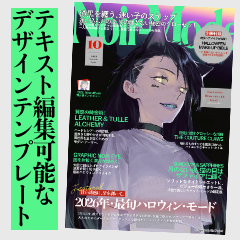
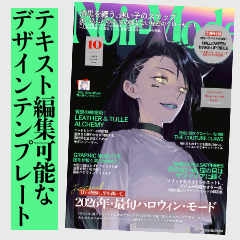
This is the second fashion magazine-style design template material created at B5.350dpi.
Vol.1, which was released before, had a light and playful design,
This Vol.2 has a solid design with a heavier center of gravity.
In addition to all edit text, many of the shapes are created with vector art, and you can adjust the line width and deformation.
* Some figures are drawn on the raster layer for usability.
Recommended for people like this ↓
・ I want to enjoy magazine-style design casually
・ I want to study layout
・ I want to shorten the production time of the cover design
・ I want to complete the design on the clip studio
It is also possible to create a design using only part of the part.
customize and enjoy the magazine-style design!
* All texts are created in accordance with the rules of ASSETS with "Iwata Antic Body B".
* The blue frame is the guide frame. Please hide or delete it when output.
This design was created when the first material was announced.
This template material was created based on the design of the example above.
Just by changing the text, you can create such a design in a short time.
It is especially recommended for illustrations with little movement and a calm atmosphere.
I imported this template material and edited the font, text, coloring, etc. to create it.
The work time is about 45 minutes to 1 hour.
It's rough, but here is the GIF of the template editing process ↓
Please customize it like this ^^
———
This collection of materials includes
(1) layer template version
→ Select and use layer template when creating a new canvas
(2) image material version
After creating a →B5 canvas, drag and drop it to the layer palette to use it.
Two types are recorded.
Both materials are loaded and placed first, and then
・ Load the main visual and place it at the bottom layer
- Change font, text, text, color, alignment, etc.
・ Hide or delete the top guide layer
Please adjust the following.
In the image material version, if the canvas is other than B5, it is necessary to adjust the material size, and if you drag and drop directly on the canvas, the center may be misaligned.
I've been using CLIP STUDIO since I was a IllustStudio and I've been using it all my life, but I didn't know how to use layer template until recently.
For those like me, we also have a familiar image material edition available.
Please use the one that is easier to use.
GIFs of how to load layer template ↓
———
In the first template of the magazine cover design that we released earlier, the following designs are included.
By using this template, you can create the following designs in a short time ↓
It will be a paid material, but if you like, please see the first bullet as well.
First material link ↓
https://assets.clip-studio.com/ja-jp/detail?id=2300557
———
There is also an explanatory article that summarizes tips on how to create a
There is an article that summarizes the points I drew when I made the first material and how to design it like a magazine.
There is also an explanatory video, so you can watch the flow.
If you are interested, such as when you get lost in the customize, please take a look ^^
Article link ↓
https://tips.clip-studio.com/ja-jp/articles/12103
———
That's all for this material.
We have uploaded other materials, so please take a look if you like.
We upload various materials that can be used for illustrations, manga, designs, etc.
"#ぬけがらデザイン素材"
"#ぬけがらイラスト素材"
"#Nukegara manga material"
You can search for each of them by the above tags.
We hope it will be useful for your creation!
B5・350dpiで作成したファッション誌風のデザインテンプレート素材の第二弾です。
以前公開したVol.1は軽やかで遊びがあるデザインでしたが、
今回のVol.2は重心が重めのしっかりしたデザインになっています。
すべてのテキスト編集ができるほか、図形類はベクターアートで作成されているものが多く、線幅変更・変形等の調整が可能です。
※一部の図形は使用感の都合からラスターレイヤーに描写されています。
こんな方におすすめです↓
・雑誌風のデザインを気軽に楽しみたい
・レイアウトの勉強がしたい
・表紙デザインの制作時間を短縮したい
・クリップスタジオ上でデザインを完結させたい
パーツの一部だけを使ってデザインを作成することも可能です。
カスタマイズして雑誌風のデザインを楽しんでみてください!
※テキスト類はASSETSの規約に倣い、すべて「イワタアンチック体B」で作成しています。
※青い枠はガイド枠になります。出力の際に非表示または削除してください。
<使用例①>
第一弾の素材を発表したときに作成したデザインです。
このテンプレート素材は上の使用例のデザインをもとに作成されました。
文字を変更するだけで、このようなデザインが時短で作れます。
特に動きが少なく、落ち着いた雰囲気のイラストにおすすめです。
<使用例②>
このテンプレート素材を読み込んで、フォント、文章、カラーリング等を編集して作成しました。
作業時間は45分〜1時間程度です。
荒いですが、テンプレ編集過程のGIFはこちら↓
こんな感じでカスタマイズしてご利用ください^^
———
<使い方>
この素材集には
①レイヤーテンプレート版
→新規キャンバス作成時にレイヤーテンプレートを選択して使う
②画像素材版
→B5キャンバスを作成した後、レイヤーパレットにドラッグ&ドロップして使う
の2種類が収録されています。
どちらの素材もまず読み込んで配置していただいて、その後
・メインビジュアルを読み込んで最下層に配置
・フォント、テキスト、文章、カラー、配置等を変更
・最上層のガイドレイヤーを非表示or削除
等の調整をしてご利用ください。
画像素材版はB5以外のキャンバスの場合、素材サイズの調整が必要になるほか、キャンバスに直接ドラッグ&ドロップすると中央がズレてしまう場合があります。
私はクリスタがイラスタだった頃から一生使っていたのに最近までレイヤーテンプレートの使い方を知りませんでした ガチで何やってんすか?
そんな私のような方のために、馴染み深い画像素材版もご用意しています
使いやすい方をご利用ください。
レイヤーテンプレートの読み込み方のGIF↓
———
<他素材のご案内: 雑誌表紙風デザインテンプレートVol.1>
以前公開した雑誌表紙デザインテンプレート第一弾では、次のようなデザインを収録しています。
こちらのテンプレートを使うことで、以下のようなデザインを時短で作成できます↓
有償素材にはなりますが、よろしければ第一弾も併せてご覧ください。
第一弾の素材リンク↓
https://assets.clip-studio.com/ja-jp/detail?id=2300557
———
<雑誌表紙風デザインを作るコツをまとめた解説記事もあります>
第一弾の素材を作った時に描いた、雑誌らしいデザインをするためのポイントをまとめた記事があります
解説動画もあるのでダラダラ流し見もできます
カスタマイズに迷った時など、ご興味があれば見てみてください^^
記事リンク↓
https://tips.clip-studio.com/ja-jp/articles/12103
———
今回の素材は以上です。
他にも素材をUPしているので良かったら見ていってください。
イラスト、漫画、デザイン等に使える素材を色々UPしています。
「#ぬけがらデザイン素材」
「#ぬけがらイラスト素材」
「#ぬけがら漫画素材」
上記タグでそれぞれ検索できます。
皆様の創作のお役に立てれば幸いです!










 MVP ◆This user has contributed greatly to the management of the community, by posting many great responses to the questions asked. Once every three months, MVPs are determined based on the points earned during that period and will be recognized accordingly.
 New Valuable Player (NVP) ◆These are the next-best contributors to the community after MVPs. This is awarded to users who have not yet won an MVP award, based on the number of points they have earned.
 Official Expert ◆Chosen out of all MVP awardees, who are already proof of excellence, this is a testimony of outstanding correspondence in the community. After careful screening, they are appointed by CELSYS and assume their position.Note: Formally called “Evangelists”
 Official Moderator of CELSYS ◆Moderators are official CELSYS staff members who are fluent in Japanese as well as various other languages. Moderators are not experts on the software or illustration, so they are not able to directly answer your questions. However, moderators provide communication and language support to ensure that everyone can smoothly communicate with each other.
 CELSYS official accountThe Official Administrator Account