


Poses that can be used as they are for illustrations vol.2 (イラストにそのまま使えるポーズ集vol.2) イラストにそのまま使えるポーズ集vol.2
Content ID:2312110
-
4


Models used: 3D drawing figure-Ver.2 (female), 3D drawing figure-Ver.2 (male)
canvas size at the time of material creation: 3762 (px) × 5320 (px) → ratio of A4 size
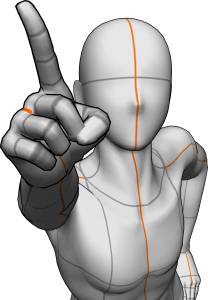
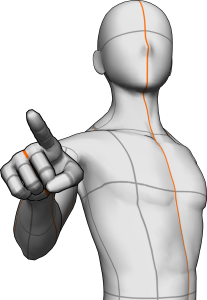
Set includes: 7 types of 3D image material pointing pose male / female
It is a material that even considers the composition so that it can be used as an atari just by pasting it on the canvas.


If you use it by pasting it on a canvas that is significantly smaller than the "canvas size at the time of material creation" described at the beginning, it may deviate even with the above method.
Once pasted on a 3762 (px) × 5320 (px) canvas and exported in png or jpg format, you can use the pose with the angle of view as per the thumbnail for Atari.
・ You can replace the model
After pasting the 3D image material on the canvas, you can drag and drop the model of your choice to replace the model while maintaining the pose. The pose of the hands can also be changed individually.
* Depending on the model, it is necessary to adjust the camera position.
使用モデル:3Dデッサン人形-Ver.2(女性)、3Dデッサン人形-Ver.2(男性)
素材作成時のキャンバスサイズ:3762(px)×5320(px)→A4サイズの比率です
セット内容:指差しポーズ男/女の3D画像素材7種
キャンバスに貼り付けるだけでそのままアタリとして使えるよう、構図まで考えた素材になっています。
冒頭に記載の「素材作成時のキャンバスサイズ」よりも大幅に小さいキャンバスに貼り付けて使用する場合は上記の方法でもずれることがあります。
一度3762(px)×5320(px)のキャンバスに貼り付けpngやjpg形式で書き出すことで、サムネ通りの画角のポーズをアタリに使うことができます。
・モデルの差し替えができます
キャンバスに3D画像素材を貼り付けた後にお好きなモデルをドラッグ&ドロップすると、ポーズはそのままにモデルを差し替えることができます。手のポーズ等も個別で変えられます。
※モデルによってはカメラ位置の調整が必要になります。
Pose/Woman ポーズ/女
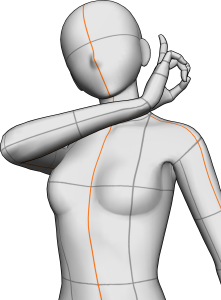
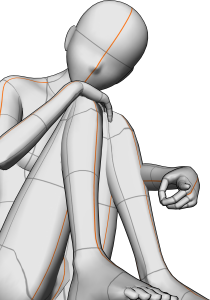
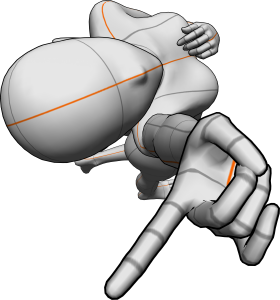

Pose/Man ポーズ/男
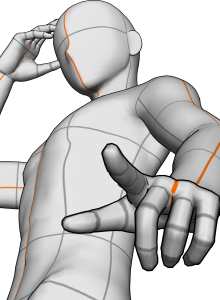


Other materials by Natsumi.U


Popular “Material catalog” materials


New materials


Badges
-
 MVP ◆This user has contributed greatly to the management of the community, by posting many great responses to the questions asked. Once every three months, MVPs are determined based on the points earned during that period and will be recognized accordingly.
 -
 New Valuable Player (NVP) ◆These are the next-best contributors to the community after MVPs. This is awarded to users who have not yet won an MVP award, based on the number of points they have earned.
 -
 Official Expert ◆Chosen out of all MVP awardees, who are already proof of excellence, this is a testimony of outstanding correspondence in the community. After careful screening, they are appointed by CELSYS and assume their position.Note: Formally called “Evangelists”
 -
 Official Moderator of CELSYS ◆Moderators are official CELSYS staff members who are fluent in Japanese as well as various other languages. Moderators are not experts on the software or illustration, so they are not able to directly answer your questions. However, moderators provide communication and language support to ensure that everyone can smoothly communicate with each other.
 -
 CELSYS official accountThe Official Administrator Account