




Batch Rename Layer Comps
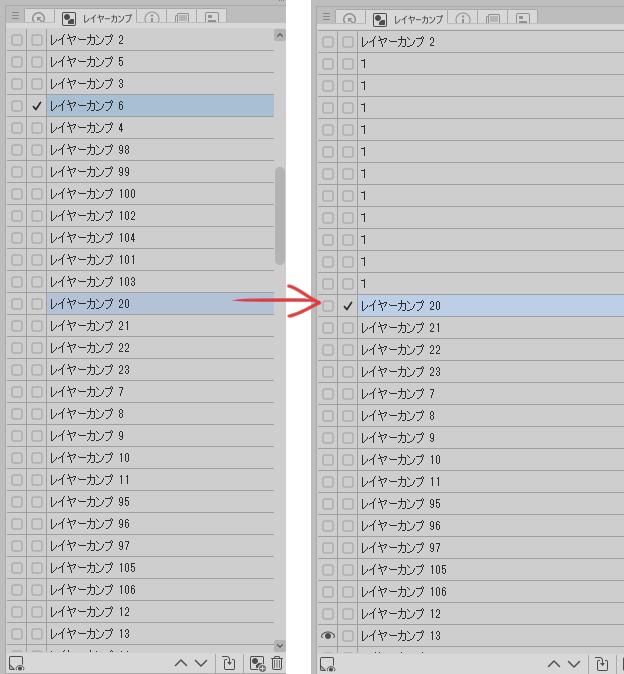
Dozens of images can be managed, but it is troublesome to name more than 100 ~ 300 facial expression differences one by one. If you divide by name, it will be troublesome to group if there are a large amount! I didn't make the difference in order in the first place! Please add a function that allows you to change multiple comp names as soon as possible!
It's a auto action for sloppy people.
For the time being, you can rename in numerical order from the top. (Other than that, you can't)
*Note: Some preparation is required. Even so, it will save a lot of time.
1. First, prepare a layer comp that you have organized and grouped by yourself.
2. Please set the name other than the most layer above comp to "1". (Full-width)
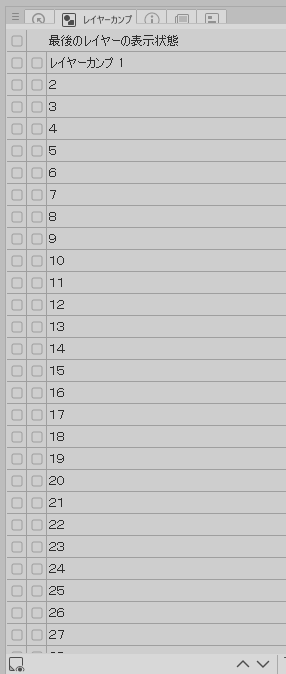
When 3,auto action is executed, the numbers are sorted in order from top to bottom. (Up to 370)
4. Change the most layer above comp to "1" and the rename is complete.
Batch Rename Layer Comps
数十枚なら何とかなるけど100~300枚以上の表情差分にいちいち名前を付けるのも面倒。名前で分けると大量にある場合はグループ分けするのも面倒になる!そもそも順番に差分作ってない!早くカンプ名を複数リネーム出来る機能を付けてくれ!
っと言う、ずぼらな人向けのオートアクションです。
とりあえず上から番号順にリネームする事が出来ます。(それ以外は出来ません)
*注意 ある程度は下準備が必要です。それでも結構な時短になります。
1,まずは自分で整理してグループ分けしたレイヤーカンプを用意します。
2,一番上のレイヤーカンプ以外の名前を「1」にして下さい。(全角)
3,オートアクションを実行すると番号が上から順番に振り分けられます。(上限370まで)
4,一番上のレイヤーカンプを「1」に変更してリネーム完了です。




Other materials by oaja

Popular “Auto Action” materials


New materials


Badges
-
 MVP ◆This user has contributed greatly to the management of the community, by posting many great responses to the questions asked. Once every three months, MVPs are determined based on the points earned during that period and will be recognized accordingly.
 -
 New Valuable Player (NVP) ◆These are the next-best contributors to the community after MVPs. This is awarded to users who have not yet won an MVP award, based on the number of points they have earned.
 -
 Official Expert ◆Chosen out of all MVP awardees, who are already proof of excellence, this is a testimony of outstanding correspondence in the community. After careful screening, they are appointed by CELSYS and assume their position.Note: Formally called “Evangelists”
 -
 Official Moderator of CELSYS ◆Moderators are official CELSYS staff members who are fluent in Japanese as well as various other languages. Moderators are not experts on the software or illustration, so they are not able to directly answer your questions. However, moderators provide communication and language support to ensure that everyone can smoothly communicate with each other.
 -
 CELSYS official accountThe Official Administrator Account