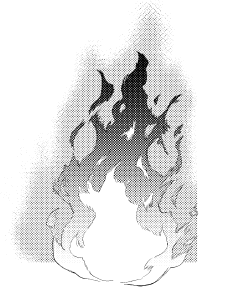
This is a collection of 12 materials: 8 types of flames, 1 type of smoke, 1 type of explosion, and 2 types of dust brushes.
It is created in B4 size, monochrome, 350 dpi that can be used in commercial magazines.
【List of recorded materials】
(1) 8 types of flames (main)
(2) 2 types of dust brushes (extra)
(3) Flame Pillar (Bonus)
(4) Black smoke (extra)
【Material Overview】
All materials except brushes are not image material, but layered folder materials ↓
Since the line is created with vector layer, you can adjust the line width and change the touch of the line.
You can quickly blend in with the picture and increase the perfection of the frame in a short time.
(Reference image ↓)
In addition, since it is made with thin lines without habit, it fits to some extent even if the unadjusted material is placed alone.
I aimed to make it so that it would be as complete as possible without as much effort.
Adjust the placement → mask→ line width adjustment→ adjust the tone (if necessary)
This alone is easy to use because you can get used to the screen and increase the amount of information.
・ When there is no time before the deadline
・ When the material floats from the screen and is difficult to use
・ When the habit of the picture is strong and it is difficult to create a sense of unity
I can recommend it at such times.
It can be used as an effect for battles, battles, fantasy comics, or even for small everyday scenes (bonfires, candles, fires, and boyas).
Materials used: Middle Fire + Fire line
This is the actual manuscript.
Middle Fire is placed in the back, Fire Line is placed in the foreground + the line width is adjusted thicker.
Here is the one with the material part bordered in red ↓
Since I only adjust the line width with almost all the material pong, it takes about 5 minutes from loading the material to the completion of the frame.
Easy to use! (Self-praise)
If the material floats from the pattern, try adjusting the line width according to the design ◎
Materials used: Middle Fire + Fire line
This is also the actual manuscript.
It can also be used for flames worn on bodies and weapons.
If you load the material like this,
Just hide it with a mask.
In addition to adjusting the line width, only the flare tone is hidden to blend in with the background.
Load and place this as well,
This is what happens when you hide it with a mask.
This is only line width adjustment.
Material used: Small fire
This is the actual manuscript.
After loading and shrinking, I just changed the flare hide + line width to 5mm.
Material used: Black smoke + Middle fire + Fire line
1. Place the Fire Line in the foreground, add tone to the white part + change the line width to 6mm.
2. Middle Fire is placed in the window part of the building, no adjustment
3. Place black smoke in the background, adjust the gradient tone + hide part with a mask
4. Scatter dust appropriately with a dust brush
That's all there is to the material process for this frame!
If you are in trouble, you can fill the margin by placing a wave of flame in the foreground for the time being.
—————————
Thank you for reading this far.
I often worry about floating out of the manuscript in image material I can't adjust, so I made it in the hope that it would help people who have similar problems.
The explosive flame column material is a bonus, so I haven't made an example of its use (sorry)
I think that this is also a material that makes the screen rich to some extent by placing it alone, so I would be happy if you could use it ^^
If you purchased the previous material collection, please re-download this updated version.
Please be assured that none of the files recorded last time have disappeared.
That's all for this collection of materials.
I hope it will help you create!
炎8種、煙1種、爆発1種、塵ブラシ2種の全12種の素材集です。
商業誌でも使えるB4サイズ、モノクロ、350dpiで作成しています。
【収録素材一覧】
① 炎8種(メイン)
② 塵ブラシ2種(おまけ)
③ 炎柱(おまけ)
④ 黒煙(おまけ)
【素材の概要】
ブラシ以外の全ての素材は画像素材ではなく、レイヤー分けされたフォルダ素材です↓
線をベクターレイヤーで作成しているため、線幅調整や線のタッチの変更ができ、
絵柄にさっと馴染ませたり、コマの完成度を短時間で上げられます。
(参考画像↓)
また、癖のない細めの線で作成しているため、無調整の素材単体ポン置きでもある程度なじみます。
なるべく手を入れなくても完成度が高くなるようなものを目指して作りました。
配置→マスク等で調整→線幅調整→(必要に応じて)トーンを調整
これだけで画面に馴染んで情報量UPできるので使いやすいです。
・締切前の時間がない時
・素材が画面から浮いて使いづらい時
・絵柄の癖が強くて統一感が出しにくい時
こんな時におすすめできます。
バトル、戦闘、ファンタジー漫画のエフェクトとして使えるほか、日常のちょっとしたシーン(焚き火やろうそく、火事やボヤ)などにもご利用いただけます。
<使用例①>
使用素材: Middle fire + Fire line
実際の原稿です。
奥にmiddle fire、手前にfire lineを配置+線幅を太めに調整しています。
素材部分を赤く縁取りしたものがこちら↓
ほぼ素材ポン置きで線幅調整しかしてないので、素材読み込んでからコマ完成まで5分くらいです。
使いやす〜〜っ!(自画自賛)
絵柄から素材が浮いてしまう場合は線幅を絵柄に合わせて調整してみてください◎
<使用例②>
使用素材: Middle fire + Fire line
こちらも実際の原稿です。
体や武器にまとっている炎にも使えます。
こんなふうに素材を読み込んだら、
マスクで隠すだけでOKです。
線幅調整のほか、背景に馴染ませるためフレアのトーンのみ非表示にしています。
こちらも読み込んで配置し、
マスクで隠すとこうなります。
こちらは線幅調整しかしてないです。
<使用例③>
使用素材: Small fire
実際の原稿です。
読み込んで縮小後、フレア非表示+線幅を5mmに変更しただけです。
<使用例④>
使用素材: 黒煙 + Middle fire + Fire line
1. 手前にfire lineを置き、ホワイト部分にトーン追加+線幅を6mmに変更
2. 建物の窓部分にmiddle fireを配置、調整なし
3. 背景に黒煙を配置、グラデーショントーンを調整+一部をマスクで隠す
4. 塵ブラシで塵を適当に散らす
このコマの素材の工程はこれだけです!
困ったらとりあえず手前に炎の波を配置するといい感じに余白を埋められます。
—————————
ここまでお読みいただきありがとうございます。
私は調整できない画像素材では原稿から浮いてしまうことによく悩むので、同じような悩みを抱えている方の助けになればと思って作りました。
爆発炎柱素材はおまけなので使用例作ってません(すみません)
こちらも単体ポン置きである程度画面がリッチになる素材だと思うので使っていただけたら嬉しいです^^
以前の素材集をご購入いただいた方は、お手数ですがこのアップデート版の再ダウンロードをお願いします。
前回収録していたファイルは一切消えていないのでご安心ください。
今回の素材集は以上です。
創作の助けになれば幸いです!










 MVP ◆This user has contributed greatly to the management of the community, by posting many great responses to the questions asked. Once every three months, MVPs are determined based on the points earned during that period and will be recognized accordingly.
 New Valuable Player (NVP) ◆These are the next-best contributors to the community after MVPs. This is awarded to users who have not yet won an MVP award, based on the number of points they have earned.
 Official Expert ◆Chosen out of all MVP awardees, who are already proof of excellence, this is a testimony of outstanding correspondence in the community. After careful screening, they are appointed by CELSYS and assume their position.Note: Formally called “Evangelists”
 Official Moderator of CELSYS ◆Moderators are official CELSYS staff members who are fluent in Japanese as well as various other languages. Moderators are not experts on the software or illustration, so they are not able to directly answer your questions. However, moderators provide communication and language support to ensure that everyone can smoothly communicate with each other.
 CELSYS official accountThe Official Administrator Account