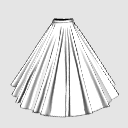
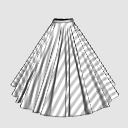
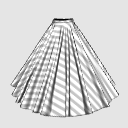
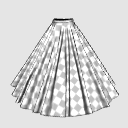
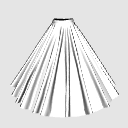
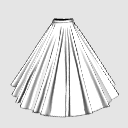
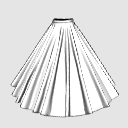
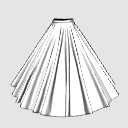
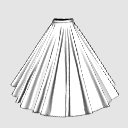
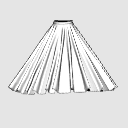
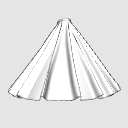
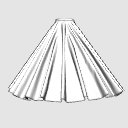
Long all-round skirt wrinkle reference 3D model (ロングの全円スカートのシワ参考用3Dモデル) ロングの全円スカートのシワ参考用3Dモデル

Content ID:2100135

  • 284
  • 150 GOLD
  • 150 CLIPPY
This material can be used in Studio Mode. (What is Studio Mode?)

Contour lines! But wrinkles! I don't know how wrinkles appear from this angle! !!
This is a reference 3D model when drawing wrinkles for you.
It is made with 3D software for clothes, so it is a realistic wrinkle.
It is made of high polygons to express the natural wrinkles peculiar to the fabric.
Therefore, if you have a computer with low specifications, the load may be high.
輪郭線はかける!でもシワが!この角度から見たシワの出方が分からない!!
そんなあなたのためのシワを描くときの参考用3Dモデルです
洋服用の3Dソフトで作ってあるのでリアルなしわになっています。
布特有の自然なしわを表現するために高めのポリゴンで作ってあります。
そのためスペックの低いパソコンだと負荷が高いかもしれません。


I wonder what happens to the wrinkles here when I try to draw clothes? I'm worried that there is no good reference material at hand, and if I just look for a material with just the right angle, I will notice it in a few hours ... It is there right.

Since it is 3D, you can check it by turning it around to the angle of "I want to know the folds of this angle!!"

You can choose from 5 different lengths.
* This is adjusted so that the folds are neatly folded with an emphasis on appearance, but in the case of actual clothes, the wrinkles change every time you move and are not even.
It can be used in combination with Mr./Ms. dolls.

※Not movable
The wrinkles on clothes change depending on the pose every time you move.
However, CLIP STUDIO does not have a function to simulate the movement of wrinkles, so it is fixed.

Surface Material◆

The surface material has white lines, plain white, vertical stripes, horizontal stripes, and gray checkerboard.

Please use checkerboard and horizontal stripes as a guide when inserting the pattern.
You can use it as a reference for wrinkles only, or you can rasterize 3D and use it as it is, and please use it to shorten the time of drawing.
If you remove the apply light source check box, you can extract only the outline neatly.

◆ How to easily draw wrinkles like that ◆

Call up the 3D model and adjust it to your preferred angle.

Create a new layer and draw a noticeable wrinkle on that layer.

Select the model in the 3D layer and open the [sub tool detail palette]. (When you select 3D, press the spanner icon that appears below)


If you clear the [apply light source] check box on the [Shadow] tab, only the outline line will be displayed.

If there is an outline line that disappears, turn on the light source once and shoot the place where the line disappears.

In order to make it easier for me to draw illustrations, not as a modeler, I made and pasted textures in advance with lines that increase the amount of information about the clothes, such as seams and seam boundaries.
(The color of the wrinkle lines has been changed for clarity.) In fact, please draw it in your favorite color)

If you write it all, it will be noisy, so please thin it out nicely and write it.
CLIP STUDIO For EX3.0
Clothes can be stacked on the same layer as the doll.
Call Mr./Ms. doll and put the clothes you want to use on the same layer.

If your hands protrude, move Mr./Ms. doll to adjust it.
If the size of the clothes does not fit the body, select the clothes and adjust them with the control unit that comes out below.
Since there is a base shape, I think it is easy to imagine the cloth even if you change the pose.
The image is an example of the configuration. This 3D model pose is not included.

If you want to use it as it is, convert it in the order of [Right-click]-[rasterize]→ on the layer of the 3D model to make it a line drawing as it is on the display. left
If you want to take out only the line Turn off [Right click] - [TL conversion of layer] - [Texture line detection] on the layer Center
[TL conversion of layers] - [Texture line detection] is turned on to make it messy. right side

◆ It is 150 yen in yen ◆
Some people may feel that it is a little expensive when you look at it as a clippy, but this 3D clothing model is 150 yen in yen.

Try to multiply your hourly rate by the time you spend looking for the wrinkles you want to draw.
Haven't it been a few hours since you noticed that you were looking for reference materials?

Repeat.
This 3D model is 150 yen in yen.

There are other 3D materials
There are also 5 types of sleeves only.


There are also skirts and trouser yukatas, so please use the ones that can be used from other materials of the Usako dressmaking workshop below to save time and improve quality.


A real sewing teacher makes it with 3D modeling software dedicated to clothes.
I make 3D models of various clothes because of my work, so if you want information on new 3D models, please follow us!

Depending on the touch to be drawn, please adjust it by deformation after rasterize.

You can use the original texture (surface material) as it is, or you can add a pattern as a guide! Please use it with your favorite pattern.
I tried various things, but clothes seem to be incompatible with TL conversion.

服を描こうとしたときここのシワどうなってるんだろう?と悩んで手元の参考資料にいいものがなく、ちょうどいい角度の資料を探すだけで気づいたら数時間とか…ありますよね。

3Dなので「この角度のヒダが知りたい!!」という角度までぐるぐる回して確認ができます。

5段階の丈が選べます。
※これは見栄えを重視して綺麗にひだが入るように調整していますが、実際の服の場合動くたびにシワは変わりますし均等にはなりません。
デッサン人形と組み合わせて使う事が出来ます。

※可動しません
洋服のシワは動くたびポーズによって変わります。
しかしクリスタではシワの動きをシミュレーションする機能はないため、固定となります。

表面素材◆

表面素材は白ラインあり、白無地、縦縞、横縞、灰色市松です。

市松や横縞などは柄を入れる際の目安にどうぞ。
しわだけの参考にするもよし、3Dをラスタライズしてそのまま使うも良し作画の時短にお役立てください。
光源の影響を受けるのチェックボックスを外すときれいに輪郭だけ抜き出せます。

◆簡単にそれっぽいしわを描く方法◆

3Dモデルを呼び出し好みの角度に調整する。

新しいレイヤーを作ってそのレイヤーに目立つしわをなぞって描く。

3Dのレイヤーでモデルを選択してから【サブツール詳細パレット】を開く。(3Dを選択したときに下に出てくるスパナのアイコンを押すと出てくる)


【陰影】タブの【光源の影響を受ける】のチェックボックスを外すと輪郭線だけになります。

消えてしまう輪郭線がある場合、一度光源をオンにして、線が消える所も写す。

モデラーとしてではなく自分がイラストを描きやすいように、縫い目や縫い合わせの境目など服の情報量が上がるようなラインをあらかじめテクスチャを作って貼ってあります。
(分かりやすいようにしわの線の色を変えてあります。実際は好きな色で描いてください)

全部書き込むとうるさくなるので、いい感じに間引いて書いてください。
クリスタEX3.0の場合
服はでっざん人形と同じレイヤ―に持っていくと重ねて表示ができます。
デッサン人形を呼び出し同じレイヤーに使いたい服を入れてください。

手などはみ出したところはデッサン人形を動かして調整してください。
ボディに洋服のサイズが合わない場合は、洋服を選択して、下に出る制御装置で調整してください。
ベースの形があるのでポーズを変えても布がイメージしやすいと思います。
画像は設定例です。この3Dモデル・ポーズは含まれません。

 そのまま使う場合は、3Dモデルのレイヤーの上で【右クリック】-【ラスタライズ】→という順で変換するとディスプレイ上のまま線画になります。左側
 線だけ取り出したい場合 レイヤーの上で【右クリック】-【レイヤーのTL変換】-【テクスチャのライン検出】をオフ 中央
 【レイヤーのTL変換】-【テクスチャのライン検出】オンにするとごちゃごちゃします。右側

◆円換算で150円です◆
クリッピーとみると、ちょっと高く感じる方もいるかもしれませんが、こちらの3D洋服モデル、円換算すると150円です。

描きたいしわを探す時間に時給をかけてみてください。
参考資料探しって気づいたら数時間経ってませんか?

くりかえします。
この3Dモデルは円換算で150円なんです。

他にも3D素材があります
 袖だけ5種類入り等もあります。


他にもスカートやズボン浴衣などありますので↓下のうさこの洋裁工房の別の素材から使えそうなものを時短やクオリティアップにご活用ください。


リアルのお裁縫の先生が洋服専用の3Dモデリングソフトで作っています。
仕事柄色んな服の3Dモデルを作るのでこれからも増えていきますので、新しい3Dモデルの情報が欲しい方はフォローしてね!

描かれるタッチによってはラスタライズ後、変形などで調整してご利用ください。

元からついているテクスチャ(表面素材)をそのまま使っても良し、目安にして柄を入れても良し!好きな柄でお使いください。
色々試しましたが洋服はTL変換と相性が悪いようです。

material マテリアル

  • With white lines 白線入り
  • Vertical stripes 縦縞
  • Horizontal stripes 横縞
  • Checkered pattern 市松模様
  • Plain 無地

disposition 配置

  • 5 paragraphs 5段
  • 4 paragraphs 4段
  • 3 paragraphs 3段
  • 2 paragraphs 2段
  • 1. Talk 1談

angle アングル

  • front 正面
  • right
  • left
  • back 背面
  • diagonal 斜め

Content ID:2100135

Published : 1 year ago

Last updated : 11 months ago

うさこの洋裁工房's profile Go to profile

洋裁の先生です。 リアルに服を作ったり 3Dで服を作ったり 洋服の作り方を教えたりしています。 しわを描くときの参考になるようなリアル系の洋服の3Dモデルをアセットで公開しています。 公開1時間は無料開放しているので最新情報が欲しい方はツイッターをフォローすると情報を受け取りやすいかも

Other materials by うさこの洋裁工房

Popular “3D object” materials

New materials