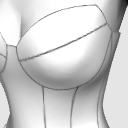
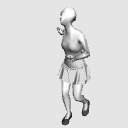
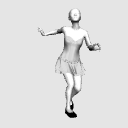
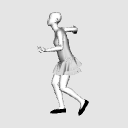
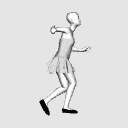
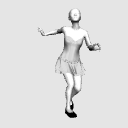
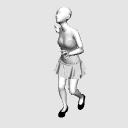
Free access for 1 hour Bustier with cup Skip 1 Wrinkle Reference 3D Model (1時間無料開放 カップ付きビスチェ スキップ1 シワ参考用3Dモデル) 1時間無料開放 カップ付きビスチェ スキップ1 シワ参考用3Dモデル

Content ID:2265913

  • 245
  • Free
This material can be used in Studio Mode. (What is Studio Mode?)

Contour lines! But wrinkles! I don't know how wrinkles appear from this angle! !!
This is a reference 3D model when drawing wrinkles for you.
It is made with 3D software for clothes, so it is a realistic wrinkle.
It is made of high polygons to express the natural wrinkles peculiar to the fabric.
Therefore, if you have a computer with low specifications, the load may be high.
輪郭線はかける!でもシワが!この角度から見たシワの出方が分からない!!
そんなあなたのためのシワを描くときの参考用3Dモデルです
洋服用の3Dソフトで作ってあるのでリアルなしわになっています。
布特有の自然なしわを表現するために高めのポリゴンで作ってあります。
そのためスペックの低いパソコンだと負荷が高いかもしれません。

Free period until 2026/4/29 around 21:00
Even beginners can draw wrinkles on proper clothes! This is a 3D model for wrinkle reference.
"I can't draw wrinkles well."
"Even if you draw it somehow, it will be unnatural"

In order to solve such problems,
This is a reference 3D model of wrinkles made by a dressmaking teacher with 3D modeling software dedicated to clothes.

This 3D product is for clothes only.
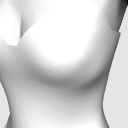
The body is a bonus about Atari.
It is not colored.

You can check it from any angle you like, so
You can greatly reduce the time spent searching for materials and trial and error.
Not only will I refer to this pose, but I will also refer only to the wrinkles of the hips and knees.
You can also use it.


3D shadows can be used as they are

If you color by multiplication from above, you can paint without removing the shadow.

Rough description

Draw line art.


1 Create a new folder below the lineart.

2 Select the part where you want to color the clothes, select the folder you created, and press the mask button.

3 Create a texture (such as the surface material of a clothing pattern) or a new layer in the folder to fill the entire layer.
If you put a mask on the folder, when you modify the body shape, it is only hidden, so you can modify it as much as you want later.


You can easily divert shadows from clothes with just the basic functions of the clip studio.
I think you can save time for people who are not close-ups, people with backgrounds such as mobs, and those who are not particular about writing explanatory pictures instead of as art.

Click here for details ↓

How to paint colors using 3D as it is
https://tips.clip-studio.com/ja-jp/articles/12457


◆Surface Material◆


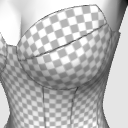
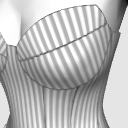
The surface material has white lines, plain white, vertical stripes, horizontal stripes, and gray checkerboard.

Please use checkerboard and horizontal stripes as a guide when inserting the pattern.

* This function cannot be used depending on the version.

You can use it as a reference for wrinkles only, or you can rasterize 3D and use it as it is, and please use it to shorten the time of drawing.
If you remove the apply light source check box, you can extract only the outline neatly.

◆ It is 90 yen per item in yen ◆

Some people may feel that it is a little expensive when you look at it as a clippy, but this 3D clothing model is 90 yen per yen.
Try to multiply your hourly rate by the time you spend looking for the wrinkles you want to draw.
Haven't it been a few hours since you noticed that you were looking for reference materials?


Repeat.
One 3D model is 90 yen in yen.
By the way, simple actual clothes and 3D clothes can often be made faster with actual clothes.

By the way, even with the same data, the download data of the pattern (blueprint of the full-size clothes) that can actually make pants is sold for 990 yen.
But the wrinkle reference 3D model is this price!
It may be difficult to understand if you don't have something to compare with, but it takes more time and effort than real clothes, and 70 yen is an insanely study price.

◆ How to easily draw wrinkles like that ◆

https://tips.clip-studio.com/ja-jp/articles/12371


Using auto action

In the case of the PC version, if you use auto action, it will automatically export the line art.


Select 3D and press the dedicated auto action button to output automatically.

* If the image is too small, it may not work.

You can download the adjusted auto action for free from Assets.


Free auto action download

https://assets.clip-studio.com/ja-jp/detail?id=2210430
You can also go from "See more" of "Another material from Usako Dressmaking Workshop" below.

May be somewhat heavy
Since the mesh is finer for the convenience of expressing wrinkles realistically, the operation may be slightly affected depending on the specifications of the terminal you are using.
We are not responsible for operational problems due to specifications.
There is also a free wrinkle reference 3D model, so if you are worried, you may want to try it first.

Free 3D Models

https://assets.clip-studio.com/ja-jp/search?user=%E3%81%86%E3%81%95%E3%81%93%E3%81%AE%E6%B4%8B%E8%A3%81%E5%B7%A5%E6%88%BF&pay=free&order=new


If you feel heavy, adjust the angle of the 3D and the direction of the light, then right-click on the layer palette → image with rasterize.

There are other 3D materials


There are also 5 types of sleeves only.
There are also skirts and trouser yukatas, so please use the ones that can be used from other materials of the Usako dressmaking workshop below to save time and improve quality.


A real sewing teacher makes it with 3D modeling software dedicated to clothes.
I make 3D models of various clothes because of my work, so if you want information on new 3D models, please follow us!

You can download it for free for 1 hour after each post.
無料期間 2026/4/29 21時くらいまで
お絵かき初心者でもちゃんとした服のシワが描ける!シワ参考用3Dモデルです。
「シワがうまく描けない」
「なんとなく描いても不自然になる」

そんな悩みを解決するために、
洋裁の先生が洋服専用の3Dモデリングソフトで作った、シワの参考用3Dのモデルです。

この3Dの商品は服のみです。
ボディはアタリ程度のおまけです。
色はついていません。

好きな角度から確認できるので、
資料探しや試行錯誤の時間を大幅に減らせます。
このポーズとして参考にするだけでなく、腰、ひざのしわだけ参考にする。
という使い方もできますよ。


3Dの影もそのまま使える

上から乗算で色を塗ると影を消さずに色が塗れます。

ざっくりした説明

線画を書く。


1 線画の下に新しいフォルダを作る。

2 服の色を塗りたいところを選択し、作ったフォルダを選んで、マスクボタンを押す。

3 フォルダの中にテクスチャ(服の柄の表面素材など)や、新しいレイヤーを作ってレイヤー全体をべた塗りする。
フォルダにマスクをかけると体形を修正した時、隠しているだけなので、後からいくらでも修正ができます。


クリップスタジオの基本の機能だけで簡単に服の影が流用できます。
アップではない、モブなどの背景の人や、アートとしてではなく説明画などを書きたいなどこだわらない方には時短できると思います。

詳しくはここ↓

3Dをそのまま使った色の塗り方
https://tips.clip-studio.com/ja-jp/articles/12457


◆表面素材◆


表面素材は白ラインあり、白無地、縦縞、横縞、灰色市松です。

市松や横縞などは柄を入れる際の目安にどうぞ。

※バージョンによってはこの機能は使えません。

しわだけの参考にするもよし、3Dをラスタライズしてそのまま使うも良し作画の時短にお役立てください。
光源の影響を受けるのチェックボックスを外すときれいに輪郭だけ抜き出せます。

◆円換算で単品90円です◆

クリッピーとみると、ちょっと高く感じる方もいるかもしれませんが、こちらの3D洋服モデル、円換算すると1つ90円です。
描きたいしわを探す時間に時給をかけてみてください。
参考資料探しって気づいたら数時間経ってませんか?


くりかえします。
3Dモデルが円換算で1つ90円なんです。
ちなみにシンプルな実際の服と3Dの服だと実際の服の方が早く作れたりすることも多いです。

ちなみに同じデータでも、実際にズボンが作れる型紙(実物大の服の設計図)のダウンロードデータは990円で販売しています。
なのにシワ参考用3Dモデルはこの価格!
比較対象がないと分かりにくいかもしれませんが、現実の服より手間がかかって70円ってめちゃくちゃ勉強価格なんですよ。

◆簡単にそれっぽいしわを描く方法◆

https://tips.clip-studio.com/ja-jp/articles/12371


オートアクションを使う

PC版の場合オートアクションを使うと自動で線画を書き出してくれます。


3Dを選択して専用のオートアクションのボタンを押すとこれ位自動で出力されます。

※小さすぎる画像の場合はうまくいかない場合があります

服用に調整したオートアクションはアセットから無料でダウンロードできます。


無料のオートアクションのダウンロード

https://assets.clip-studio.com/ja-jp/detail?id=2210430
下の「うさこの洋裁工房"さんの別の素材」の「もっと見る」からも行けます。

やや重いかもしれません
皺をリアルに表現する都合上メッシュが細かくなっているため、ご利用の端末のスペックによっては少々動作に影響が出る可能性があります。
スペックによる動作の不具合はこちらでは責任を取りかねます。
無料のシワ参考用3Dモデルもあるので、心配な方は先にそちらをお試しいただくとよいかもしれません。

無料の3Dモデル

https://assets.clip-studio.com/ja-jp/search?user=%E3%81%86%E3%81%95%E3%81%93%E3%81%AE%E6%B4%8B%E8%A3%81%E5%B7%A5%E6%88%BF&pay=free&order=new


重いなと感じたら、3Dの角度や光の方向を調整したら、レイヤーパレットの上で右クリック→ラスタライズで画像化すると作業しやすいかもしれません。

他にも3D素材があります


袖だけ5種類入り等もあります。
他にもスカートやズボン浴衣などありますので↓下のうさこの洋裁工房の別の素材から使えそうなものを時短やクオリティアップにご活用ください。


リアルのお裁縫の先生が洋服専用の3Dモデリングソフトで作っています。
仕事柄色んな服の3Dモデルを作るのでこれからも増えていきますので、新しい3Dモデルの情報が欲しい方はフォローしてね!

毎回投稿後1時間は無料でダウンロードできます。

Material マテリアル

  • With white lines 白線入り
  • Checkered pattern 市松模様
  • Vertical stripes 縦縞
  • Horizontal stripes 横縞
  • Plain 無地

configuration 配置

  • 服+体 clothes+body 服+体 clothes+body
  • Clothes only 服のみ clothes only

Angle アングル

  • Before
  • Left
  • Right
  • After
  • Diagonal 斜め

Content ID:2265913

Published : 1 hour ago

Last updated : 1 hour ago

うさこの洋裁工房's profile Go to profile

洋裁の先生です。 リアルに服を作ったり 3Dで服を作ったり 洋服の作り方を教えたりしています。 しわを描くときの参考になるようなリアル系の洋服の3Dモデルをアセットで公開しています。 公開1時間は無料開放しているので最新情報が欲しい方はツイッターをフォローすると情報を受け取りやすいかも

Other materials by うさこの洋裁工房

Popular “3D object” materials

New materials