



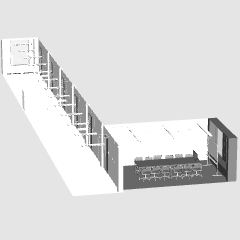
It is a 3D material that can be used in the office scene.
It's a small meeting room.
There is also a hallway.
オフィスのシーンで活用できる3D素材です。
小さめな会議室です。
廊下もついています。

Conference Room and Hallway
This is one point of 3D material.
There are two types of meeting rooms: normal size (12 seats) and small size (6 seats).
↓ LT conversion (no retouch).
The detection accuracy is 100 and the texture extract line is turned on.


There are eight types of materials.
The room is two types of whitish and black system, the chair is white solid color for select color gamut, and six species that combines it with three types of gray and black.
The door knob in the conference room is moving.
Prop door stuff in the hallway doesn't move.

If you want to open the door of a meeting room, please select it from the layout.
There are four steps to opening the door.
Each angle is 0, 20, 45 and 90 degrees.
At first there is a meeting room at the very end of the corridor, but you can move to the location.
You can also move the number of the meeting room information in the right figure.
It would be messy with the legs of the chair, but it is also easy to put a gradient on the floor when using the material for the select color gamut (please use the light source off).


The meeting room has a desk, a chair, a whiteboard and a monitor.
You can hide the display because the object is individual.

Since the equipment of entry and exit management is on, I think that it is more convenient when I have it in the entering and leaving scene in combination with the employee ID of 3D material of another exhibition.

https://assets.clip-studio.com/ja-jp/detail?id=1978298
Because the plate is attached next to the door, if it is used as a corridor only, please write the place of the material etc. in the room not limited to the conference room.
The mark used is the original without trace.
For fonts use the Ivata Antic body of the specified font.
Some of the hiragana katakana parts have been rewritten in the Gothic style in reference to the specified font.
・会議室と廊下
以上3D素材1点です。
会議室はレイアウトから選べる通常サイズ(12席)と小サイズ(6席)の2タイプがあります。
↓LT変換例(加筆なし)です。
検出精度は100、テクスチャのライン抽出をオンにしています。
マテリアルは全部で8種類です。
部屋が白系と黒系の2タイプ、椅子が白とグレーと黒の3タイプでそれを組み合わせた6種と色域選択用、白単色です。
可動は会議室のドアノブが動きます。
廊下のハリボテのドアのものは動きません。
会議室のドアを開きたい場合はレイアウトから選んでください。
ドアの開き具合は4段階あります。
角度はそれぞれ0、20、45、90度です。
最初は廊下の一番端に会議室はありますが、位置移動できます。
右図の会議室の位置情報の数値を入力していただいても動かせます。
椅子の脚でごちゃごちゃしてしまいますが、マテリアルの色域選択用(光源はオフで使用してください)を利用すると床にグラデーションを入れたりするのも簡単にできます。
会議室には机、椅子、ホワイトボード、モニターがついています。
オブジェクトは個別になっているので表示非表示もそれぞれできます。
入退室管理の機器がついているので入退室のシーンでは別出品の社員証3D素材と組み合わせていただくとより便利かと思います。
https://assets.clip-studio.com/ja-jp/detail?id=1978298
プレートもドア横にはついていますので単に廊下として使用する場合には会議室に限らず資料室など任意の場所を書き込んだりしてください。
使用されているマークなどはトレースなしのオリジナルのものです。
フォントについては指定フォントのイワタアンチック体を使用しています。
ひらがなカタカナ部分は指定フォントを参考に一部ゴシック体風に書き直したところもあります。
Conference Room and Hallway 3D 会議室と廊下の3D





Other materials by ldl


Popular “Material catalog” materials


New materials





Badges
-
 MVP ◆This user has contributed greatly to the management of the community, by posting many great responses to the questions asked. Once every three months, MVPs are determined based on the points earned during that period and will be recognized accordingly.
 -
 New Valuable Player (NVP) ◆These are the next-best contributors to the community after MVPs. This is awarded to users who have not yet won an MVP award, based on the number of points they have earned.
 -
 Official Expert ◆Chosen out of all MVP awardees, who are already proof of excellence, this is a testimony of outstanding correspondence in the community. After careful screening, they are appointed by CELSYS and assume their position.Note: Formally called “Evangelists”
 -
 Official Moderator of CELSYS ◆Moderators are official CELSYS staff members who are fluent in Japanese as well as various other languages. Moderators are not experts on the software or illustration, so they are not able to directly answer your questions. However, moderators provide communication and language support to ensure that everyone can smoothly communicate with each other.
 -
 CELSYS official accountThe Official Administrator Account