




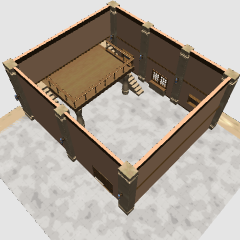
The stairs can also be hidden, and the moving parts are also more.
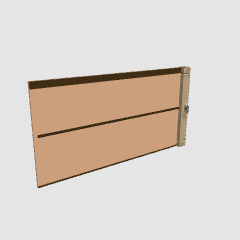
Windows and doors are set to pose preset.
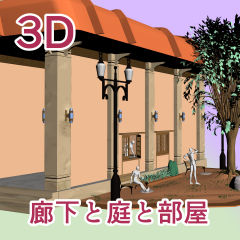
The roof and room are hidden in the default layout object.
There are rooms from the layout preset, and you can choose only a garden.


▲ Most Viewed Figure

▲ "Focus on editing target" is also convenient when cubic a big material such as a room and a pose doll.

▲ The check of the extract line of the texture might be able to dilute the pattern like the grid of the floor when it misses.
The room is empty this time. Please try to arrange the furniture you have.
The loft and the stairs can be removed.
▲ The image in the picture frame is my own.

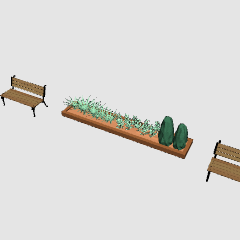
Extra bonus. You can also use other.

▲ The leaves can be hidden.

▲ Firnsia flowers. Does not exist. Original
I made it in detail but do not see it because I use it in a distant view.


* We recommend saving the work file before placing the material.
▲階段も非表示にできるほか、動かせるパーツも多めです。
窓やドアなどは可動プリセットに設定しています。
▲全部入りのオブジェクトは、屋根と部屋が初期レイアウトでは非表示です。
レイアウトプリセットから部屋あり、庭だけ、などを選べます。
▲ほぼ上から見た図
▲部屋などの大きな素材とポーズ人形を組みあわせる時は、「編集対象を注視」も便利です。
▲テクスチャのライン抽出のチェックは外すと床のグリッドのような模様を薄めることができることがあります。
▲部屋の中は今回は空っぽです。お持ちの家具などを配置してみてください。
ロフトと階段は外せます。
▲額縁の中の画像も自分のものです。
▲おまけ。他でも使えます。
▲葉は非表示できます。
▲フィルンシアという花。存在しません。オリジナル。
細かく作りましたが遠景で使うからほぼ見えません…
※素材を配置前に作業ファイルの保存をお勧めします。
object オブジェクト

Description 説明


Other materials by dpsbk


Popular “Material catalog” materials


New materials





Badges
-
 MVP ◆This user has contributed greatly to the management of the community, by posting many great responses to the questions asked. Once every three months, MVPs are determined based on the points earned during that period and will be recognized accordingly.
 -
 New Valuable Player (NVP) ◆These are the next-best contributors to the community after MVPs. This is awarded to users who have not yet won an MVP award, based on the number of points they have earned.
 -
 Official Expert ◆Chosen out of all MVP awardees, who are already proof of excellence, this is a testimony of outstanding correspondence in the community. After careful screening, they are appointed by CELSYS and assume their position.Note: Formally called “Evangelists”
 -
 Official Moderator of CELSYS ◆Moderators are official CELSYS staff members who are fluent in Japanese as well as various other languages. Moderators are not experts on the software or illustration, so they are not able to directly answer your questions. However, moderators provide communication and language support to ensure that everyone can smoothly communicate with each other.
 -
 CELSYS official accountThe Official Administrator Account