




 Brushes
The function that adjusts the length of the video (Smart Shape function) is
https://tips.clip-studio.com/ja-jp/articles/11934CLIP STUDIO Ver.5.0 or later
Other than the Smart Shape function, drawing straight is
- While holding down SHIFT.
- Or grid view, snap according to the view menu.

Both cannot be used with the Smart Shape function

 2 tools
Video is a tool for those without space

( 2302664 ) ( 2302665 ) Original characters also used for ( 1895198 ) etc.
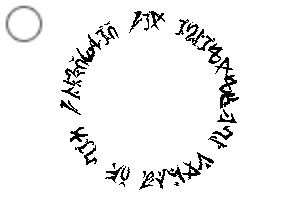
There is an alphabet, but the brush is random and the letters come out, so it doesn't mean much.

▼ Original Characters Related Materials
 2104728
 1895198
 2032127ブラシ
動画の、長さを調整している機能(スマートシェイプ機能)は
https://tips.clip-studio.com/ja-jp/articles/11934クリスタVer.5.0以降
スマートシェイプ機能以外でまっすぐ描くのは、
- shiftを押しながら。
- またはグリッド表示、表示メニューに従いスナップ。
ともにスマートシェイプ機能と併用不可
ツール2つ動画は、スペース無しの方のツール
( 2302664 )( 2302665 )( 1895198 ) などにも使用しているオリジナル文字
アルファベット分ありますが、ブラシはランダムで文字が出てくるので、あまり意味はない。
▼ オリジナル文字 関連素材
2104728 1895198 2032127Original Text Brush Tool オリジナル文字ブラシ・ツール




Other materials by dpsbk


Popular “Material catalog” materials


New materials


Badges
-
 MVP ◆This user has contributed greatly to the management of the community, by posting many great responses to the questions asked. Once every three months, MVPs are determined based on the points earned during that period and will be recognized accordingly.
 -
 New Valuable Player (NVP) ◆These are the next-best contributors to the community after MVPs. This is awarded to users who have not yet won an MVP award, based on the number of points they have earned.
 -
 Official Expert ◆Chosen out of all MVP awardees, who are already proof of excellence, this is a testimony of outstanding correspondence in the community. After careful screening, they are appointed by CELSYS and assume their position.Note: Formally called “Evangelists”
 -
 Official Moderator of CELSYS ◆Moderators are official CELSYS staff members who are fluent in Japanese as well as various other languages. Moderators are not experts on the software or illustration, so they are not able to directly answer your questions. However, moderators provide communication and language support to ensure that everyone can smoothly communicate with each other.
 -
 CELSYS official accountThe Official Administrator Account