



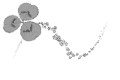
It is a brush which literally grows crispy trifolium.
It is difficult to blur even a large canvas because the brush tip itself has been created quite large. But it might be a bit heavy.
In that case, please try to register and then change the size of the tip on your own after downloading (attention because it is a way for advanced people)
There is no problem in the minute used normally.
The brush tip size is 800 * 800/350dpi gray sub color mixed.
文字通りシロツメクサがサクサク生えてくるブラシです。
ブラシ先端自体が結構大きめに作成されているので大きなキャンバスでもボケボケになりにくいです。でも少し重たいかもしれないです。
その場合はダウンロード後にご自身で先端のサイズなどを変更して登録しなおしたりしてみてください(上級者向けのやり方なので注意)
普通に使う分には何の問題はないです。
ブラシ先端のサイズは800*800/350dpi・グレースケール・サブカラー混合です。


Silots Mexer シロツメクサーん







Other materials by 藤矢つづみ


Popular “Material catalog” materials


New materials





-
 MVP ◆This user has contributed greatly to the management of the community, by posting many great responses to the questions asked. Once every three months, MVPs are determined based on the points earned during that period and will be recognized accordingly.
 -
 New Valuable Player (NVP) ◆These are the next-best contributors to the community after MVPs. This is awarded to users who have not yet won an MVP award, based on the number of points they have earned.
 -
 Official Expert ◆Chosen out of all MVP awardees, who are already proof of excellence, this is a testimony of outstanding correspondence in the community. After careful screening, they are appointed by CELSYS and assume their position.Note: Formally called “Evangelists”
 -
 Official Moderator of CELSYS ◆Moderators are official CELSYS staff members who are fluent in Japanese as well as various other languages. Moderators are not experts on the software or illustration, so they are not able to directly answer your questions. However, moderators provide communication and language support to ensure that everyone can smoothly communicate with each other.
 -
 CELSYS official accountThe Official Administrator Account