


Drawable Infiltration Scene 01|Plant Machine Room [Full] (描ける潜入シーン01|プラント機械室[Full]) 描ける潜入シーン01|プラント機械室[Full]
Content ID:2318601
-
39


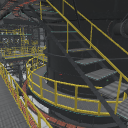
This asset contains all sections of the plant machine room.
Materials optimized for LT conversion are applied.
The machine room, which I had given up due to "lack of materials" and "difficult to draw", can be easily used for draft drawing and line drawing with a large number of registered angle preset.
本アセットは、プラント機械室の全区画を収録しています。
LT変換に最適化したマテリアル付けを行っています。
「資料がない」「描くのが大変」で諦めていた機械室を、多数登録したアングルプリセットで、お手軽に下描きや線画にご使用いただけます。


 This is the extract line value of this explanation and usage example.


 この解説・使用例のライン抽出値です。
Material マテリアル
-
default material 初期マテリアル

Configuration 配置
-
default layout 初期レイアウト

Angle アングル
-
thumbnail angle サムネイルアングル
-
Angle A アングルA
-
Angle B アングルB
-
Angle C アングルC
-
Angle D アングルD
-
Angle E アングルE
-
Angle F アングルF
-
Angle G アングルG
-
Angle H アングルH
-
Angle I アングルI
-
Angle J アングルJ
-
Angle K アングルK
-
Angle L アングルL
-
Angle plane アングル平面




pose parts 可動パーツ
-
Movable 可動


Other materials by 伝説(レジェ)


Popular “3D object” materials


New materials


-
 MVP ◆This user has contributed greatly to the management of the community, by posting many great responses to the questions asked. Once every three months, MVPs are determined based on the points earned during that period and will be recognized accordingly.
 -
 New Valuable Player (NVP) ◆These are the next-best contributors to the community after MVPs. This is awarded to users who have not yet won an MVP award, based on the number of points they have earned.
 -
 Official Expert ◆Chosen out of all MVP awardees, who are already proof of excellence, this is a testimony of outstanding correspondence in the community. After careful screening, they are appointed by CELSYS and assume their position.Note: Formally called “Evangelists”
 -
 Official Moderator of CELSYS ◆Moderators are official CELSYS staff members who are fluent in Japanese as well as various other languages. Moderators are not experts on the software or illustration, so they are not able to directly answer your questions. However, moderators provide communication and language support to ensure that everyone can smoothly communicate with each other.
 -
 CELSYS official accountThe Official Administrator Account