


Drawable Infiltration Scene 01|Plant Machine Room [Free] (描ける潜入シーン01|プラント機械室[Free]) 描ける潜入シーン01|プラント機械室[Free]
Content ID:2317762
-
1,469


This is a free limited section version of "Drawable Infiltration Scene 01 | Plant Machine Room [Full]" that can be used as a background for the infiltration scene.
Materials optimized for LT conversion are applied.
The machine room, which I had given up due to "lack of materials" and "difficult to draw", can be easily used for draft drawing and line drawing with a large number of registered angle preset.
潜入シーンの背景などに使える、「描ける潜入シーン01|プラント機械室[Full]」の無償限定区画版です。
LT変換に最適化したマテリアル付けを行っています。
「資料がない」「描くのが大変」で諦めていた機械室を、多数登録したアングルプリセットで、お手軽に下描きや線画にご使用いただけます。
■ What is contained in this material
This asset is a free limited section version "Drawable Infiltration Scene 01 | Plant Machine Room [Free]" that cuts out a part of "Drawable Infiltration Scene 01 | Plant Machine Room [Full]" and makes it into one 3D Object.
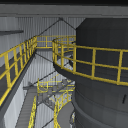
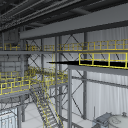
Multi-tiered catwalks and stairs, ceiling piping, towers and scaffolding, equipment such as pumps and motors, and even control cabinets were confined to the space in a consistent arrangement.

To complement Clip Studio Paint's 3D Object rendering quality, we apply to whole shaded baked materials, including AO.


In addition, the mapping image is adjusted so that it looks the best as a line drawing during LT conversion.
Example of 3D drawing figure placement (this asset does not include 3D drawing figure)


■ How to use
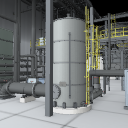
When placed, it appears at a similar angle to the thumbnail.

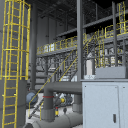
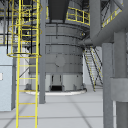
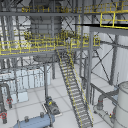
You can choose from multiple presets of camera angles, or you can move the 3D layer camera, widen the viewing angle, or lower the viewpoint to create a composition that suits the scene, such as low angle, looking down, or looking up at a tower.

■ The front of the compartment is cut in a straight line.
Since it is a limited section cut out of a part of "Drawable Infiltration Scene 01 | Plant Machine Room [Full]", the front side (the lower side of the plan view in the figure below) is cut in a straight line with the wall.
If you point the camera at the side of the cutting surface, the back will be hollow, so please use it in a composition that goes from the inside of the machine room to the back.

■ Specifications
The object of this asset are integral and cannot be moved or hidden individually.
■ Introduction of "Drawable Infiltration Scene 01|Plant Machine Room [Full]"
Unlike the free version of this asset, "Drawable Infiltration Scene 01 | Plant Machine Room [Full]" includes all areas and individual object can be selected, so you can hide the object that obstructs the view when specifying the angle, and you can "set the angle" more freely.
It includes a large triple fan installed on the wall behind the machine room, a control room, and an infiltration passage.
 Large wall triple fan (not included in this asset) It's a shot in development. )
 Control room (not included in this asset) It's a shot in development. )
 Infiltration passage (not included in this asset) It's a shot in development. )
・LT conversion is the result of confirmation in the PC version.
■ この素材に入っているもの
本アセットは「描ける潜入シーン01|プラント機械室[Full]」の一部を切り出し、1つの3Dオブジェクトにした無償限定区画版「描ける潜入シーン01|プラント機械室[Free]」です。
多層のキャットウォークや階段、天井の配管群、塔と足場、ポンプやモーターなどの機器、制御盤まで、整合性のとれた配置で空間に閉じ込めました。
Clip Studio Paintの3Dオブジェクトレンダリング品質を補完するため、AOを含め陰影をベイクしたマテリアルを全体に適用しています。
さらにLT変換時に最も線画として映えるように、マッピング画像を調整しています。
3Dデッサン人形配置例(本アセットには3Dデッサン人形は含まれません)
■ 使い方
配置すると、サムネイルと同様のアングルで表示されます。
複数登録済みのカメラアングルのプリセットからお選びいただくか、3Dレイヤーのカメラを移動、視野角を広げたり視点を下げたりすると、ローアングル・見下ろし・塔の見上げなど、場面に合わせた構図がつくれます。
■ 区画の手前は一直線に切ってあります
「描ける潜入シーン01|プラント機械室[Full]」の一部を切り出した限定区画のため、手前側(下図の平面図下側)は壁ごと一直線に切断しています。
切断面の側にカメラを向けると奥が空洞になるので、機械室の内側から奥へ向かう構図でお使いください。
■ 仕様
本アセットのオブジェクトは一体で、個別に動かしたり非表示にしたりはできません。
■ 「描ける潜入シーン01|プラント機械室[Full]」のご紹介
無償版の本アセットとは異なり、「描ける潜入シーン01|プラント機械室[Full]」は全エリアを内包し、個々のオブジェクトも選択できるため、アングル指定の際に視界を妨げるオブジェクトの非表示が行え、より自由に"アングル決め"が行えます。
機械室後方の壁面に設置された大型三連ファン、制御室、潜入通路などを内包しています。
壁面大型三連ファン(本アセットには収録されていません。開発中のショットです。)
制御室(本アセットには収録されていません。開発中のショットです。)
潜入通路(本アセットには収録されていません。開発中のショットです。)
・LT変換はPC版での確認結果です。
Material マテリアル
-
default material 初期マテリアル
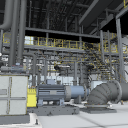
Configuration 配置
-
default layout 初期レイアウト
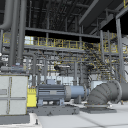
Angle アングル
-
thumbnail angle サムネイルアングル
-
Angle A アングルA
-
Angle B アングルB
-
Angle C アングルC
-
Angle D アングルD
-
Angle E アングルE
-
Angle F アングルF
-
Angle G アングルG


Other materials by 伝説(レジェ)


Popular “3D object” materials




New materials


-
 MVP ◆This user has contributed greatly to the management of the community, by posting many great responses to the questions asked. Once every three months, MVPs are determined based on the points earned during that period and will be recognized accordingly.
 -
 New Valuable Player (NVP) ◆These are the next-best contributors to the community after MVPs. This is awarded to users who have not yet won an MVP award, based on the number of points they have earned.
 -
 Official Expert ◆Chosen out of all MVP awardees, who are already proof of excellence, this is a testimony of outstanding correspondence in the community. After careful screening, they are appointed by CELSYS and assume their position.Note: Formally called “Evangelists”
 -
 Official Moderator of CELSYS ◆Moderators are official CELSYS staff members who are fluent in Japanese as well as various other languages. Moderators are not experts on the software or illustration, so they are not able to directly answer your questions. However, moderators provide communication and language support to ensure that everyone can smoothly communicate with each other.
 -
 CELSYS official accountThe Official Administrator Account