



This is a proofreading template that gives the impression of a flash popping onto paper. 종이 위로 플래시를 터트린 것 같은 느낌을 내는 보정용 템플릿입니다.
Update: Added a flash angle template to worn paper.
Existing template: Style that looks like noise due to exposure adjustment mistakes
This template: Paper that looks worn and worn + a bit of prism light border flash
---------------------------------------------------------------------------------


Apply [Filter - Draw - Perlin Noise - Size1] to Layer 1 at the very bottom of the folder. New noise appears, making the texture sharper.


업데이트: 마모된 종이에 플래시 찰각 템플릿을 추가했습니다.
기존 템플릿: 노출 조정 미스로 노이즈가 낀듯한 스타일
이번 템플릿: 낡아서 마모된 느낌이 나는 종이 +약간의 프리즘광 테두리 플래시
---------------------------------------------------------------------------------
폴더 가장 아래에 있는 레이어 1에 [필터-그리기-펄린노이즈-크기1]을 적용시켜주세요. 새로운 노이즈가 생겨 질감이 선명해집니다.
Category 1 카테고리 1

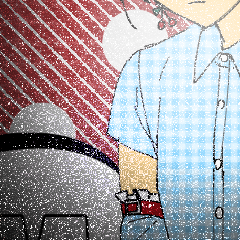
Old version







Other materials by ㅂㄹㅅ


Popular “Material catalog” materials


New materials


-
 MVP ◆This user has contributed greatly to the management of the community, by posting many great responses to the questions asked. Once every three months, MVPs are determined based on the points earned during that period and will be recognized accordingly.
 -
 New Valuable Player (NVP) ◆These are the next-best contributors to the community after MVPs. This is awarded to users who have not yet won an MVP award, based on the number of points they have earned.
 -
 Official Expert ◆Chosen out of all MVP awardees, who are already proof of excellence, this is a testimony of outstanding correspondence in the community. After careful screening, they are appointed by CELSYS and assume their position.Note: Formally called “Evangelists”
 -
 Official Moderator of CELSYS ◆Moderators are official CELSYS staff members who are fluent in Japanese as well as various other languages. Moderators are not experts on the software or illustration, so they are not able to directly answer your questions. However, moderators provide communication and language support to ensure that everyone can smoothly communicate with each other.
 -
 CELSYS official accountThe Official Administrator Account