


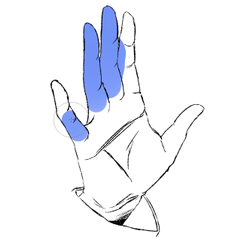

I want to softly erase the color to express skin tone in the Greske manga manuscript, but I don't want to erase the adjacent part beyond the line drawing.
It takes a long time to erase the parts that you don't want to erase, paint and erase, erase and paint repeatedly.
The third installment in which such a poor person will save you by omitting the following.
I was using it custom for myself, but I received a request to use it, so I will publish it.
I just didn't publish it because I thought there would be no demand for ・・・・・・, it's true.
グレスケ漫画原稿で肌色表現に色を柔らかく消したいけど、線画を越えた隣接部分は消したくない。
消したくない所まで消してしまい、塗っては消して、消しては塗ってを繰り返して時間がかかってしまう。
そんなかわいそうな人が以下省略、救ってくれる第3弾。
自分用でカスタムして使っていたけど、使いたいと要望頂いたので公開します。
・・・・・・対して需要無いだろうとか思って公開してなかっただけです、本当です。

You can erase it softly in an airbrush style along the lineart.
It is an eraser version of the airbrush along the lineart.
Useful for expressing the light part with a shadow multiplication layer.
It makes it easier to express glossy skin with the Greske manuscript. (Of course toning can also be used for monochrome binary manuscripts.)

Omake
You can erase along the line art.
It is an eraser version of the brush that paints along the lineart.
This is a bonus because there are similar tools.
For those who want to align their tool design with quick access?
Addendum 1
Reference the lineart layer before using it.

Preferences → cursor →eraser-type cursor
If you set the setting to "brush shape and cross", the fill area is easy to understand.

線画に沿ってエアブラシ風に柔らかく消すことができます。
線画に沿ってエアブラシの消しゴムバージョンです。
陰乗算レイヤーで光部分の表現をする際に便利。
グレスケ原稿で艶っぽく肌を表現したりが楽になる。(もちろんトーン化でモノクロ2値原稿にも使える)
オマケ
線画に沿って消すことができます。
線画に沿って塗るブラシの消しゴムバージョンです。
これは似たツールもあるのでオマケということで付けときます。
クイックアクセスでツールデザインを揃えたい人向け?
補記1
線画レイヤーを参照設定してから使ってね。
環境設定→カーソル→消しゴム系カーソル
の設定を「ブラシ形状と十字」にすると塗り範囲がわかりやすいよ。
Eraser tool 消しゴムツール







Other materials by Sataki_666


Popular “Material catalog” materials


New materials





-
 MVP ◆This user has contributed greatly to the management of the community, by posting many great responses to the questions asked. Once every three months, MVPs are determined based on the points earned during that period and will be recognized accordingly.
 -
 New Valuable Player (NVP) ◆These are the next-best contributors to the community after MVPs. This is awarded to users who have not yet won an MVP award, based on the number of points they have earned.
 -
 Official Expert ◆Chosen out of all MVP awardees, who are already proof of excellence, this is a testimony of outstanding correspondence in the community. After careful screening, they are appointed by CELSYS and assume their position.Note: Formally called “Evangelists”
 -
 Official Moderator of CELSYS ◆Moderators are official CELSYS staff members who are fluent in Japanese as well as various other languages. Moderators are not experts on the software or illustration, so they are not able to directly answer your questions. However, moderators provide communication and language support to ensure that everyone can smoothly communicate with each other.
 -
 CELSYS official accountThe Official Administrator Account