


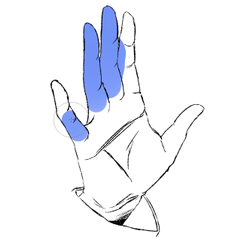

The line art is not closed, and the close and fill tool sticks out.
Trying to make it easier and looking for parts that are not closed takes a lot of time.
Such a poor person is me.
A brush that saves me.
線画が閉じていなくて、囲って塗るツールだとはみ出しまくってしまう。
楽をしようとして、閉じてない部分を探すことでかえって時間がかかってしまう。
そんなかわいそうな人が私です。
私を救ってくれるブラシ。

You can color along the line art.
However, the unclosed area is wide and protrudes.
The close and fill tool is useful when it is difficult to paint fine drawings.
Append
Reference the lineart layer before using it.

Preferences → cursor →brush-type cursor
If you set the setting to "brush shape and cross", the fill area is easy to understand.

線画に沿って色塗りができます。
ただ、閉じていない範囲が広いとはみ出します。
囲って塗るツールだと細かい描画の塗り分けがしづらい時とかは便利。
追記
線画レイヤーを参照設定してから使ってね。
環境設定→カーソル→ブラシ系カーソル
の設定を「ブラシ形状と十字」にすると塗り範囲がわかりやすいよ。









Other materials by Sataki_666


Popular “Brush” materials


New materials










-
 MVP ◆This user has contributed greatly to the management of the community, by posting many great responses to the questions asked. Once every three months, MVPs are determined based on the points earned during that period and will be recognized accordingly.
 -
 New Valuable Player (NVP) ◆These are the next-best contributors to the community after MVPs. This is awarded to users who have not yet won an MVP award, based on the number of points they have earned.
 -
 Official Expert ◆Chosen out of all MVP awardees, who are already proof of excellence, this is a testimony of outstanding correspondence in the community. After careful screening, they are appointed by CELSYS and assume their position.Note: Formally called “Evangelists”
 -
 Official Moderator of CELSYS ◆Moderators are official CELSYS staff members who are fluent in Japanese as well as various other languages. Moderators are not experts on the software or illustration, so they are not able to directly answer your questions. However, moderators provide communication and language support to ensure that everyone can smoothly communicate with each other.
 -
 CELSYS official accountThe Official Administrator Account