


Crm_Toolbox_Expansion2026 (Crm_Toolbox_Expansion2026) Crm_Toolbox_Expansion2026
Content ID:2303861
-
6,871
 ◆
◆

This is a set of tools that atApostle [@Carume_CuO] has been using lately! 軽目くお(atApostle)[@Carume_CuO]が最近使用しているツールのセットです!

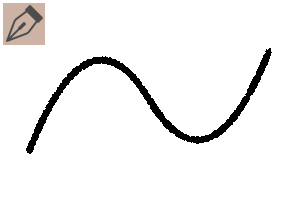
- RoughLiner: A lightweight pen with a rough texture. For rough and detailed drawings
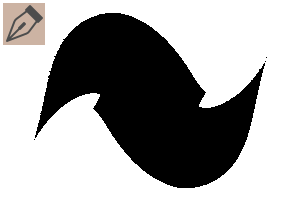
- FlatBasePen: A pen that is prone to strength and weakness, and does not have rounded corners or ends. You can use it as it is for fill, or lower the opacity and apply it thickly.
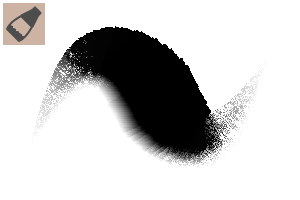
- DetailBuffer_2Way: Textured fill brush. If you change the "Spacing" of the tool property from "Wide (second from left, default setting)" to "Fixed (leftmost)", it changes to a hatch brush that increases the amount of information.
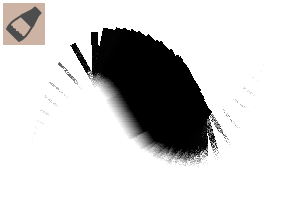
- DetailBuffer_Flex: Pen pressure changes the interval between hatching and painting brushes
- DetailBuffer_Rakes: Unlike 2Way/Flex, the line is parallel to the stroke
- DetailBuffer_Hair: Specialized in drawing hair strands
- Lasso_BG: A lasso tool to fill in the transparent caused by cutting/moving some parts with thick coatings. I use it well with the default lasso tool


- LassoLayerSelect: A tool that allows you to select multiple layers with a lasso. You can also select a single layer with just a click. Registration for shortcut is recommended!
- Rough with RoughLiner, old Fil and FlatBasePen, color with lasso
- Integrate into one sheet and shape with lasso + Lasso_BG
- Divide each part into multiple layers and draw with each brush while filling it with Lasso_BG.


- RoughLiner: ガサガサした質感の軽量なペンです。ラフや細部の描き込みに
- FlatBasePen: 強弱がつきやすく、角や末端が丸くなりにくいペンです。そのままベタ塗りに使ったり、不透明度を下げて厚塗りしたり
- DetailBuffer_2Way: テクスチャの効いた塗りブラシ。ツールプロパティの「間隔」を「広い(左から2番目、初期設定)」から「固定(一番左)」にすると、情報量を増やすハッチングブラシに変化します
- DetailBuffer_Flex: 筆圧でハッチング〜塗りブラシまでの間隔が変化します
- DetailBuffer_Rakes: 2Way/Flexと違いストロークと並行な線になっています
- DetailBuffer_Hair: 毛束の描き込みに特化しています
- Lasso_BG: 厚塗りで一部のパーツを切り取り/移動変形時に生じる透明部分を埋めるための投げ縄ツールです。初期設定の投げ縄ツールと上手いこと使い分けています
- LassoLayerSelect: 投げ縄で複数レイヤーを選択できるツールです。クリックのみで単一のレイヤーを選択することもできます。ショートカットへの登録がおすすめ!
- RoughLinerでざっくりラフ、旧版FilとFlatBasePen、投げ縄で色置き
- 1枚に統合し投げ縄+Lasso_BGで形を整える
- パーツごとに複数レイヤーに分け、Lasso_BGで埋めつつ各ブラシで描き込む
Brushes ブラシ
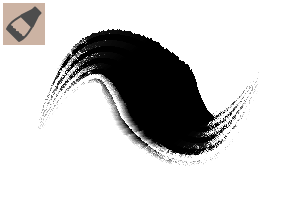
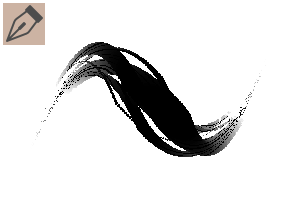
Other Tools 他ツール


Update history
2026/09/09: Upload 2026/09/09: アップロード








Other materials by 軽目くお(atApostle)


Popular “Material catalog” materials


New materials


-
 MVP ◆This user has contributed greatly to the management of the community, by posting many great responses to the questions asked. Once every three months, MVPs are determined based on the points earned during that period and will be recognized accordingly.
 -
 New Valuable Player (NVP) ◆These are the next-best contributors to the community after MVPs. This is awarded to users who have not yet won an MVP award, based on the number of points they have earned.
 -
 Official Expert ◆Chosen out of all MVP awardees, who are already proof of excellence, this is a testimony of outstanding correspondence in the community. After careful screening, they are appointed by CELSYS and assume their position.Note: Formally called “Evangelists”
 -
 Official Moderator of CELSYS ◆Moderators are official CELSYS staff members who are fluent in Japanese as well as various other languages. Moderators are not experts on the software or illustration, so they are not able to directly answer your questions. However, moderators provide communication and language support to ensure that everyone can smoothly communicate with each other.
 -
 CELSYS official accountThe Official Administrator Account