


Homogeneity Palette Material [OKlab Palette] (同明度パレット素材[OKlab Palette]) 同明度パレット素材[OKlab Palette]
Content ID:2293061
-
3


★ People who want to choose continental, value-filled, colorful, but unified colors
★ People who are not good at sensory color schemes and want to color with logic
★ People who are worried about saturation errors in "Color" mode
★People who want to do OKlab color scheme
It is a material for .
Even if you change the hue, you can choose a color that does not lose the brightness of the appearance. There is no way to pick a color with the same brightness in CLIP STUDIO yet (the L fix that came out in V5 is also CIELAB's L*, so the brightness is a little off. . . We programmatically created picker materials with a homogeneity color palette for each stage in Python.
The brightness can be adjusted even in the layer mode "Color", but with vivid colors, the brightness of the appearance may vary and the feeling of unity may not be achieved. In such a case, please try this homobility (perceptual brightness / OKLab criterion). It is also recommended for those who want to express a slightly dull and colorful color that looks like a continental paint.
It probably works the same way as the color scheme of the same brightness palette that comes with left-hand devices, so if you want to try it before buying, please do.
★大陸塗り・バリュー塗り・カラフルなのに、統一感のある色選びをしたい人
★感覚的な配色が苦手、理屈で色を塗りたい人
★「カラー」モードだと彩度の誤差が気になる人
★OKlab配色やりたい人
向けの素材です。
色相を変えても、見た目の明るさが崩れない色選びができます。クリスタには同明度の色をピックする方法がまだないので(V5で出たL固定もCIELABのL*なのでちょっと明度がずれる。。。)Pythonで段階ごとの同明度カラーパレットのピッカー素材をプログラミングで制作しました。
レイヤーモード『カラー』でも輝度は合わせられますが、鮮やかな色では見た目の明るさがバラついて統一感が出ないことがあります。そういうときに、こちらの同明度(知覚明度・OKLab基準)を試してみてください。大陸塗りっぽい、ちょっとくすんだカラフルな色味を表現したい人にもおすすめです。
左手デバイスなどに付属でついている同明度パレットの配色と多分同じ仕組みなので、買う前に試してみたい方もどうぞ。
- Color the base
- Paint the shadow in one color
- Check the "Color Settings" of the shadow color and look at the "L*" value.
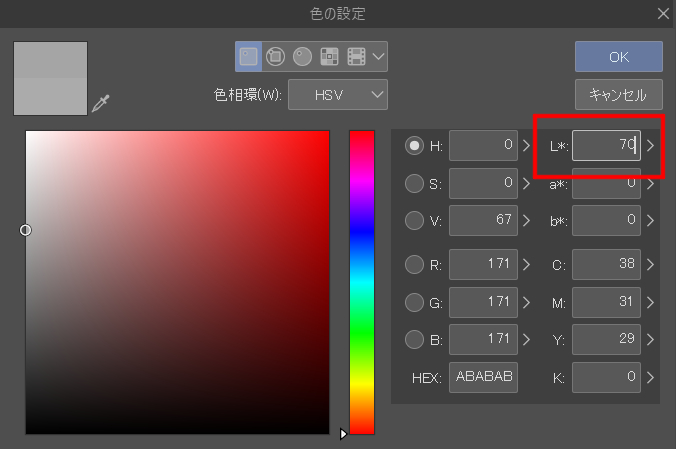
- Choose a color palette of 5~10 plus the value of "L*", pick a color, clip it to the shadow and paint it. The L* in CLIP STUDIO is the L* in CIELAB (Lab), so it deviates a little from OKLab.
Please use a numerical value such as "L70" in the name of each material.

- ベースを着彩します
- 影を1色で塗ります
- 影の色の「色の設定」を確認し、「L*」の値を見てください。
- 「L*」の値に5~10足したカラーパレットを選び、色をピックして、影にクリップして塗ります。クリスタのL*はCIELAB(Lab)のL*なので、OKLabと少しずれます。
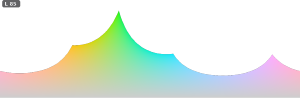
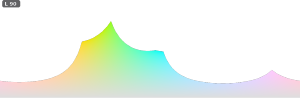
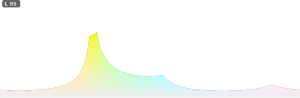
素材の名前にそれぞれ「L70」のような数値が含まれていますのでそちらをご使用ください。
Category 1 カテゴリ1
-
EqLuma_rect_L20_t EqLuma_rect_L20_t
-
EqLuma_rect_L25_t EqLuma_rect_L25_t
-
EqLuma_rect_L30_t EqLuma_rect_L30_t
-
EqLuma_rect_L35_t EqLuma_rect_L35_t
-
EqLuma_rect_L40_t EqLuma_rect_L40_t
-
EqLuma_rect_L45_t EqLuma_rect_L45_t
-
EqLuma_rect_L50_t EqLuma_rect_L50_t
-
EqLuma_rect_L55_t EqLuma_rect_L55_t
-
EqLuma_rect_L60_t EqLuma_rect_L60_t
-
EqLuma_rect_L65_t EqLuma_rect_L65_t
-
EqLuma_rect_L70_t EqLuma_rect_L70_t
-
EqLuma_rect_L75_t EqLuma_rect_L75_t
-
EqLuma_rect_L80_t EqLuma_rect_L80_t
-
EqLuma_rect_L85_t EqLuma_rect_L85_t
-
EqLuma_rect_L90_t EqLuma_rect_L90_t
-
EqLuma_rect_L95_t EqLuma_rect_L95_t















Other materials by sazanami_saya


Popular “Material catalog” materials


New materials





-
 MVP ◆This user has contributed greatly to the management of the community, by posting many great responses to the questions asked. Once every three months, MVPs are determined based on the points earned during that period and will be recognized accordingly.
 -
 New Valuable Player (NVP) ◆These are the next-best contributors to the community after MVPs. This is awarded to users who have not yet won an MVP award, based on the number of points they have earned.
 -
 Official Expert ◆Chosen out of all MVP awardees, who are already proof of excellence, this is a testimony of outstanding correspondence in the community. After careful screening, they are appointed by CELSYS and assume their position.Note: Formally called “Evangelists”
 -
 Official Moderator of CELSYS ◆Moderators are official CELSYS staff members who are fluent in Japanese as well as various other languages. Moderators are not experts on the software or illustration, so they are not able to directly answer your questions. However, moderators provide communication and language support to ensure that everyone can smoothly communicate with each other.
 -
 CELSYS official accountThe Official Administrator Account