



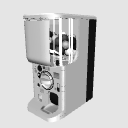
It is a capsule toy housing that supports single unit display and vertical 3 × width 5 body display. It also supports the rotation of the lever, the opening and closing of the outlet, the capsule display in the outlet, and the single display before and after opening the capsule.
This material is a sister product of the "Capsule Toy Shop" that is available separately.
【About the half-price period】
This material will be sold for 50GOLD (500CP) instead of the usual 100GOLD (1000CP) for one week from May 22nd to 29th, which is the release date of this material. Basically, we will not reduce the price except for the public commemorative price of the material, so please take this opportunity to purchase it.
[Reference image by LT conversion below] * In addition to highlighting the outline, no additions have been made after LT conversion.
単体表示と縦3×横5体表示に対応したカプセルトイ筐体です。レバーの回転、取り出し口の開閉と取り出し口内のカプセル表示やカプセルの開封前と後の単体表示にも対応しています。
本素材は別途公開中の「カプセルトイショップ」の姉妹品となります。
【半額期間について】
本素材の公開日である5月22日から29日までの1週間限定で通常100GOLD(1000CP)の所50GOLD(500CP)での販売となります。基本的に素材の公開記念価格以外では値下げをしないのでこの機会に是非お求めください。
【以下LT変換による参考画像】※アウトラインの強調表示以外にLT変換後の加筆は行っていません。


Material マテリアル
-
default material 初期マテリアル
Configuration 配置
-
default layout 初期レイアウト
-
default layout capsules available 初期レイアウト カプセル有
-
5-barrel enclosure 筐体5連
-
5-row housing with 1st row capsule 筐体5連 1列目カプセル有
-
5-row housing with 2nd row capsule 筐体5連 2列目カプセル有
-
5-row housing with 3rd row capsule 筐体5連 3列目カプセル有
-
5-row enclosure with 4th row capsule 筐体5連 4列目カプセル有
-
5-row enclosure with 5th row capsule 筐体5連 5列目カプセル有
-
Capsule alone カプセル単体
-
Capsule alone opened カプセル単体 開封済み











Other materials by ---ZEN---


Popular “3D object” materials





New materials





-
 MVP ◆This user has contributed greatly to the management of the community, by posting many great responses to the questions asked. Once every three months, MVPs are determined based on the points earned during that period and will be recognized accordingly.
 -
 New Valuable Player (NVP) ◆These are the next-best contributors to the community after MVPs. This is awarded to users who have not yet won an MVP award, based on the number of points they have earned.
 -
 Official Expert ◆Chosen out of all MVP awardees, who are already proof of excellence, this is a testimony of outstanding correspondence in the community. After careful screening, they are appointed by CELSYS and assume their position.Note: Formally called “Evangelists”
 -
 Official Moderator of CELSYS ◆Moderators are official CELSYS staff members who are fluent in Japanese as well as various other languages. Moderators are not experts on the software or illustration, so they are not able to directly answer your questions. However, moderators provide communication and language support to ensure that everyone can smoothly communicate with each other.
 -
 CELSYS official accountThe Official Administrator Account