



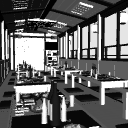
It is a houseboat that supports both interior and exterior with karaoke and gozen.
[Reference image by LT conversion below] * No additions have been made after LT conversion.
カラオケと御膳を備えた内観・外観両対応の屋形船です。
【以下LT変換による参考画像】※LT変換後の加筆は行っていません。


[About LT conversion setting values]
The LT conversion setting values of the reference image of this material are as follows.
* If you want to change your own LT conversion setting value, we recommend that you register to preset the LT conversion setting in advance so that it can be restored.

"LT conversion setting values for CLIP STUDIO PAINT EX Ver.3.1 and later"
Basically, the setting value does not change from the conventional Ver, but the setting screen has changed.
Please set it as shown in the image below.


[Display status list]
You can select the following display states from "Layout Presets".
Basically, it is a preset that hides walls and small items that get in the way when you point the camera (viewpoint) at the guest room from each direction. You can also select "Hull Under Water Hide" as a preset for appearance, so that the houseboat is floating on the surface of the water.

* Some images other than preset name are posted.
[About the number and display position of dishes due to data capacity saving]
This material has the following saving measures to reduce the growth of data capacity.
①
Houseboats made of this material have gozen dishes at each seat in the cabin, but in the initial display state, out of a total of 32 seats, only 16 seats on the stern side are food, and the remaining 16 seats on the bow side are only gozen (tableware) without dishes. You can flip these positions by selecting a preset named "Dish Flip" from "Material Presets". Switch the position of the dish according to the position of the desired camera (viewpoint).

②
The engine on the rear bottom of the hull that hides under the water is not made.

③
The main locations on the ship are the "corridor" from the stern to the guest room, the "guest room", and the "corridor" leading to the bow. The doors attached to the corridor are "wheelhouse" and "cooking room" on the two stern sides, and "toilet" on the bow side, but these are not made indoors.
【About opening and closing sliding doors】
The sliding door can be opened and closed by moving it horizontally in the appropriate arrow direction after being selected.

【About hiding structures】
By hiding structures and small items in the object list, this material makes it easier to place the camera (viewpoint) in any position more than the layout preset.

[About other recommended materials] * Not included with this material.
In addition to this material, various 3D materials suitable for manga backgrounds are being released, so please check my material list.
・The following is a reference image. No additions have been made after LT conversion.
"Showa ↔ Modern Variable Housing Living Room"

"Red Light District View Hotel"

"Showa Retro Pure Cafe"

[About the font of the text used in the material]
Furniture logos and other characters are handwritten or used only in Iwata Antic B font.
【LT変換の設定値について】
本素材の参考画像のLT変換設定値は以下の通りとなります。
※ご自身のLT変換設定値を変更される場合は事前にLT変換設定をプリセットに登録する等して復元可能な状態にしておく事を推奨します。
「CLIP STUDIO PAINT EX Ver.3.1以降のLT変換設定値について」
基本的に従来のVerと設定値は変わりませんが設定画面が変わっています。
以下の画像のように設定してください。
【表示状態一覧】
「レイアウトのプリセット」から以下の表示状態を選択できます。
基本的に各方向から客室にカメラ(視点)を向けた際に邪魔になる壁や小物を非表示にしたプリセットとなります。また、外観に関するプリセットとして「船体 水面下 非表示」を選択する事で屋形船を水面に浮いている表示状態にする事もできます。
※プリセット名以外の画像に関しては一部を掲載しています。
【データ容量節約に伴う料理の数と表示位置について】
本素材はデータ容量の増大を抑えるために以下の節約対策を行っています。
①
本素材の屋形船は客室内の各席に御膳が置かれていますが、初期の表示状態では全32席の中で船尾側の16席にのみ料理が置かれ、残りの船首側の16席では料理のない御膳(食器)のみとなっています。「マテリアルのプリセット」から「料理反転」という名称が付いたプリセットを選択すると、これらの位置を反転させる事ができます。任意のカメラ(視点)の位置に合わせて料理の位置の切り替えを行ってください。
②
水面下に隠れる船体後部底面のエンジンは作られていません。
③
船内は船尾から客室への「廊下」・「客室」・船首へ続く「廊下」がメインのロケーションとして作られています。廊下に取り付けられたドアは船尾側2つが「操舵室」と「調理室」、船首側1つが「トイレ」となっていますが、これらは室内が作られていません。
【引戸の開閉について】
引戸は選択状態にしたあとに適当な矢印方向に水平移動させる事で開閉できます。
【構造物の非表示について】
本素材はオブジェクトリスト内の構造物や小物を非表示にする事でカメラ(視点)をレイアウトのプリセット以上に任意の位置に置きやすくなります。
【その他のおすすめ素材について】※本素材には付属していません。
本素材以外にも漫画背景に向いた様々な3D素材を公開中ですので是非私の素材一覧からご確認ください。
・以下は参考画像になります。LT変換後の加筆は行っていません。
「昭和↔現代可変住宅居間」
「歓楽街眺望ホテル」
「昭和レトロな純喫茶」
【素材に使われているテキストのフォントについて】
家具のロゴ等の文字は手書きかイワタアンチック体Bフォントのみを使用しています。
Material マテリアル
-
default material 初期マテリアル
configuration 配置
-
default layout 初期レイアウト
-
default layout Cooking inversion 初期レイアウト 料理反転
-
Walls 1, 4, and 3 are hidden 壁1・4・3側非表示
-
Hidden on walls 1, 4, and 3 Cooking reversal 壁1・4・3側非表示 料理反転
-
Wall 2 side hidden 壁2側非表示
-
Wall 2 side hidden Dish inverted 壁2側非表示 料理反転
-
Walls 5, 6, and 7 are hidden 壁5・6・7側非表示
-
Hidden on the 5th, 6th, and 7th sides of the wall Cooking reversal 壁5・6・7側非表示 料理反転
-
Wall 8 side hidden 壁8側非表示
-
Wall 8 side hidden Dish inverted 壁8側非表示 料理反転
-
Hull hidden under water 船体 水面下非表示













Other materials by ---ZEN---


Popular “3D object” materials


New materials





Badges
-
 MVP ◆This user has contributed greatly to the management of the community, by posting many great responses to the questions asked. Once every three months, MVPs are determined based on the points earned during that period and will be recognized accordingly.
 -
 New Valuable Player (NVP) ◆These are the next-best contributors to the community after MVPs. This is awarded to users who have not yet won an MVP award, based on the number of points they have earned.
 -
 Official Expert ◆Chosen out of all MVP awardees, who are already proof of excellence, this is a testimony of outstanding correspondence in the community. After careful screening, they are appointed by CELSYS and assume their position.Note: Formally called “Evangelists”
 -
 Official Moderator of CELSYS ◆Moderators are official CELSYS staff members who are fluent in Japanese as well as various other languages. Moderators are not experts on the software or illustration, so they are not able to directly answer your questions. However, moderators provide communication and language support to ensure that everyone can smoothly communicate with each other.
 -
 CELSYS official accountThe Official Administrator Account