


Line art conversion & vectorization auto action (線画変換&ベクター化オートアクション) 線画変換&ベクター化オートアクション
Content ID:2269894
-
902


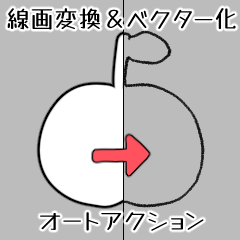
It is a auto action to extract only the black lines from the raster layer and vectorize them.
You can change the border effect line to a different brush shape.
It may be cleaner to use it in monochrome.
【How to use】
1. Draw in white with a border effect. opacity 100 fixed pens are recommended.

2. If you rasterize it with line art conversion, it will convert brightness to opacity.

3. Use either color or monochrome. It will be vector layer.

4. Change to the object tool, adjust the shape and size, and you're done.

【How to register your favorite brush in the brush shape】
1. Open the tool detail palette of the brush you like.

2. Press "register to preset" from the brush shape to add it.


ラスターレイヤーから黒線のみを抽出してベクター化するオートアクションです。
境界効果の線を別のブラシ形状に変更とかができます。
モノクロで使用するほうが綺麗になるかもしれません。
【使用方法】
1.境界効果をつけて白で描画してください。不透明度100固定のペンがオススメです。
2.線画変換でラスタライズと、輝度を透明度に変換します。
3.カラーとモノクロどちらかを使用してください。ベクターレイヤーになります。
4.オブジェクトツールに変更して形状やサイズを調整して完了です。
【ブラシ形状に好きなブラシを登録する方法】
1.好きなブラシのツール詳細パレットを開きます。
2.ブラシ形状から「プリセットに登録」を押すと追加されます。
Line art conversion & vectorization auto action 線画変換&ベクター化オートアクション

Update history
The image was difficult to understand, so I changed it slightly. 画像が分かりづらかったので少し変えました。


Other materials by 猫宮遊紀


Popular “Material catalog” materials


New materials









Badges
-
 MVP ◆This user has contributed greatly to the management of the community, by posting many great responses to the questions asked. Once every three months, MVPs are determined based on the points earned during that period and will be recognized accordingly.
 -
 New Valuable Player (NVP) ◆These are the next-best contributors to the community after MVPs. This is awarded to users who have not yet won an MVP award, based on the number of points they have earned.
 -
 Official Expert ◆Chosen out of all MVP awardees, who are already proof of excellence, this is a testimony of outstanding correspondence in the community. After careful screening, they are appointed by CELSYS and assume their position.Note: Formally called “Evangelists”
 -
 Official Moderator of CELSYS ◆Moderators are official CELSYS staff members who are fluent in Japanese as well as various other languages. Moderators are not experts on the software or illustration, so they are not able to directly answer your questions. However, moderators provide communication and language support to ensure that everyone can smoothly communicate with each other.
 -
 CELSYS official accountThe Official Administrator Account