* This collection of materials is created for gray manuscripts, so it is not suitable for monochrome manuscripts.
In addition, some materials can reflect the selected color, so I think that it can be used in color manuscripts.
It is a manga toolset made by people who don't want to lose quality.
gray think it will be for the type of person who is creating a manuscript and is too elaborate on drawings.
In particular, the eyes and hair will be the part that strongly reflects the individual's pattern, so please use only those that you think you can use.
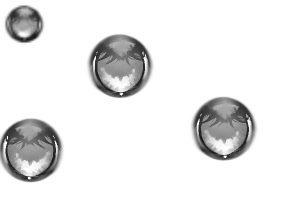
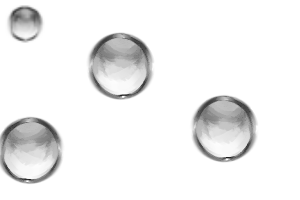
●Eyes
There are two types: Color variable
・ On the image: "Eye_Normal"
・ Bottom image: "Eyes_bright"
The left side of the image shows the dual brushes on, and the right side shows them off. Dual brushes are turned on by default.
Adjust the intensity of the main color color from "brush density" (it is displayed in the tool property). The default is 90% for both.
! Note!
・ If it becomes an oblique face or profile, it will not fit neatly, so please change it with a distortion tool as appropriate. Please erase the parts that protrude from the eyeliner and eyelashes with the eraser tool and let them blend in.
・ Please add pupils and highlights by yourself.
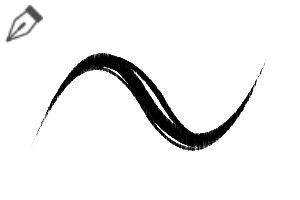
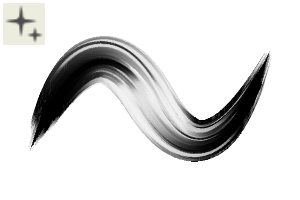
● Hair
For priming and coloring.
I think that the primer can also be used for light painting.
Both are color variable
・ Above image: "Hair undercoat pen"
・Bottom image: "Hair Highlights"
●Outline (auto action)
It is a auto action that creates an analogue-style rough outline.
The outline will be raster layer, so if you want to modify the layer from which the outline is drawn, auto action again.
The color is fixed and black, so if you want to change the color auto action please play with it individually after finishing.
It contains a thickness of 1.5px (fixed) and variable thickness.
The image outlines the white areas, but it outlines the parts of the layer other than the transparent color.
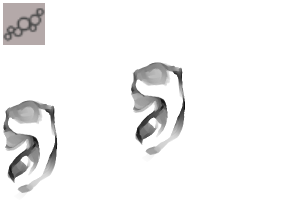
● Ears
It is a stamp on the jumbled part of the inside of the ear.
Color variable
First, draw only the shape of the ear, stamp it, and blend it with the distortion tool.
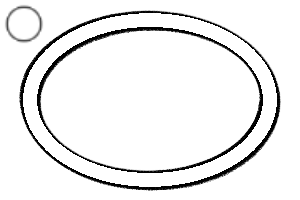
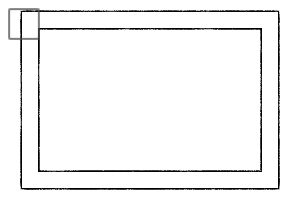
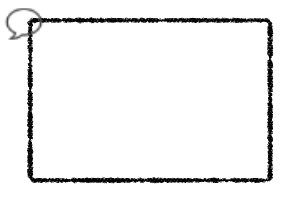
●Frame
It has a round and rectangular frame.
It is also possible to change from tool property to other polygons.
Color variable
・ Image left: "Ellipse frame analog style"
・ Image right: "Rectangular frame analog style"
Filled does not face the image.
If you want to change the thickness of the frame, please change the normal brush size.
If you want to change the line width itself, change the "2-brush size" displayed on the tool property.
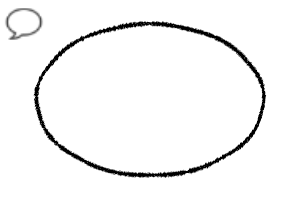
●Balloon
It is an analog style rough kidashi.
Left: Handwritten balloon
Center of image: "Hand-drawn balloon square"
Right: "Analog balloon pen"
The handwritten balloon is not a beautiful oval, but a slightly stuttered balloon.
●Bonus
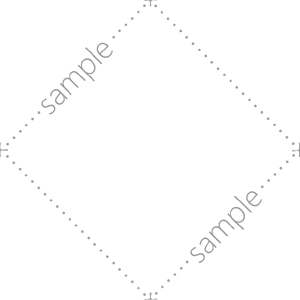
・Sample watermark
・ Gray gradient for manga
It thickens every 10%.
0%◎10%~40%◎50%◎60%~90%◎100% The ◎ part is transparent, so it is difficult to mistake the color to dropper.
- Reference image
This is a sample image using the following materials.
・Ocular → eye_normal
・Hair undercoat pen → hair
・Hair → hair highlights
・Rough outline → hair
・Ears → ears
・ Earrings → elliptical frame analog style
・Balloon→ handwritten balloon
・ Balloon →analog style balloon pen
・ Balloon → handwritten balloon square
※この素材集はグレースケール原稿向けとして作成していますので、モノクロ原稿には向きません。
なお、一部素材は選択中の色を反映できるので、カラー原稿でも使用できるかと思います。
ズボラなのにクオリティを落としたくない人間が作った漫画ツールセットです。
グレースケール原稿で作成していて、絵を凝ってしまうタイプの人向けになると思います。
特に眼や髪は個人の絵柄が濃く反映されている部分になりますので、使えそうなものだけ使用してください。
●眼
2種類あります。色可変
・画像上:「眼_通常」
・画像下:「眼_明るい」
画像左がデュアルブラシがオンの状態、右がオフの状態です。デフォルトではデュアルブラシがオンになっています。
メインカラーの色の濃さは「ブラシ濃度」から調整してください(ツールプロパティに表示状態となっています)。デフォルトはどちらも90%です。
!注意!
・斜め顔や横顔になると綺麗に収まらないので、適宜歪みツールなどで変更してください。アイラインやまつ毛などにはみ出してしまう部分は消しゴムツールで消して馴染ませてください。
・瞳孔やハイライトは自分で描き足してください。
●髪の毛
下塗り用と色塗り用です。
下塗り用はあっさりした塗りの時にも使えると思います。
どちらも色可変
・画像上:「髪下塗りペン」
・画像下:「髪ハイライト」
●アウトライン(オートアクション)
アナログ風のザラザラのアウトラインを作ってくれるオートアクションです。
アウトラインはラスターレイヤー化されるので、アウトラインを引く元のレイヤーを修正する場合は再度オートアクションを行ってください。
色は固定で黒色なので、色を変えたい場合はオートアクション終了後に個別で弄ってください。
太さ1.5px(固定)と太さ可変のものが収録されています。
画像は白部分のアウトラインを作成していますが、レイヤー内の透明色以外の部分にアウトラインを作成します。
●耳
耳の内側のごちゃっとしている部分のスタンプです。
色可変
最初に耳の形だけ描いて、スタンプして歪みツールで馴染ませてください。
●枠
円形と長方形の枠です。
ツールプロパティから他の多角形に変更も可能です。
色可変
・画像左:「楕円枠 アナログ風」
・画像右:「長方形枠 アナログ風」
塗りありは画像の通り向きません。
枠の太さを変更したい場合は通常のブラシサイズ変更を行ってください。
線の太さ自体を変更したい場合は、ツールプロパティに表示状態になっている「2-ブラシサイズ」を変更してください。
●フキダシ
アナログ風のザラザラフキダシです。
画像左:「手書き風フキダシ」
画像中央:「手書き風フキダシ 四角」
画像右:「アナログ風フキダシペン」
手書き風フキダシはキレイな楕円ではなく、少しカクついたフキダシになっています。
●おまけ
・サンプル透かし
・漫画用グレーグラデーション
10%毎で濃くなっています。
0%◎10%~40%◎50%◎60%~90%◎100% という風に、◎の部分が透明になっているのでスポイトする色を間違えにくいです。
●参考画像
下記素材を使用してみたサンプル画像です。
・眼→眼_通常
・髪→髪下塗りペン
・髪→髪ハイライト
・髪→ざらざらアウトライン
・耳→耳
・イヤリング→楕円枠アナログ風
・フキダシ→手書き風フキダシ
・フキダシ→アナログ風フキダシペン
・フキダシ→手書き風フキダシ四角












 MVP ◆This user has contributed greatly to the management of the community, by posting many great responses to the questions asked. Once every three months, MVPs are determined based on the points earned during that period and will be recognized accordingly.
 New Valuable Player (NVP) ◆These are the next-best contributors to the community after MVPs. This is awarded to users who have not yet won an MVP award, based on the number of points they have earned.
 Official Expert ◆Chosen out of all MVP awardees, who are already proof of excellence, this is a testimony of outstanding correspondence in the community. After careful screening, they are appointed by CELSYS and assume their position.Note: Formally called “Evangelists”
 Official Moderator of CELSYS ◆Moderators are official CELSYS staff members who are fluent in Japanese as well as various other languages. Moderators are not experts on the software or illustration, so they are not able to directly answer your questions. However, moderators provide communication and language support to ensure that everyone can smoothly communicate with each other.
 CELSYS official accountThe Official Administrator Account