



Uh, first of all, sorry, but the best demo image might be left behind
I've been quite busy lately, but I also want to release this brush first
In fact, this brush is more suitable for regular thick application, celluloid, and refinement
He can perceive the current color and draw the real colors without needing to switch colors midway,
It can also serve as a perfect blending brush for smearing

Its color is related to pressure sensitivity. When you stabilize within a certain intensity range, it can easily draw color blocks with clear edges and keep it within the color range. When you draw hard, it gradually changes to the tip color you currently select.
For reference, you can open [Panel - Color Mixing]
Their feel is extremely similar and also very light,
Long hours of work don't cause fatigue, and the features can significantly improve efficiency
As easy as cutting butter with a hot knife
- Feel free to add textures, pen tip shapes, and other materials to freely change
Because its initial setup is very basic, but it has great potential for growth,
You can add other nib shapes according to your current image needs,
For example, square shapes or any shape you like
It has no initial texture or nib shape, which you can freely add or use directly
By the way, some people have reported that his color mixing might look different
You can refer to my software's global pressure sensing: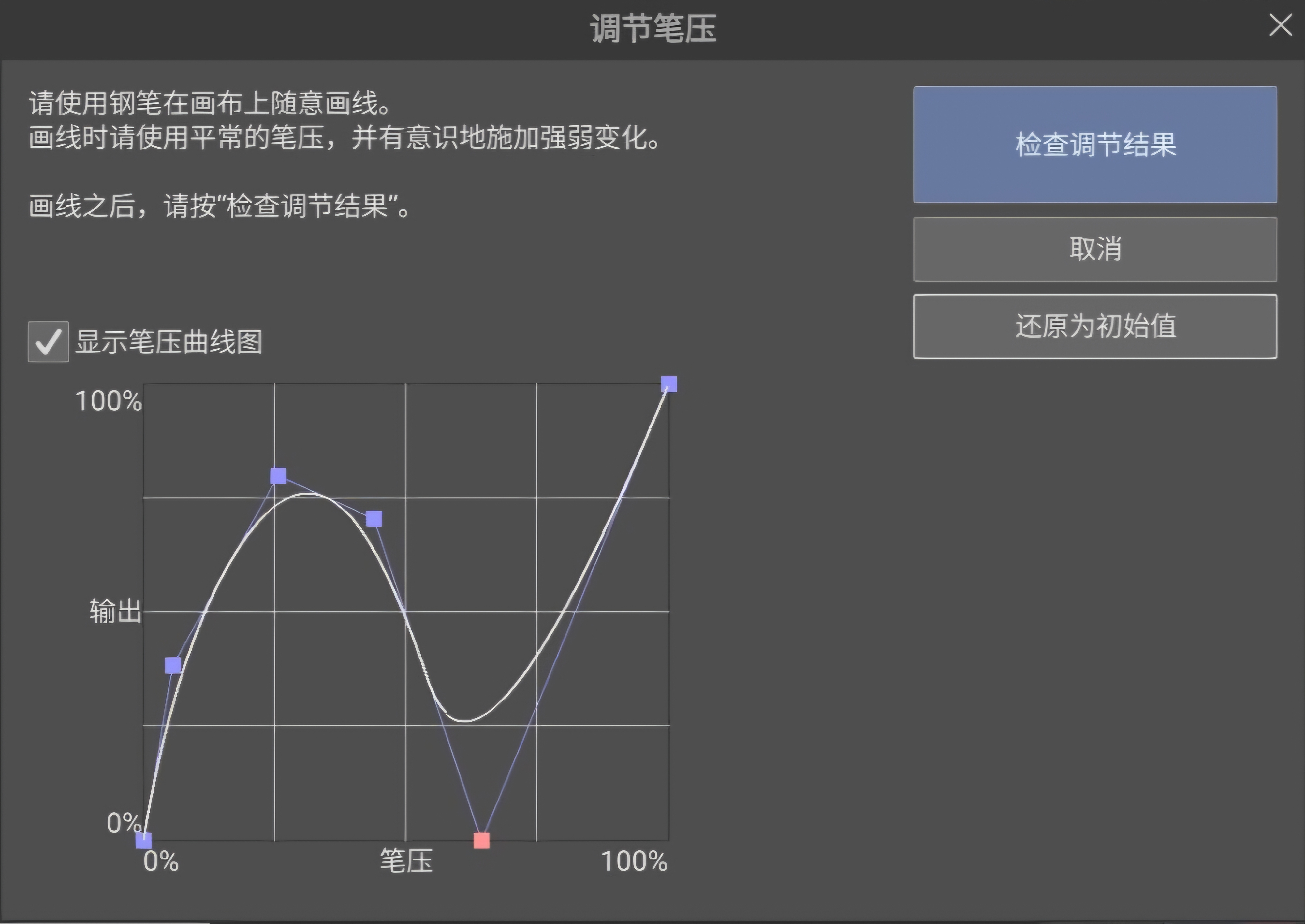

*If you want to change the color blend, please set the [Pigment Amount] option to visible in the [Ink] settings, then you can freely adjust it
呃首先很抱歉,最佳的示范图片可能要先欠着了
因为我最近比较忙,但是又比较想把这个笔刷先发出来
实际上这个笔刷比较适合常规厚涂、赛璐璐和细化
他能感知当前颜色并画出实色的颜料,中途不需要切换颜色,
并且可以充当一个非常完美的涂抹混色笔刷来使用
它的颜色和压感有关,当你稳定在一个力度范围之内,让它可以轻松地画出边缘清晰的色块,并让他保持在一个色彩范围之内,当你用力画的时候,他会逐渐变成为你当前所选的笔尖颜色。
作为使用参考,你可以打开【面板-混色】
他们的手感极为相似,并且手感也非常轻,
长时间工作不会感到疲惫,特性也可以提高相当的效率
就像热刀切黄油一样轻松
- 请自由添加纹理、笔尖形状等素材自由改变
因为它的初始设置非常基础,但是他很有发展潜力,
你可以根据自己当前画面的需求,自己添加其他形状的笔尖,
比如方形或者各种你喜欢的形状等
他没有初始纹理和笔尖形状,你可以自由添加,也可以直接使用
顺便有人反映他的混色可能会显得不一样
可以参考我的软件全局压感:
*如果你想改变它的混色程度,请在【墨水】设置里面把它的【颜料量】选项调整为可见,然后就可以自由调整





Other materials by ȻATƵ/凯茨


Popular “Brush” materials


New materials


Badges
-
 MVP ◆This user has contributed greatly to the management of the community, by posting many great responses to the questions asked. Once every three months, MVPs are determined based on the points earned during that period and will be recognized accordingly.
 -
 New Valuable Player (NVP) ◆These are the next-best contributors to the community after MVPs. This is awarded to users who have not yet won an MVP award, based on the number of points they have earned.
 -
 Official Expert ◆Chosen out of all MVP awardees, who are already proof of excellence, this is a testimony of outstanding correspondence in the community. After careful screening, they are appointed by CELSYS and assume their position.Note: Formally called “Evangelists”
 -
 Official Moderator of CELSYS ◆Moderators are official CELSYS staff members who are fluent in Japanese as well as various other languages. Moderators are not experts on the software or illustration, so they are not able to directly answer your questions. However, moderators provide communication and language support to ensure that everyone can smoothly communicate with each other.
 -
 CELSYS official accountThe Official Administrator Account