



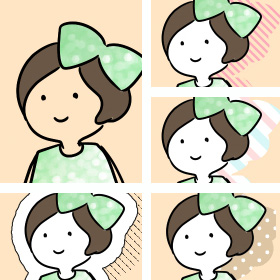
The standing picture that I drew hard,
Since it's a big deal, I want to kill time by decorating various things.
It's a good place to hit at such a time!
A auto action set that allows you to create [cute shadows] with one click.
It is also sold at BOOTH (*^^*)
BOOTH ⇒ https://bit.ly/4vl6cWp
せっかく描いた立ち絵、
せっかくなので、色々飾り立てて暇つぶしをしたい。
そんな時に打ってつけ!
ワンクリックで【かわいい影】が作れるオートアクションセット。
BOOTHでも販売しております(*^^*)
BOOTH ⇒ https://bit.ly/4vl6cWp


01 Shadow fill - White
02 Shadow fill + Thin Frame
03 Shadow fill - Multiplication
04 Edge + Drop Shadow
05 Drop Shadow
06 Chromatic Aberration Kazekage
07 Gradeshadow
------- Dot & Border -------
08 Shadow White Dot
09 White fill shadow + color dot
10 Transparent dots
11 Shadow fill Border
12 Shadow fill Border [Thick]
13 Transparent border [fine]
14 Transparent border [thin]
15 Transparent Border [Thick]
-------Pattern-------
16 Pattern Shadow - Diamond
17 Pattern Shadow - Gradediamond
18 Patterned Shadows - Stars
19 Pattern Shadows - Retro Polka Dot
20 Pattern Shadows - Retro Polka Dot [Large]
21 Pattern Shadow - Double Border
22 Pattern Shadows - Trico
------- Edge & Shadow -------
23 Border Shadow
24 Border Shadow Denim
-------Halftone-------
25 Fuchidot Grade [Dot Medium]
26 Fuchidot Grade [Dot Large]
27 Fuchidot White Shadow
-------Emblem-------
28 Stitch patches
└ Stitch line narrowed
29 Stitch Patch Shadow Border
30 Bumpy Edge + Shadow A
31 Uneven Edge + Shadow B
32 Mokomoko edge + faint shadow


You can make the "stitch line" layer thinner.

I hope you enjoy it even a little ٩ ( ᐛ ) و


01 影ベタ塗り - 白
02 影ベタ塗り+細枠
03 影ベタ塗り - 乗算
04 フチ+ドロップシャドウ
05 ドロップシャドウ
06 色収差風影
07 グラデシャドウ
------- ドット&ボーダー -------
08 影 白ドット
09 影ベタ塗り白+カラードット
10 透過ドット
11 影ベタ塗りボーダー
12 影ベタ塗りボーダー[太]
13 透過ボーダー[細細]
14 透過ボーダー[細]
15 透過ボーダー[太]
------- 模様 -------
16 模様影 - ダイヤ
17 模様影 - グラデダイヤ
18 模様影 - 星
19 模様影 - レトロ水玉
20 模様影 - レトロ水玉 [大]
21 模様影 - 二重ボーダー
22 模様影 - トリコ
------- フチ&影 -------
23 フチ影
24 フチ影デニム
------- ハーフトーン -------
25 フチドットグラデ [ドット中]
26 フチドットグラデ [ドット大]
27 フチドット白影
------- ワッペン -------
28 ステッチワッペン
└ステッチライン細く
29 ステッチワッペン影ボーダー
30 ぼこぼこフチ+影A
31 ぼこぼこフチ+影B
32 もこもこフチ+かすれ影
「ステッチライン」レイヤーを細くすることができます。
少しでも楽しんでもらえれば幸いです٩( ᐛ )و
auto action オートアクション

Old version


Other materials by おくとば


Popular “Material catalog” materials


New materials


-
 MVP ◆This user has contributed greatly to the management of the community, by posting many great responses to the questions asked. Once every three months, MVPs are determined based on the points earned during that period and will be recognized accordingly.
 -
 New Valuable Player (NVP) ◆These are the next-best contributors to the community after MVPs. This is awarded to users who have not yet won an MVP award, based on the number of points they have earned.
 -
 Official Expert ◆Chosen out of all MVP awardees, who are already proof of excellence, this is a testimony of outstanding correspondence in the community. After careful screening, they are appointed by CELSYS and assume their position.Note: Formally called “Evangelists”
 -
 Official Moderator of CELSYS ◆Moderators are official CELSYS staff members who are fluent in Japanese as well as various other languages. Moderators are not experts on the software or illustration, so they are not able to directly answer your questions. However, moderators provide communication and language support to ensure that everyone can smoothly communicate with each other.
 -
 CELSYS official accountThe Official Administrator Account