



Thank you for browsing
Thank you for reading.
I hope it will be useful for your work.
I would be happy if you could use my asset.
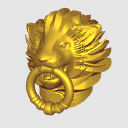
This is a 3D model of "Lion's Door Knocker".
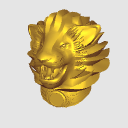
・3 types of lion head shapes
・13 types of textures
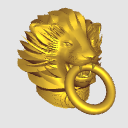
・4 types of rings
It's easy to choose.
Immediately after placement:


> the rear of the lion head is made rough on the premise that it will be hidden when placed on the door.
If you do not need it, rasterize it and erase it with an "eraser" etc.
Example of use: We use a door (1686213, Clip Studio Official). Here, the door knocker is slightly reduced after placement.

Lion shape, texture, and ring combination: example

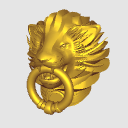
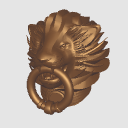
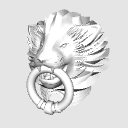
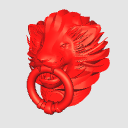
Textures (materials): 13 types of textures

Layout: Combination of "3 types of lion head shapes" and "4 types of rings"
No > ring

Movable: Ring rotation
It can be rotated with the movable slider for each type of > ring.

If you select only the > ring, you can drag the handler to rotate it.

No ring: 3 types of lion head only

Lion head only thickness change:
(1) Open the object list and click Eyes_LR to select it.
(2) Similarly, [Ctrl] + click to Lion_xx (xx is a number) select additionally
(3) Similarly, [Ctrl] + click to select additionally Teeth.
(4) Change the thickness of the lion's head only
(5) In the object list, select only the Ring_xx (where xx is a number), move and adjust the position.


Other: Use as a "per" or "sketch"
Make it only the head in the layout, adjust the direction of the light source to change the shadow,
It can also be used as a rough sketch or as a rough sketch.

Other: Use as an object
Adjust the direction of the light source without a ring, with variations of various shades,
It can also be expressed as an object.

Thank you very much
Thank you for always reading my posts.
If you use it, I will be glad
I would be happy if you could use my asset.
閲覧いただきありがとうございます
Thank you for reading.
作品作りにお役に立てれば嬉しく思います
I would be happy if you could use my asset.
「ライオンのドアノッカー」の3Dモデルです。
・3種類のライオンヘッド形状
・13種類の質感
・4種類のリング
を簡単に選べます。
配置直後:
>ライオンヘッドの後方は、ドア上に配置時に隠れる前提でラフに作ってます。
不要ならラスタライズし「消しゴム」等で消去ください。
使用例:ドア(1686213、ClipStudioOfficial)を使用させていただいてます。ここでは、ドアノッカーは配置後に少し縮小してます。
ライオン形状&質感&リングの組合せ:例
質感(マテリアル):13種類の質感
レイアウト:「3種類のライオンヘッド形状」と「4種類のリング」の組合せ
>リング無しも可
可動:リングの回転
>リングの種類毎の可動スライダで回転できます。
>リングのみ選択すれば、ハンドラをドラッグし回転できます。
リング無し:ライオンのヘッドのみ3種類
ライオンヘッドのみ厚み変更:
① オブジェクトリストを開き、Eyes_LRをクリック選択
②同じく、[Ctrl]+クリックで、Lion_xx(xxは数字)を追加選択
③同じく、[Ctrl]+クリックで、Teethを追加選択
④ライオンのヘッドのみ厚さを変更する
⑤オブジェクトリストで、Ring_xx(xxは数字)のみ選択し、移動し位置調整する
その他:「あたり」「下絵」としての利用
レイアウトでヘッドのみにし、光源方向を調整して陰影を変え、
あたりや下絵としても使えるでしょう。
その他:オブジェとしての利用
リング無しで光源方向を調整し、様々な陰影のヴァリエーションで、
オブジェとして表現することもできるでしょう。
いつもありがとうございます
Thank you for always reading my posts.
お使いいただければ、うれしく思います
I would be happy if you could use my asset.
Material マテリアル
-
Gold Gold
-
Bronze Bronze
-
Brown1 Brown1
-
Brown2 Brown2
-
White White
-
Black Black
-
Silver Silver
-
MetalPink MetalPink
-
MetalGreen MetalGreen
-
MetalBlue MetalBlue
-
Red Red
-
Green Green
-
Blue Blue






configuration 配置
-
Lion00Ring00 Lion00Ring00
-
Lion01Ring00 Lion01Ring00
-
Lion02Ring00 Lion02Ring00
-
Lion00Ring01 Lion00Ring01
-
Lion01Ring01 Lion01Ring01
-
Lion02Ring01 Lion02Ring01
-
Lion00Ring02 Lion00Ring02
-
Lion01Ring02 Lion01Ring02
-
Lion02Ring02 Lion02Ring02
-
Lion00Ring03 Lion00Ring03
-
Lion01Ring03 Lion01Ring03
-
Lion02Ring03 Lion02Ring03
-
Lion00NoRing Lion00NoRing
-
Lion01NoRing Lion01NoRing
-
Lion02NoRing Lion02NoRing







Angle アングル
-
FrontLeft FrontLeft
-
FrontRight FrontRight
-
Front Front
-
FrontUp FrontUp
-
FrontDown FrontDown
-
SideLeft SideLeft
-
SideRight SideRight
-
FrontLeftDown FrontLeftDown
-
FrontRightDown FrontRightDown




pose parts 可動パーツ
-
Ring00_Rotation Ring00_Rotation
-
Ring01_Rotation Ring01_Rotation
-
Ring02_Rotation Ring02_Rotation
-
Ring03_Rotation Ring03_Rotation



Other materials by アルフェッカ


Popular “3D object” materials


New materials


Badges
-
 MVP ◆This user has contributed greatly to the management of the community, by posting many great responses to the questions asked. Once every three months, MVPs are determined based on the points earned during that period and will be recognized accordingly.
 -
 New Valuable Player (NVP) ◆These are the next-best contributors to the community after MVPs. This is awarded to users who have not yet won an MVP award, based on the number of points they have earned.
 -
 Official Expert ◆Chosen out of all MVP awardees, who are already proof of excellence, this is a testimony of outstanding correspondence in the community. After careful screening, they are appointed by CELSYS and assume their position.Note: Formally called “Evangelists”
 -
 Official Moderator of CELSYS ◆Moderators are official CELSYS staff members who are fluent in Japanese as well as various other languages. Moderators are not experts on the software or illustration, so they are not able to directly answer your questions. However, moderators provide communication and language support to ensure that everyone can smoothly communicate with each other.
 -
 CELSYS official accountThe Official Administrator Account