



This is a lightning and lightning brush set. 雷・稲妻ブラシセットです。
This is a set of simple brushes for drawing lightning and lightning effects.
You can set the color of the main unit and the surrounding emission color individually, so you can draw lightning and lightning of your favorite color.
The main color of the foreground color is the emission color, and the sub color is the body color.
If you draw with sub color, you will get one color.
Depending on the color combination, you can also make it feel like a beam attack, so please try various things.

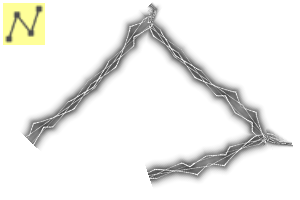
The image above is drawn on a normal layer using lightning brush 1.
The background is fill in black for easy viewing.

In this image, I layered three addition (luminous) layers drawn with different brush size.
Lightning Brush 2 is a brush for accents.
The light is thinner than Lightning Brush 1.


This is an image of one more addition (luminescence) layer drawn with Lightning Brush 2 on top of the second image.
I feel that it is a little overkill, so please do as many sheets as you like.
It was troublesome to use the ruler tool, so I also made a line version, but if you don't bend it at a loose angle, the lightning will fly out slightly in the bent part.


If you are interested, you need to correct the part that jumped out manually.
Thank you for watching.
雷・稲妻エフェクトを描く用のシンプルなブラシのセットです。
本体の色と周りの発光色を個別に設定できますので、好きな色の雷・稲妻が描けます。
描画色のメインカラーが発光色、サブカラーが本体色になります。
サブカラーで描くと1色になります。
色の組み合わせによってはビーム攻撃ぽい感じにもできるので、色々試してみてください。
上の画像は雷ブラシ1を使って通常レイヤーに描いています。
見やすいように背景は黒で塗りつぶしています。
こちらの画像はブラシサイズを変えて描いた加算(発光)レイヤーを3枚重ねてみました。
雷ブラシ2はアクセント用のブラシです。
雷ブラシ1より細い光になっています。
2枚目の画像に雷ブラシ2で描いた加算(発光)レイヤーをさらに1枚重ねた画像です。
ちょっとやり過ぎた感があるので、重ねる枚数はお好みでどうぞ。
定規ツールを使うのがめんどくさくて、折れ線バージョンも作ったのですが、緩い角度で曲げないと曲げた部分で雷が若干飛び出してしまいます。
気になる方は、手作業で飛び出した部分の修正が必要です。
ご覧いただきありがとうございました。
Lightning Brush Set 雷ブラシセット





Other materials by 桜塚shinobu


Popular “Material catalog” materials


New materials





Badges
-
 MVP ◆This user has contributed greatly to the management of the community, by posting many great responses to the questions asked. Once every three months, MVPs are determined based on the points earned during that period and will be recognized accordingly.
 -
 New Valuable Player (NVP) ◆These are the next-best contributors to the community after MVPs. This is awarded to users who have not yet won an MVP award, based on the number of points they have earned.
 -
 Official Expert ◆Chosen out of all MVP awardees, who are already proof of excellence, this is a testimony of outstanding correspondence in the community. After careful screening, they are appointed by CELSYS and assume their position.Note: Formally called “Evangelists”
 -
 Official Moderator of CELSYS ◆Moderators are official CELSYS staff members who are fluent in Japanese as well as various other languages. Moderators are not experts on the software or illustration, so they are not able to directly answer your questions. However, moderators provide communication and language support to ensure that everyone can smoothly communicate with each other.
 -
 CELSYS official accountThe Official Administrator Account