



It is a set of the brush to burn the light effect. 光効果を焼き込んでいくブラシのセットです。
Thank you for browsing.


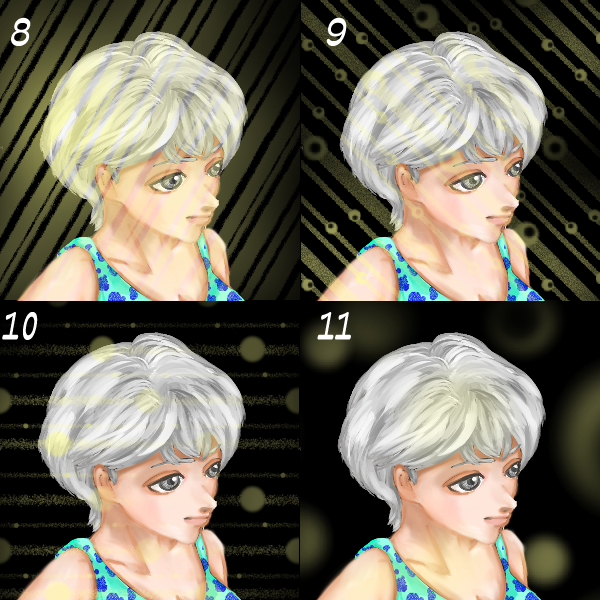


It is a set of brushes to put the light effect "easily". 15-point set.
If you choose brush size, you can use the default settings in the following example size
It is the type which paints the effect of light.


No Nos ~ No. 7 is white, 8 to 15 is yellow and light is in the normal mode.

This is replica ~ screen 100%

dodge emission

Soft light (duplicate layer color change)

Additive emission (color change of duplicated layer)

If you do not replicate, it is like this.
Features-
-The type to be applied seamlessly in the "paper setting" of the main color.
-Even if you put the ponpon in part, it becomes feeling that there is a connection.
Change of the size and the angle can be done from "paper setting".
-You can put multiple colors on one layer or overlay them to make your favorite color taste.
The image of Samune is ellipse deformed on the character.
It is easy to use it to erase partially or to put only a part.
Light-emitting layer, blur and compatibility are good.
I hope you enjoy your errand.
閲覧ありがとうございます。
光効果を「簡単に」入れるブラシのセットです。15点セットです。
ブラシサイズをどう選択してもデフォルトの設定で以下の使用例のサイズで
光エフェクトを塗り込んでいくタイプです。
無番~7番は白、8~15番は黄色で光を「通常モード」で入れた状態です。
こちらは複製~スクリーン100%
覆い焼き発光
ソフトライト(複製レイヤー色変更)
加算発光(複製レイヤー色変更)
複製しない場合、こんな感じです。
~特徴~
・メインカラー反映の、「用紙設定」でシームレスに塗り込むタイプです。
・部分的にぽんぽんと置いても、繋がりがある感じになります。
・サイズ変更、角度の変更は「用紙設定」から行えます。
・1レイヤーに複数の色を乗せたり重ねたりして、お好みの色味を出せます。
サムネの画像は、キャラクターの上を楕円選択し変形したものです。
部分的に消したり、一部だけ乗せたり、簡単に使えます。
発光レイヤー、ぼかしと相性が良いです。
楽しんでお使い頂ければ幸いです。
Category 1 カテゴリ1
-
Hikari full ヒカリフル
-
Hikari full 2 ヒカリフル 2
-
Hikari full 3 ヒカリフル 3
-
Hikari full 4 ヒカリフル 4
-
Hikari full 5 ヒカリフル 5
-
Hikari full 6 ヒカリフル 6
-
Hikari full 7 ヒカリフル 7
-
Hikari full 8 ヒカリフル 8
-
Hikari full 9 ヒカリフル 9
-
Hikari full 10 ヒカリフル 10
-
Hikari full 11 ヒカリフル 11
-
Hikari full 12 ヒカリフル 12
-
Hikari full 13 ヒカリフル 13
-
Hikari full 14 ヒカリフル 14
-
Hikari full Fifteen ヒカリフル 15


Other materials by EZO-SHIKA


Popular “Material catalog” materials


New materials





Badges
-
 MVP ◆This user has contributed greatly to the management of the community, by posting many great responses to the questions asked. Once every three months, MVPs are determined based on the points earned during that period and will be recognized accordingly.
 -
 New Valuable Player (NVP) ◆These are the next-best contributors to the community after MVPs. This is awarded to users who have not yet won an MVP award, based on the number of points they have earned.
 -
 Official Expert ◆Chosen out of all MVP awardees, who are already proof of excellence, this is a testimony of outstanding correspondence in the community. After careful screening, they are appointed by CELSYS and assume their position.Note: Formally called “Evangelists”
 -
 Official Moderator of CELSYS ◆Moderators are official CELSYS staff members who are fluent in Japanese as well as various other languages. Moderators are not experts on the software or illustration, so they are not able to directly answer your questions. However, moderators provide communication and language support to ensure that everyone can smoothly communicate with each other.
 -
 CELSYS official accountThe Official Administrator Account