


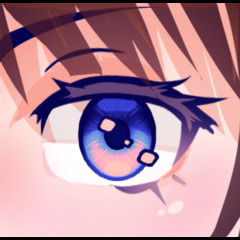
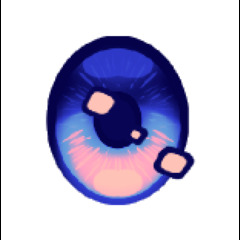
Draw perfect anime eyes in seconds with this brush set!
【 How to use 】
(1) - Pick a main color and a secondary color.
⤷ I recommend making the main color less saturated but darker than the secondary color.
(2) - Choose the brush size and thickness you want.
⤷ If the character's head is turned, the outer eye may be thinner and slightly smaller.
⤷ You can make the eyes wider and bigger to make the character look more childlike.
(3) - Draw the eyes where you want them to be.
⤷ If the shape doesn't look the way you want, you can easily transform or liquify it to the shape you want.
(4) - Use the eye highlights brush to make the eyes look shiny.
⤷ You can customize the shape and location of the highlights to however you like since it's separate from the eye brush.
These are all the steps you need to do, but if you want more customization, consider the additional steps below:
(5) - Use a gradient map.
⤷ For the best results (most amount of colors in gradient map present), use black as a main color and white as a secondary color when drawing the eye.
⤷ You can use the gradient maps already included in CSP, experiment with your own, or use ones downloaded from assets.
[!] If you end up using a gradient map, I recommend adding highlights afterwards. This allows you to have more control over the color of the highlights and outline, since sometimes you may want them to be different from the eye color.
(6) - Airbrush over the eye in a new layer and use blending modes.
⤷ Glow can be used to make the eyes look like they are glowing.
⤷ Multiply can be used to shade the eyes.
⤷ Overlay can be used to make the eye look even more vibrant.

Here's another example on the same Sunrise (purple) gradient map, but with the original main and secondary colors being black and white respectively instead of navy and cyan like in the second example above. As you can see, the colors look much more vibrant.

Here are the examples from the thumbnail. Each eye's main color and secondary colors are black and white, with different Somber Shade gradient maps (included in CSP). The mid tone color is airbrushed over the the eyes in a layer above and set to overlay.

Easy Anime Eyes


Popular “Material catalog” materials


New materials


Badges
-
 MVP ◆This user has contributed greatly to the management of the community, by posting many great responses to the questions asked. Once every three months, MVPs are determined based on the points earned during that period and will be recognized accordingly.
 -
 New Valuable Player (NVP) ◆These are the next-best contributors to the community after MVPs. This is awarded to users who have not yet won an MVP award, based on the number of points they have earned.
 -
 Official Expert ◆Chosen out of all MVP awardees, who are already proof of excellence, this is a testimony of outstanding correspondence in the community. After careful screening, they are appointed by CELSYS and assume their position.Note: Formally called “Evangelists”
 -
 Official Moderator of CELSYS ◆Moderators are official CELSYS staff members who are fluent in Japanese as well as various other languages. Moderators are not experts on the software or illustration, so they are not able to directly answer your questions. However, moderators provide communication and language support to ensure that everyone can smoothly communicate with each other.
 -
 CELSYS official accountThe Official Administrator Account
