


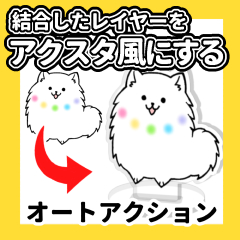


This is a auto action that processes transparent images in Akusta style.
Please use it for sample images to be arranged in the item.
透過画像をアクスタ風に加工するオートアクションです。
お品書きで並べるサンプル画像などにご活用ください。
Since it is for the actual size of Akusta (width 40mm ~ 70mm), it is not suitable for images that are too small or too large.
 (2) Drag and drop the template to place the original image on the specified layer (★ location), and adjust the size according to the stand part (white square). The image placement layer will be automatically deleted, so please leave it as it is.
  (3) Click the auto action of the desired width.


アクスタの実寸(幅40mm~70mm)向けなので、小さすぎるor大きすぎる画像には向きません。
②テンプレートをドラッグ&ドロップして元の画像を指定のレイヤー(★の場所)に配置し、スタンド部分(白い四角)に合わせて大きさを調整します。画像配置用レイヤー自動で削除されるのでそのままにしてください。③希望の幅のオートアクションをクリックします。 Update history
Old version




Other materials by おりしま美城


Popular “Material catalog” materials


New materials


-
 MVP ◆This user has contributed greatly to the management of the community, by posting many great responses to the questions asked. Once every three months, MVPs are determined based on the points earned during that period and will be recognized accordingly.
 -
 New Valuable Player (NVP) ◆These are the next-best contributors to the community after MVPs. This is awarded to users who have not yet won an MVP award, based on the number of points they have earned.
 -
 Official Expert ◆Chosen out of all MVP awardees, who are already proof of excellence, this is a testimony of outstanding correspondence in the community. After careful screening, they are appointed by CELSYS and assume their position.Note: Formally called “Evangelists”
 -
 Official Moderator of CELSYS ◆Moderators are official CELSYS staff members who are fluent in Japanese as well as various other languages. Moderators are not experts on the software or illustration, so they are not able to directly answer your questions. However, moderators provide communication and language support to ensure that everyone can smoothly communicate with each other.
 -
 CELSYS official accountThe Official Administrator Account