


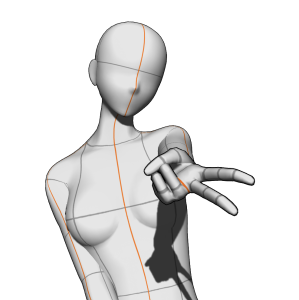
3 poses total!

This is a 3D image material: after importing it, the material will load with the same camera angle as the image above. However, you can still completely change the camera view, tweak the pose, and replace the 3D model with your preferred one!
Instructions

How to import
Step 1: Please open the material palette window and locate the desired material.
Step 2: Select the material.
Step 3: Tap this button to paste it on the canvas! You can also drag and drop the material onto the canvas, but the model will be positioned differently based on where you drop it.
A/N: To avoid clashing with the different camera angles, it’s best to import each pose onto a separate layer. If you import them all on a single layer, the poses will have different angles from those shown in the thumbnail.
Recommended canvas size
4000x4000 px or larger (best if the canvas is square)! Nevertheless, there are no problems if the canvas is horizontal or vertical.
Tutorial for a smaller canvas


About the GAL pose


How to import
Step 1: Please open the advanced tool settings and click on the “Camera” option.
Step 2: Toggle off the lock icon on the current camera.
Step 3: Click on this button to switch to parallel projection* and you’re done!
*with parallel projection, the hand will not appear in perspective (it will appear smaller), but you’ll be able to move the model without the angle changing.
Bust Up Poses







Other materials by mengli


Popular “Material catalog” materials


New materials




Badges
-
 MVP ◆This user has contributed greatly to the management of the community, by posting many great responses to the questions asked. Once every three months, MVPs are determined based on the points earned during that period and will be recognized accordingly.
 -
 New Valuable Player (NVP) ◆These are the next-best contributors to the community after MVPs. This is awarded to users who have not yet won an MVP award, based on the number of points they have earned.
 -
 Official Expert ◆Chosen out of all MVP awardees, who are already proof of excellence, this is a testimony of outstanding correspondence in the community. After careful screening, they are appointed by CELSYS and assume their position.Note: Formally called “Evangelists”
 -
 Official Moderator of CELSYS ◆Moderators are official CELSYS staff members who are fluent in Japanese as well as various other languages. Moderators are not experts on the software or illustration, so they are not able to directly answer your questions. However, moderators provide communication and language support to ensure that everyone can smoothly communicate with each other.
 -
 CELSYS official accountThe Official Administrator Account
