



* It will be charged after a while.
It's just a slightly gritty blur tool.
9/13 : 1 added (added at the bottom of the page)
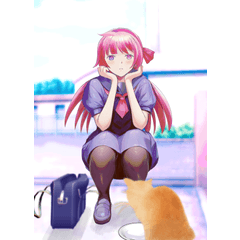
↓ * Image conversion of official 3D model that can be used as a sample
Normal blur on the left, Rough blur on the right (50% display)

If you do it once, it will not mix completely, so please layer it more than once.
If you change the size of the paper quality, the grain will increase.
↓ Canvas 50% display

↓ The lower half is stacked twice or more

↓ It's hard to understand, but the bokeh foot becomes a little grainy.

As a bonus, there is also a blur tool that is a little more fuzzy.

Rough blur brush
It is a little more brush-like than the rough blur, and the "color extension" is set and stretches a little.

Recommended for painting wrinkles on clothes.

※暫くしたら有料化します
ほんの少しザラついたぼかしツールです。
9/13 : 1本追加(ページ下部に追記)
↓※サンプル使用可の公式3Dモデルを画像変換したもの
左が通常のぼかし、右がザラぼかし(50%表示)
1回だと混ざりきらないので2回以上重ねてください。
紙質のサイズを変更すると粒が大きくなります。
↓キャンバス50%表示
↓下半分が2回以上重ねたもの
↓分かりにくいですが、ボケ足がほんの少し粒っぽくなります。
おまけで更にもう少しモヤっとしたぼかしツールもあります。
ザラぼかし筆
ザラぼかしより少し筆っぽいもので、「色延び」が設定されていて少し伸びます。
服のシワを塗るのにおすすめ。
Category 1 カテゴリ1







Other materials by horitora


Popular “Material catalog” materials


New materials










Badges
-
 MVP ◆This user has contributed greatly to the management of the community, by posting many great responses to the questions asked. Once every three months, MVPs are determined based on the points earned during that period and will be recognized accordingly.
 -
 New Valuable Player (NVP) ◆These are the next-best contributors to the community after MVPs. This is awarded to users who have not yet won an MVP award, based on the number of points they have earned.
 -
 Official Expert ◆Chosen out of all MVP awardees, who are already proof of excellence, this is a testimony of outstanding correspondence in the community. After careful screening, they are appointed by CELSYS and assume their position.Note: Formally called “Evangelists”
 -
 Official Moderator of CELSYS ◆Moderators are official CELSYS staff members who are fluent in Japanese as well as various other languages. Moderators are not experts on the software or illustration, so they are not able to directly answer your questions. However, moderators provide communication and language support to ensure that everyone can smoothly communicate with each other.
 -
 CELSYS official accountThe Official Administrator Account