



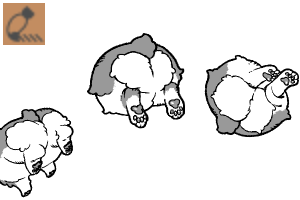
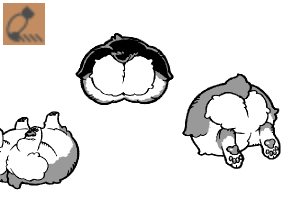
This is a stamp brush for Corgi's buttocks only.
I drew only the buttocks of a corgi, so I made it incidentally. If you need a Corgi's buttocks.
It supports color because it is created in gray.
It is also recommended to color gray from above with a color layer or change the color with gradient map.

The default setting is
"Orientation random"→ Corgi's buttocks are randomly rolled
"Vertical fixation" → the direction of the Corgi's buttocks is fixed up and down (top and bottom)
"Nagao" → The direction of the Nagao Corgi's buttocks is fixed up and down (top and bottom)
(Because there is a tail ↑ If it is the same brush size as the two, the buttocks will look small, so it will be nice to draw with a brush size that is one size larger)
* Please adjust the direction randomly by rolling or fixing the top and bottom, and whether to space or narrow the spacing between the cogi by tool property.
(As soon as you open the tool property, the orientation, left and right flip vertical, and spacing should be displayed.) )
コーギーのおしり“だけ”のスタンプブラシです。
コーギーのおしりだけ描いたのでついでに作りました。コーギーのおしりがご入用の方に。
グレースケールで作成しているためカラーに対応しています。
グレーにカラーレイヤーで上から色を付けたり、グラデーションマップで色を変更するのもおすすめです。
初期設定としては
“向きランダム”→コーギーのおしりの向きがランダムでころころしています
“上下固定” →コーギーのおしりの向きが上下(天地)で固定されています
“長尾” →長尾のコーギーのおしりの向きが上下(天地)で固定されています
(尻尾がある関係で↑二つと同じブラシサイズだとおしりが小さく見えるので一回り大きいブラシサイズで描画するといい感じになります)
※向きをランダムにしてころころさせるか天地を固定させるか、またコギけつの間隔を空けるか狭めるかはツールプロパティで各自ご調整ください。
(ツールプロパティを開いてすぐ、向き・左右上下反転・間隔は表示するようにしているはずです。)
Category 1 カテゴリ1







Popular “Material catalog” materials


New materials


Badges
-
 MVP ◆This user has contributed greatly to the management of the community, by posting many great responses to the questions asked. Once every three months, MVPs are determined based on the points earned during that period and will be recognized accordingly.
 -
 New Valuable Player (NVP) ◆These are the next-best contributors to the community after MVPs. This is awarded to users who have not yet won an MVP award, based on the number of points they have earned.
 -
 Official Expert ◆Chosen out of all MVP awardees, who are already proof of excellence, this is a testimony of outstanding correspondence in the community. After careful screening, they are appointed by CELSYS and assume their position.Note: Formally called “Evangelists”
 -
 Official Moderator of CELSYS ◆Moderators are official CELSYS staff members who are fluent in Japanese as well as various other languages. Moderators are not experts on the software or illustration, so they are not able to directly answer your questions. However, moderators provide communication and language support to ensure that everyone can smoothly communicate with each other.
 -
 CELSYS official accountThe Official Administrator Account