


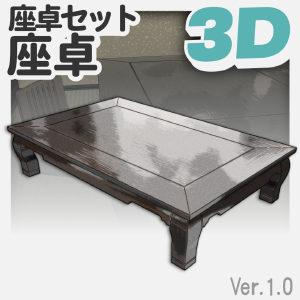
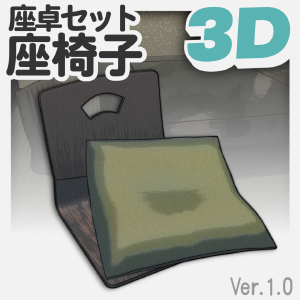
It is a 3D material with table and chair textures and shape keys.
Complex Japanese-style tables can also be drawn from various angles.
All the illustrations used in the explanatory images actually use the LT conversion function of the CLIP STUDIO. I hope you find it helpful!
– – – – – – – – – – – – – – – – – – – – – – – – – – – – – – – – – – – – – – – – – – – – – – – – – – – – – – – – – – – – – –
【About size and contents】
Size
・Table................. Approx. 120~200cm×Approx. 60~150cm×Approx. 36cm
・Chair ............ Approx. 50cm×Approx. 45cm×Approx. 37cm
The length and depth of the table can be changed with the shape keys. Please adjust it to your favorite size!


Contents
・Seating table
・Seating and chair
The table can be combined with the top plate and legs to your liking using the shape keys.
You can change the seat type by using the shape key!


– – – – – – – – – – – – – – – – – – – – – – – – – – – – – – – – – – – – – – – – – – – – – – – – – – – – – – – – – – – – – –
【About Materials】
The normal map and texture are set.
If you turn on apply light source on a supported version, it will reflect the light source and give it a better texture.

– – – – – – – – – – – – – – – – – – – – – – – – – – – – – – – – – – – – – – – – – – – – – – – – – – – – – – – – – – – – – –
【About Shape Key】
・Table................. Horizontal size adjustment, vertical size adjustment, 2 types of top plate, 2 types of legs
・Chair ............ 3 types of seats, cushion size adjustment (with thickness adjustment), cushion position adjustment, cushion misalignment expression, cushion hide
There are two settings: one for sizing and one for changing shape. You can adjust it to your liking.
There are two settings: one for sizing and one for changing shape. You can adjust it to your liking.
The cushion is integrated with the chair. If you don't need it, please use the shape key that hides the cushions!


– – – – – – – – – – – – – – – – – – – – – – – – – – – – – – – – – – – – – – – – – – – – – – – – – – – – – – – – – – – – – –


– – – – – – – – – – – – – – – – – – – – – – – – – – – – – – – – – – – – – – – – – – – – – – – – – – – – – – – – – – – – – –
【Recommended LT conversion recipe】

– – – – – – – – – – – – – – – – – – – – – – – – – – – – – – – – – – – – – – – – – – – – – – – – – – – – – – – – – – – – – –
座卓と座椅子のテクスチャ、シェイプキー付きの3D素材です。
複雑な和風の座卓も、様々な角度から描画が可能です。
説明画像に利用しているイラストはすべて、実際にクリスタのLT変換機能を利用しています。ご参考になれば幸いです!
– – – – – – – – – – – – – – – – – – – – – – – – – – – – – – – – – – – – – – – – – – – – – – – – – – – – – – – – – – – – – –
【サイズと内容について】
サイズ
・座卓.................約120~200cm×約60~150cm×約36cm
・座椅子............約50cm×約45cm×約37cm
座卓は長さと奥行きがシェイプキーで変更可能です。お好みのサイズに調節してお使いください!
内容
・座卓
・座椅子
座卓はシェイプキーの利用で天板と脚をお好みのものに組み合わせることができます。
座椅子はシェイプキーの利用で座面の種類を変更できます!
– – – – – – – – – – – – – – – – – – – – – – – – – – – – – – – – – – – – – – – – – – – – – – – – – – – – – – – – – – – – – –
【マテリアルについて】
ノーマルマップと質感が設定されています。
対応しているバージョンで『光源の影響を受ける』をオンにすると、光源を反射し、よりよい感じの質感になります。
– – – – – – – – – – – – – – – – – – – – – – – – – – – – – – – – – – – – – – – – – – – – – – – – – – – – – – – – – – – – – –
【シェイプキーについて】
・座卓.................横サイズ調整、縦サイズ調整、天板2種、脚2種
・座椅子............座面3種、座布団サイズ調整(厚み調整あり)、座布団位置調整、座布団のずれ表現、座布団非表示
サイズ調整のものと、形を変更するものが設定されています。お好みで調整することが可能です。
サイズ調整のものと、形を変更するものが設定されています。お好みで調整することが可能です。
座布団は座椅子と一体化しています。不必要でしたら、座布団非表示のシェイプキーをご利用ください!
– – – – – – – – – – – – – – – – – – – – – – – – – – – – – – – – – – – – – – – – – – – – – – – – – – – – – – – – – – – – – –
– – – – – – – – – – – – – – – – – – – – – – – – – – – – – – – – – – – – – – – – – – – – – – – – – – – – – – – – – – – – – –
【おすすめLT変換レシピ】
– – – – – – – – – – – – – – – – – – – – – – – – – – – – – – – – – – – – – – – – – – – – – – – – – – – – – – – – – – – – – –
Category 1 カテゴリ1

 Report problematic material
For those who don’t have a Clip Studio account
Please contact us by email with the following information.
- Name of product/software
- Detailed information about the issue

Software
-
 CLIP STUDIO PAINT PRO/EX
Purchase method
 Re-download
Please purchase with GOLD or Clippy if you plan to use a device that is not verified with your annual/monthly plan.

Price
100

Current balance
 Purchase
 Purchase successful.
 See save location for materials


100
GOLD
200
CLIPPY

Type
Material catalog

Compatible software
CLIP STUDIO PAINT PRO/EX
Content ID:
2297305

Published : 3 months ago
Last updated : 21 days ago







Badges
-
 MVP ◆This user has contributed greatly to the management of the community, by posting many great responses to the questions asked. Once every three months, MVPs are determined based on the points earned during that period and will be recognized accordingly.
-
 New Valuable Player (NVP) ◆These are the next-best contributors to the community after MVPs. This is awarded to users who have not yet won an MVP award, based on the number of points they have earned.
-
 Official Expert ◆Chosen out of all MVP awardees, who are already proof of excellence, this is a testimony of outstanding correspondence in the community. After careful screening, they are appointed by CELSYS and assume their position.Note: Formally called “Evangelists”
-
 Official Moderator of CELSYS ◆Moderators are official CELSYS staff members who are fluent in Japanese as well as various other languages. Moderators are not experts on the software or illustration, so they are not able to directly answer your questions. However, moderators provide communication and language support to ensure that everyone can smoothly communicate with each other.
-
 CELSYS official accountThe Official Administrator Account