



It is a auto action that converts line art drawn in raster layer to vector layer.

Since it is only for priming, please fill in by hand when there are gaps or unpainted residues.
〈How to use〉
・ Execute auto action with line art layer and folder selected.
* The original layer is retained.
Please set the detailed settings to your favorite values in the image below.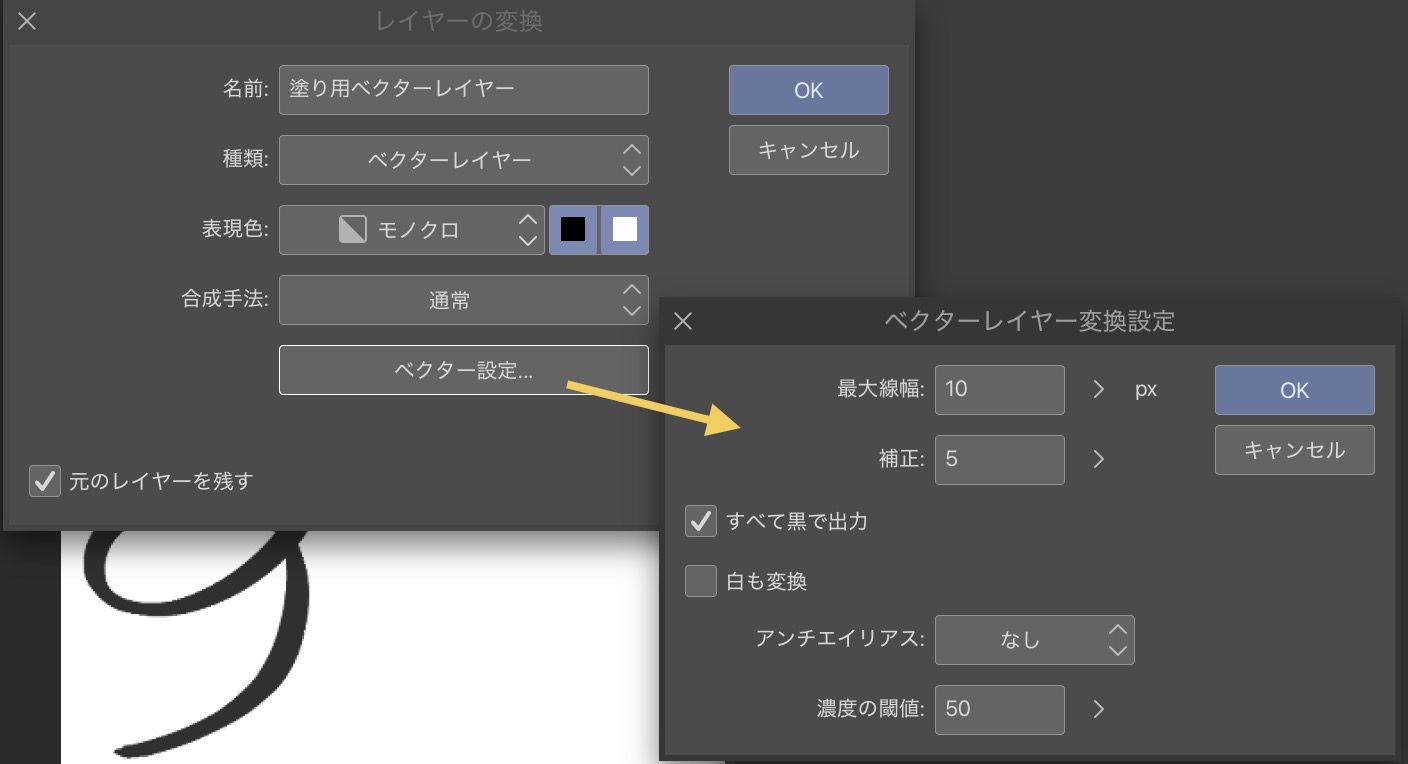
Such a layer is created.
The layer color is red and the transparency is 15% so that it is easy to understand when applying, but if you do not need it, please return it.

ラスターレイヤーで描かれた線画をベクターレイヤーに変換するオートアクションです。
あくまで下塗り用なので隙間や塗り残しができた時は手作業で埋めて下さい。
〈使い方〉
・線画レイヤー、フォルダを選択した状態でオートアクション実行
※もとのレイヤーは保持されます
細かい設定などは以下画像時にお好みの数値にして下さい。
このようなレイヤーが作成されます。
塗る際に分かりやすいようにレイヤーカラーが赤色、透明度が15%になっていますが、いらない場合は戻して下さい。


Other materials by カカオ豆クッキー

Popular “Auto Action” materials


New materials


Badges
-
 MVP ◆This user has contributed greatly to the management of the community, by posting many great responses to the questions asked. Once every three months, MVPs are determined based on the points earned during that period and will be recognized accordingly.
 -
 New Valuable Player (NVP) ◆These are the next-best contributors to the community after MVPs. This is awarded to users who have not yet won an MVP award, based on the number of points they have earned.
 -
 Official Expert ◆Chosen out of all MVP awardees, who are already proof of excellence, this is a testimony of outstanding correspondence in the community. After careful screening, they are appointed by CELSYS and assume their position.Note: Formally called “Evangelists”
 -
 Official Moderator of CELSYS ◆Moderators are official CELSYS staff members who are fluent in Japanese as well as various other languages. Moderators are not experts on the software or illustration, so they are not able to directly answer your questions. However, moderators provide communication and language support to ensure that everyone can smoothly communicate with each other.
 -
 CELSYS official accountThe Official Administrator Account