



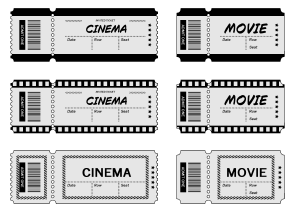
It is a set of layer template that can make something that looks like a retro movie ticket and a default font version of the image material.
I think it can be arranged for tickets for amusement parks, theaters, trains, etc.
ちょっとレトロな映画チケットっぽいものを作れるレイヤーテンプレートと、デフォルトフォント版の画像素材のセットです。
遊園地、観劇、汽車などのチケットにもアレンジできると思います。

- Please edit → text to your favorite font and text. If the position is misaligned, please adjust it by referring to the guide layer (default: hidden).
- The border → vector layer. Please customize the thickness and brush to your liking.
- The general decoration → raster layer (some line tones). Please erase or add to your liking.

- 文字→お好きなフォント・テキストに編集してお使いください。位置がズレた場合、ガイドのレイヤー(デフォルト:非表示)を参考にしてご調整ください。
- 枠線→ベクターレイヤーです。お好みで太さやブラシをカスタムしてください。
- 装飾全般→ラスターレイヤー(一部線トーン)です。お好みで消したり足したりアレンジしてください。
image material 画像素材
-
_L1 movie tickets 映画チケット_L1
-
_S3 movie tickets 映画チケット_S3
-
_L2 movie tickets 映画チケット_L2
-
_S2 movie tickets 映画チケット_S2
-
_L3 movie tickets 映画チケット_L3
-
_S3 movie tickets 映画チケット_S3
-
No letters _L1_ movie ticket 映画チケット_L1_文字なし
-
Movie ticket _S1_ without letters 映画チケット_S1_文字なし
-
Movie ticket _L2_ no letters 映画チケット_L2_文字なし
-
Movie ticket _S2_ no letters 映画チケット_S2_文字なし
-
Movie ticket _L3_ without letters 映画チケット_L3_文字なし
-
Movie ticket _S3_ no letters 映画チケット_S3_文字なし










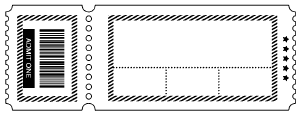

layer template レイヤーテンプレート





Popular “Material catalog” materials


New materials










-
 MVP ◆This user has contributed greatly to the management of the community, by posting many great responses to the questions asked. Once every three months, MVPs are determined based on the points earned during that period and will be recognized accordingly.
 -
 New Valuable Player (NVP) ◆These are the next-best contributors to the community after MVPs. This is awarded to users who have not yet won an MVP award, based on the number of points they have earned.
 -
 Official Expert ◆Chosen out of all MVP awardees, who are already proof of excellence, this is a testimony of outstanding correspondence in the community. After careful screening, they are appointed by CELSYS and assume their position.Note: Formally called “Evangelists”
 -
 Official Moderator of CELSYS ◆Moderators are official CELSYS staff members who are fluent in Japanese as well as various other languages. Moderators are not experts on the software or illustration, so they are not able to directly answer your questions. However, moderators provide communication and language support to ensure that everyone can smoothly communicate with each other.
 -
 CELSYS official accountThe Official Administrator Account