



It is a set of auto action that can be fill from the reference layer of line drawings, landfill unpainted parts, and delete leisure parts.


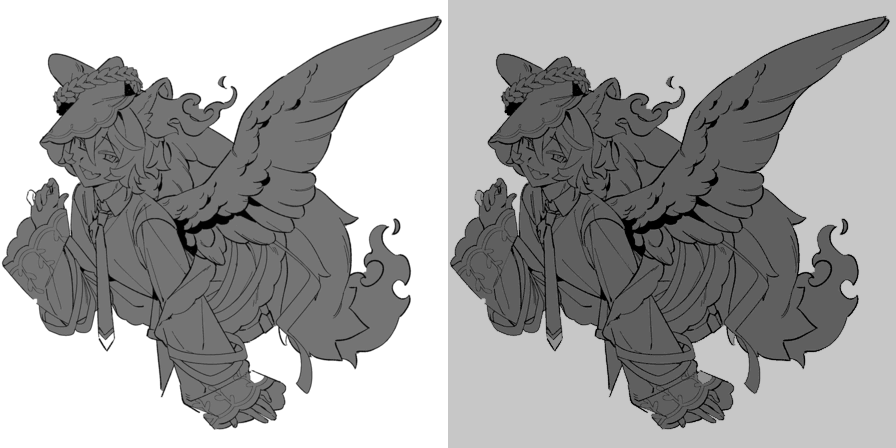


Operation is confirmed only for line drawings that do not change the opacity.

– – – – – – – – – – – – – – – – – – – –
□ fill in reference layer ... After use, the fill layer is placed behind the selected layer. Depending on the composition of the line art, unintended parts and gaps will also be filled. Areas with large gaps in the line art are excluded.

– – – – – – – – – – – – – – – – – – – –
□Paint removal... Fill it to some extent if there is a part that could not be painted above (first sheet at the bottom) or if there is a part that you forgot to paint (second sheet at the bottom). Areas with large gaps in the line art are excluded.
* Red areas are fill with auto action

– – – – – – – – – – – – – – – – – – – –
□fill Delete surplus: Create a new layer and use it after fill the surplus with the fill tool.
Example: fill the surplus in yellow, remove it with auto action
線画の参照レイヤーから塗りつぶし、塗り残し部分の埋め立て、余暇部分の削除ができるオートアクションのセットです。
不透明度の変化がない線画でのみ動作確認を行っています。
– – – – – – – – – – – – – – – – – – – –
□参照レイヤーで塗りつぶし…使用後、選択したレイヤーの背面に塗りつぶしレイヤーが配置されます。線画の構図によっては意図しない部分や隙間も塗りつぶされます。線画に途切れた大きな隙間がある箇所は除外されます。
– – – – – – – – – – – – – – – – – – – –
□塗り残し除去…上記で塗れなかった部分(下部一枚目)、もしくは塗り忘れ箇所がある場合(下部二枚目)にある程度埋め立てます。線画に途切れた大きな隙間がある箇所は除外されます。
※赤色の箇所がオートアクションで塗りつぶしされた箇所– – – – – – – – – – – – – – – – – – – –
□塗りつぶし余剰を削除・・・新規レイヤーを作成し、塗りつぶしツールで余剰箇所を塗りつぶした後に使用してください。
例:黄色で余剰部分を塗りつぶし、オートアクションで削除
Category 1 カテゴリ1








Other materials by みるひか


Popular “Material catalog” materials


New materials




Badges
-
 MVP ◆This user has contributed greatly to the management of the community, by posting many great responses to the questions asked. Once every three months, MVPs are determined based on the points earned during that period and will be recognized accordingly.
 -
 New Valuable Player (NVP) ◆These are the next-best contributors to the community after MVPs. This is awarded to users who have not yet won an MVP award, based on the number of points they have earned.
 -
 Official Expert ◆Chosen out of all MVP awardees, who are already proof of excellence, this is a testimony of outstanding correspondence in the community. After careful screening, they are appointed by CELSYS and assume their position.Note: Formally called “Evangelists”
 -
 Official Moderator of CELSYS ◆Moderators are official CELSYS staff members who are fluent in Japanese as well as various other languages. Moderators are not experts on the software or illustration, so they are not able to directly answer your questions. However, moderators provide communication and language support to ensure that everyone can smoothly communicate with each other.
 -
 CELSYS official accountThe Official Administrator Account