


Quick access has been added to the left-based workspace (Samsung tablet). (左边为主的工作区(三星平板)新增快速访问) 左边为主的工作区(三星平板)新增快速访问
Content ID:2257770
-
4


The tool is mainly on the left, which is convenient for left-handed clicking.
Color picking, brush size/brush transparency, quick access, stock around the canvas for easy spen clicking.
Quick access has been added in this release
工具主要在左边,方便左手点击。
取色,笔刷大小/笔刷透明度,快速访问,素材库在画布周围,方便spen点击。
此版本新增了快速访问
 The tool is mainly on the left, which is convenient for left-handed clicking.
Quick access has been added in this release. 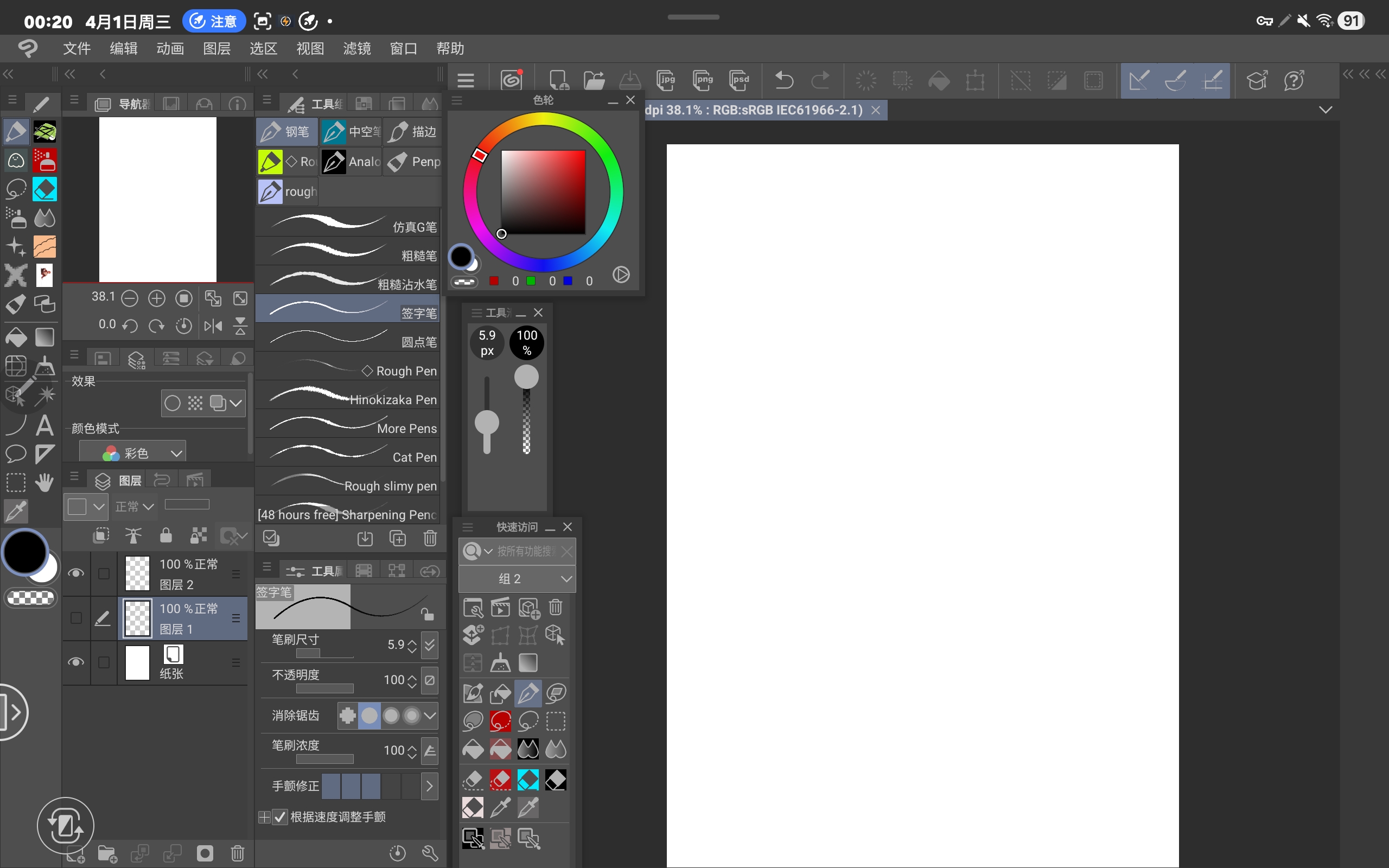 Fold the shortcut key on the right tablet and pull the width of the toolbar to the narrowest; After the left material folder is folded.
 Fold the shortcut key on the right tablet and pull the width of the toolbar to the narrowest; After the left material folder is folded.工具主要在左边,方便左手点击。
此版本新增了快速访问。将右侧平板快捷键折叠,工具栏宽度拉到最窄;左侧素材文件夹折叠后。
将右侧平板快捷键折叠,工具栏宽度拉到最窄;左侧素材文件夹折叠后。


Other materials by Hql


Popular “Workspace” materials




New materials







Badges
-
 MVP ◆This user has contributed greatly to the management of the community, by posting many great responses to the questions asked. Once every three months, MVPs are determined based on the points earned during that period and will be recognized accordingly.
 -
 New Valuable Player (NVP) ◆These are the next-best contributors to the community after MVPs. This is awarded to users who have not yet won an MVP award, based on the number of points they have earned.
 -
 Official Expert ◆Chosen out of all MVP awardees, who are already proof of excellence, this is a testimony of outstanding correspondence in the community. After careful screening, they are appointed by CELSYS and assume their position.Note: Formally called “Evangelists”
 -
 Official Moderator of CELSYS ◆Moderators are official CELSYS staff members who are fluent in Japanese as well as various other languages. Moderators are not experts on the software or illustration, so they are not able to directly answer your questions. However, moderators provide communication and language support to ensure that everyone can smoothly communicate with each other.
 -
 CELSYS official accountThe Official Administrator Account