


Line border shifting tone to add a little three-dimensional effect (ちょっと立体感を足す線フチずらしトーン) ちょっと立体感を足す線フチずらしトーン
Content ID:2246817
-
11,531


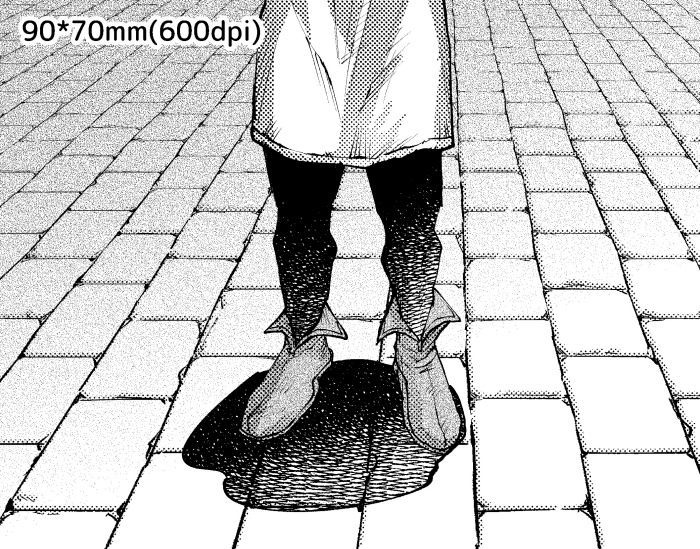
This auto action was made to add a little three-dimensional effect to line drawings of bricks, stones, boards, flooring, etc. レンガや石材、板間、フローリングなどの線画にちょびっと立体感を足すために作ったオートアクションです。
【2026/02/20: Update】


- Added a new auto action.
- Minor corrections have been made.
Created for use in black and white manuscripts (600 dpi).
It is a auto action that can add a little shadow and three-dimensional effect to drawings with grooves and gaps such as bricks, stones, boards, and flooring.
For auto action named "Range Shift", please manually paste your favorite image material by yourself after playing the auto action.

【In such a case】
Q1. When I play the auto action, I get the message "○○○○ cannot be executed at this time, do you want to continue?" A dialog will appear.
A1.There is no problem, so press [OK] as it is to continue.
Q2. I want to adjust the direction of the shadows.
A2.Select the auto action you want to use from the auto action palette.
Check [Toggle settings] in the [movable blur] command before playing the auto action.

auto action the following dialog is displayed during playback.

Change the [Blur angle] to the value you like and press [OK].
【Example of use】
It may be convenient when you want to create a three-dimensional effect in a short time.
Try it if you like!
【2026/02/20:アップデート】
・新しいオートアクションの追加をしました。
・軽微な修正をしました。
白黒原稿(600dpi)で使用することを目的に作成しました。
レンガや石材、板間、フローリングなどの溝や隙間のある描画物にちょびっと影と立体感を足せるオートアクションです。
「範囲ずらし」と名前のついているオートアクションはオートアクションの再生後にご自身で手動で好きな画像素材を貼り付けてください。
【こんな時には】
Q1.オートアクションを再生すると「現在○○○○は実行できません。続行しますか?」というダイアログが出てくる。
A1.問題ないのでそのまま[OK]を押して続行してください。
Q2.影のできる向きを調節したい。
A2.オートアクションパレットから使用したいオートアクションを選択します。
[移動ぼかし]というコマンドの[設定切り替え]にチェックを入れてからオートアクションを再生してください。
オートアクション再生時に次のようなダイアログが表示されます。
[ぼかす角度]を好きな値に変えて[OK]を押してください。
【使用例】
時短で立体感を出したい時に便利かもしれません。
良ければお試しください!
Old version




Other materials by 荒川とら


Popular “Auto Action” materials




New materials




Badges
-
 MVP ◆This user has contributed greatly to the management of the community, by posting many great responses to the questions asked. Once every three months, MVPs are determined based on the points earned during that period and will be recognized accordingly.
 -
 New Valuable Player (NVP) ◆These are the next-best contributors to the community after MVPs. This is awarded to users who have not yet won an MVP award, based on the number of points they have earned.
 -
 Official Expert ◆Chosen out of all MVP awardees, who are already proof of excellence, this is a testimony of outstanding correspondence in the community. After careful screening, they are appointed by CELSYS and assume their position.Note: Formally called “Evangelists”
 -
 Official Moderator of CELSYS ◆Moderators are official CELSYS staff members who are fluent in Japanese as well as various other languages. Moderators are not experts on the software or illustration, so they are not able to directly answer your questions. However, moderators provide communication and language support to ensure that everyone can smoothly communicate with each other.
 -
 CELSYS official accountThe Official Administrator Account