



It is a three-dimensional fit authentic sunglasses 3D model.
The curved shape that naturally matches the face and realistic wearing feel accelerate illustration production.
It can be used as sunglasses as well as eyeglass frames by hiding the lenses.
立体的にフィットする 本物志向のサングラス3Dモデルです。
顔に自然に合うカーブ形状、リアルな着用感でイラスト制作が加速します。
サングラスとしてはもちろん、レンズを非表示にすることで、眼鏡フレームとしても使用できます。


Material マテリアル
-
Colored Sunglasses カラーサングラス
-
White 白


configuration 配置
-
default layout 初期レイアウト
-
Without lens レンズなし
-
No right temple 右テンプルなし
-
No left temple 左テンプルなし
-
No right temple (no lens) 右テンプルなし(レンズなし)
-
No left temple (no lens) 左テンプルなし(レンズなし)
-
Without both temples 両テンプルなし
-
Without both temples (without lens) 両テンプルなし(レンズなし)


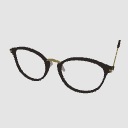


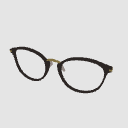
pose parts 可動パーツ
-
Left 左
-
Right 右


Other materials by ouoaoi


Popular “3D object” materials
-
 Plan Bonus





New materials







-
 MVP ◆This user has contributed greatly to the management of the community, by posting many great responses to the questions asked. Once every three months, MVPs are determined based on the points earned during that period and will be recognized accordingly.
 -
 New Valuable Player (NVP) ◆These are the next-best contributors to the community after MVPs. This is awarded to users who have not yet won an MVP award, based on the number of points they have earned.
 -
 Official Expert ◆Chosen out of all MVP awardees, who are already proof of excellence, this is a testimony of outstanding correspondence in the community. After careful screening, they are appointed by CELSYS and assume their position.Note: Formally called “Evangelists”
 -
 Official Moderator of CELSYS ◆Moderators are official CELSYS staff members who are fluent in Japanese as well as various other languages. Moderators are not experts on the software or illustration, so they are not able to directly answer your questions. However, moderators provide communication and language support to ensure that everyone can smoothly communicate with each other.
 -
 CELSYS official accountThe Official Administrator Account