



Some simple stroke auto actions that can be used for layer groups. (All layers need rasterization, all layers do not use any layer property function)
1 Base Block Stroke: Add a white stroke to the image, which needs to be manually moved to the bottom
2 Hollow Stroke: Extract the stroke in the image layer properties, note: if the image is translucent, the stroke will also have a translucent effect
3 Highlight Shine: Add a glowing layer below the image
4 Find edges: With the blur effect, add dark lines around the color block, and the blur effect can be adjusted manually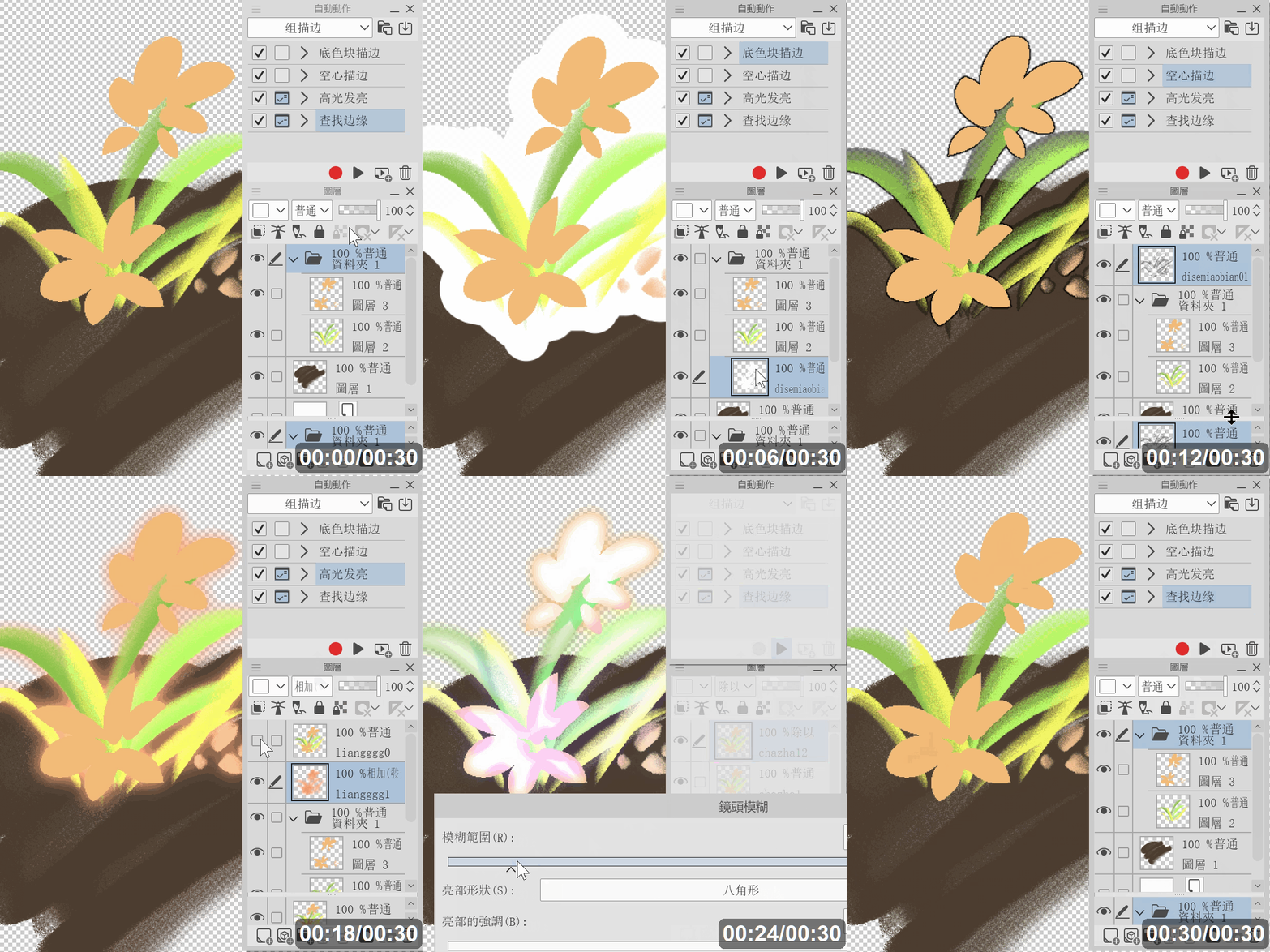
1 Base Block Stroke: Add a white stroke to the image, which needs to be manually moved to the bottom
2 Hollow Stroke: Extract the stroke in the image layer properties, note: if the image is translucent, the stroke will also have a translucent effect
3 Highlight Shine: Add a glowing layer below the image
4 Find edges: With the blur effect, add dark lines around the color block, and the blur effect can be adjusted manually
一些简单的描边自动动作,可以用于图层组。(所有图层都需要点阵化栅格化,所有图层不要使用任何图层属性功能)
1 底色块描边:给图像添加白色描边,需要手动将描边移至底部
2 空心描边:提取图像图层属性中的描边,注意:若图像为半透明,描边也会出现半透明效果
3 高光发亮:在图像下方添加一个发光的图层
4 查找边缘:通过模糊效果,给色块周围添加深色的线条,可手动调整模糊效果
1 底色块描边:给图像添加白色描边,需要手动将描边移至底部
2 空心描边:提取图像图层属性中的描边,注意:若图像为半透明,描边也会出现半透明效果
3 高光发亮:在图像下方添加一个发光的图层
4 查找边缘:通过模糊效果,给色块周围添加深色的线条,可手动调整模糊效果
Old version



Other materials by Cspxx


Popular “Auto Action” materials



New materials





Badges
-
 MVP ◆This user has contributed greatly to the management of the community, by posting many great responses to the questions asked. Once every three months, MVPs are determined based on the points earned during that period and will be recognized accordingly.
 -
 New Valuable Player (NVP) ◆These are the next-best contributors to the community after MVPs. This is awarded to users who have not yet won an MVP award, based on the number of points they have earned.
 -
 Official Expert ◆Chosen out of all MVP awardees, who are already proof of excellence, this is a testimony of outstanding correspondence in the community. After careful screening, they are appointed by CELSYS and assume their position.Note: Formally called “Evangelists”
 -
 Official Moderator of CELSYS ◆Moderators are official CELSYS staff members who are fluent in Japanese as well as various other languages. Moderators are not experts on the software or illustration, so they are not able to directly answer your questions. However, moderators provide communication and language support to ensure that everyone can smoothly communicate with each other.
 -
 CELSYS official accountThe Official Administrator Account