



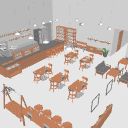
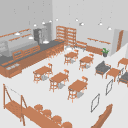
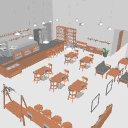
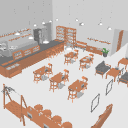
3D Cafe [Each object movable]

・Easy-to-use layout pattern
Multiple layout patterns are available, so you can switch them according to your needs.

High-quality 3D models optimized for CLIP STUDIO
Number of polygons: -170,000 polygons (when all assets are displayed)
・ Can be moved and adjusted for each object
The finely divided object is movable, making it easy to adjust the details.
It is a flexible data structure that can be used in various scenes.

・By angle


・Overall

☆ Easy-to-use settings for background models
――If you change the rendering settings, the back wall surface will be transparent and easy to use.
・ Model outline → OFF
・ rendering settings back face culling →ON

- Setting that does not cast shadows that can be used in indoor scenes
・apply light source→OFF
・ → OFF to cast the shadow of this model

3Dカフェ【各オブジェクト可動】
・使いやすいレイアウトパターン
複数のレイアウトパターンを用意しているので、用途に応じて切り替えてご使用いただけます。
・クリスタ用に最適化された高品質3Dモデル
ポリゴン数:△約17万ポリゴン(全アセット表示時)
・ オブジェクトごとの移動や調整が可能
細かく分割されたオブジェクトが可動するため、細部の調整が簡単にできます。
様々なシーンで使用できる、柔軟なデータ構造になっています。
・アングル別
・全体
☆背景モデルの使いやすい設定
●レンダリング設定を変えると裏壁面が透けて使いやすくなります。
・モデルの輪郭線→OFF
・レンダリング設定のバックフェースカリング→ON
●室内のシーンなどで使える影を落とさない設定
・光源の影響を受ける→OFF
・このモデルの影を落とす→OFF
material マテリアル
-
default material 初期マテリアル

disposition 配置
-
Full representation 全表示
-
All accessories× 全小物×
-
Accessories × 小物×
-
× wall 壁×
-
Poster × ポスター×








Other materials by ちいさな3D素材店


Popular “3D object” materials


New materials





Badges
-
 MVP ◆This user has contributed greatly to the management of the community, by posting many great responses to the questions asked. Once every three months, MVPs are determined based on the points earned during that period and will be recognized accordingly.
 -
 New Valuable Player (NVP) ◆These are the next-best contributors to the community after MVPs. This is awarded to users who have not yet won an MVP award, based on the number of points they have earned.
 -
 Official Expert ◆Chosen out of all MVP awardees, who are already proof of excellence, this is a testimony of outstanding correspondence in the community. After careful screening, they are appointed by CELSYS and assume their position.Note: Formally called “Evangelists”
 -
 Official Moderator of CELSYS ◆Moderators are official CELSYS staff members who are fluent in Japanese as well as various other languages. Moderators are not experts on the software or illustration, so they are not able to directly answer your questions. However, moderators provide communication and language support to ensure that everyone can smoothly communicate with each other.
 -
 CELSYS official accountThe Official Administrator Account